
Frequently Asked Questions: Photonic Canvas
Photonic Canvas keeps your design, your PDK version, your simulation results and your measured data together in one project, with versions and traceability.
Photonic Canvas projects need a Flexcompute account. Photonic Canvas is part of PhotonForge Enterprise.
In this notebook, you will learn how to:
make a project, open it again, and add your components, your PCell code and a PDK,
keep simulation files and measurement data with a component, and a DRC deck with the technology,
give a component, a technology or the whole project a numbered version,
share the project, and see when a colleague changes a component,
go back to an earlier version or to an earlier save,
see the whole project, its history and its files at one time.
Run the questions in sequence, from top to bottom. Each question uses the results of the questions before it. The notebook runs no simulations. It takes approximately two minutes.
Before you start
Install PhotonForge and set your Flexcompute API key.
Put the folder
data/next to this notebook. It contains the PCell file and the small files that the questions attach:waveguide_bend.py,design_review.txt,bend_sweep.py,basic_technology.drc,basic_technology_v2.drcandbend_loss.csv.Each run makes a new project in your account. The last section tells you how to remove it.
Everything in one place
A Photonic Canvas project works like a shared folder in a cloud drive:

There are two differences:
Your notebook works on its own copy of the project. Other people do not type into your copy live. Before you save, look for saves from other people with
changed_since()(question 14).A file that you keep in the project does not change. To change a file, attach a new file.
For photonics, this gives one place for all the parts of a tape-out, with their history: every save, and the versions that you name.

Glossary
Term |
Meaning |
|---|---|
project |
The shared place for one piece of work, for example a tape-out. The project is on the server. You open it with its id. |
component |
A layout in the project, for example a bend or a reticle. You find a component by its name. |
cell |
A component that is placed in another component, for example one of the nine gratings on a reticle. |
technology |
The process stack that a component uses: layers, thicknesses and waveguide types. |
PCell |
A Python function that makes a component from its parameters, for example |
source |
The Python files in the project that contain your PCells. |
library |
A version of another project that you add to your project, for example a foundry PDK. You can then use its cells and its technology. |
file |
Anything that you keep in the project, for example a simulation script, a GDS file or measurement data. A file does not change after you attach it. |
target |
The component or technology that a file belongs to. Use its name or the object. With no target, the file belongs to the whole project. |
tag |
A label on a file, for example |
version tag |
The tag |
save |
One |
version |
A number that you give to one save, for example |
marker |
The point where a component was when you looked at it. Later, |
Commands that show the project
These commands only read. You can run them at any time.
To see |
Run |
|---|---|
what is in the project |
|
one component, with all its cells and files |
|
all versions, with their dates |
|
which file belongs to which version |
|
every save of a component |
|
the saves after you looked |
|
Setup
Import PhotonForge and its project interface, pda. Use the demo technology of PhotonForge as the default technology.
The questions use 6 small files. Download them into a folder named data next to this notebook: basic_technology.drc, basic_technology_v2.drc, bend_loss.csv, bend_sweep.py, design_review.txt, waveguide_bend.py.
[1]:
import subprocess
import sys
import tempfile
import time
from pathlib import Path

import photonforge as pf
from photonforge import pda

# the demo process stack of PhotonForge
pf.config.default_technology = pf.basic_technology()
Two short functions help in the questions below:
compare()shows components next to each other, at the same scale.run_colleague()acts as a colleague. It starts a second Python program. That program opens the project and saves changes, as a person on a different computer does.
[2]:
def compare(*pairs):
    """Show components next to each other, at the same scale, with titles.

    Example: compare(("now", a), ("at 1.0.0", b))
    """
    heights = [c.bounds()[1][1] - c.bounds()[0][1] for _, c in pairs]
    text_size = 0.08 * max(heights) + 0.4
    picture = pf.Component("compare")
    x = 0.0
    for title, component in pairs:
        (x0, y0), (x1, y1) = component.bounds()
        # align the tops of the components
        picture.add(pf.Reference(component.copy(), origin=(x - x0, -y1)))
        picture.add("METAL", *pf.text(title, text_size, (x, 1.5 * text_size)))
        x += (x1 - x0) + 4 * text_size
    return picture


COLLEAGUE = '''
import sys, time
from photonforge import pda

project = pda.load_project(project_id=sys.argv[1])   # open the project
project.import_module(globals())                     # get its PCell code
name = sys.argv[2]
for change in sys.argv[3:]:                          # save each change alone
    key, value = change.split("=")
    component = project.component(name)
    component.update(**{key: float(value)})
    print("saved at", time.time(), flush=True)
    project.update(component)
    time.sleep(6)
'''


def run_colleague(project_id, name, *changes):
    """Run the program of the colleague, and wait until it stops.

    Each change is one save, for example "radius=5.0".
    Returns the times at which the colleague sent the saves.
    """
    folder = Path(tempfile.mkdtemp())   # a different folder: a different computer
    script = folder / "colleague.py"
    script.write_text(COLLEAGUE)
    done = subprocess.run(
        [sys.executable, str(script), project_id, name, *changes],
        cwd=folder, capture_output=True, text=True, timeout=300,
    )
    if done.returncode != 0:
        raise RuntimeError(done.stderr[-2000:])
    return [float(line.split()[-1]) for line in done.stdout.splitlines()
            if line.startswith("saved at")]
A. Your project
1. What is a project?
A project is the shared place for one piece of work, for example a tape-out. It contains your components, their technology, the PCell code, the files that you keep with them, and their versions. The project is on the server. Your notebook works on a copy of it.
[3]:
project = pda.create_project("FAQ project")   # make a new private project
print("name:", project.name)
print("id  :", project.id)   # you and your colleagues open the project with it
name: FAQ project
id  : <project id>
2. How do I open the project again?
Use its id. Each id is unique, but two projects can have the same name. Keep the id with your work, for example in a file next to the notebook.
[4]:
Path("project_id.txt").write_text(project.id)   # keep the id in a file

# open the project again, today or next week
same = pda.load_project(project_id=Path("project_id.txt").read_text())
print("opened:", same.name)
opened: FAQ project
pda.list_projects() can also find a project by its name. But it opens every project that you can see, so it is slow when you have many projects.
3. How do I add a component?
Make the component, give it a name, and add it with add(). Later calls find the component by this name.
The server gets each save immediately. add() and update() are the saves. There is no separate upload step. Each person who opens the project gets your save.
[5]:
straight = pf.Component("straight_wg")   # its name in the project
straight.add("WG_CORE", pf.Rectangle(center=(0, 0), size=(10, 0.5)))  # 10 um
project.add(straight)                    # save it in the project
# Watch out: add() works one time for each name.
# To save a changed component later, use update().

project.component("straight_wg")         # get it back by its name
[5]:

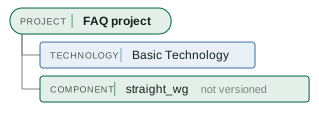
Now the project has its technology and one component. Each box shows its kind in small letters, above a line. Each kind has its own color: technology (blue), library (purple), source (gray), component (green) and file (orange).
[6]:
project.tree()
[6]:
4. How do I add my PCell code?
A PCell is Python code. To change a component that a PCell made, you need that code. Without the code, a colleague can see the bend but cannot set a new radius. So put the code in the project. add_module_file() copies your .py file into the project and gives it back to you, ready to use.
Our PCell is in data/waveguide_bend.py. It makes a 90 degree bend with two parameters, radius and width:
[7]:
print(Path("data/waveguide_bend.py").read_text())
"""A waveguide bend PCell with two parameters: radius and width."""

import photonforge as pf
import photonforge.typing as pft

__version__ = "1.0"


@pf.parametric_component
def waveguide_bend(
    *, radius: pft.PositiveDimension = 3.0, width: pft.PositiveDimension = 0.5
):
    """A 90 degree bend: a quarter of a ring, so radius and width show."""
    c = pf.Component("bend")   # the name of the component in the project
    ring = pf.Circle(
        radius=radius + width / 2, inner_radius=radius - width / 2, sector=(0, 90)
    )
    c.add("WG_CORE", ring)
    return c
[8]:
# Watch out: if a colleague changed the project code after you opened the
# project, this call stops with an error. Then call project.load_latest()
# first, so that you do not write over their files.
# add the PCell file to the project
bend_code = project.add_module_file("data/waveguide_bend.py")

bend = bend_code.waveguide_bend(radius=3.0)   # make one bend with the PCell
project.add(bend)                             # save it: its name is "bend"
time.sleep(3)   # add() returns a moment before the server has the bend
bend
[8]:

A colleague uses the code. The colleague opens the project and runs import_module(globals()) one time. This gets the project code and makes it ready to use in their notebook. Now the colleague can change the parameters of the bend.
[9]:
colleague = pda.load_project(project_id=project.id)   # a colleague opens it
# Watch out: import_module(globals()) adds a module with the name of each
# project ("faq_project" here). A variable with the same name is replaced.
colleague.import_module(globals())   # get the project code, one time per session

theirs = colleague.component("bend")
theirs.update(radius=5.0)   # a new radius: this needs the PCell code
theirs                      # their own copy: nothing is saved
[9]:

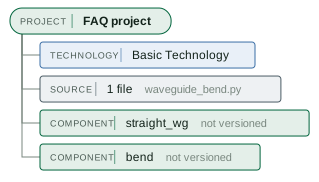
Now the project also has the bend, and the source that makes it.
[10]:
project.tree()
[10]:
5. How do I add a PDK?
A foundry PDK is published as a library: a version of another project. Add the library to your project. Then you can use its cells and its technology by their names, next to your own components.
[11]:
# Find the library by its name, then add it with its id.
# Watch out: a search by name opens every project that you can see, so it
# can be slow. Do the search one time and keep the id.
versions = pda.list_libraries(name="SiEPIC EBeam", latest=False)   # all versions
siepic_id = next(v["id"] for v in versions if v["version"] == "1.2.2")

project.add_library(library_id=siepic_id)   # add the PDK to the project
project.import_module(globals())            # get the code of the PDK

gc = project.component("ebeam_gc_te1550")   # a cell of the PDK, by its name
print("cell:", gc.name, "| technology:", gc.technology.name)
gc
cell: ebeam_gc_te1550 | technology: SiEPIC EBeam Si
[11]:

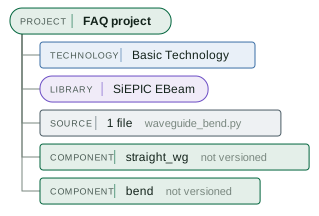
Now the library is next to our own technology, source and components. The cells of the library stay in the library. The project uses them by their names.
[12]:
project.tree()
[12]:
B. Files and versions
6. How do I keep a file with the project?
Use attach() with no target. The file then belongs to the whole project. This is correct for a file about the whole project, for example a design review.
[13]:
# no target: the file belongs to the whole project
review = project.attach("data/design_review.txt", tags=["review"])
print(review["filename"], review["tags"])
design_review.txt ['review']
7. How do I keep a file with a component?
Use two arguments:
targettells which component the file belongs to. Use the name of the component. Question 10 uses a technology as the target. With notarget, as in question 6, the file belongs to the whole project.tagsis a list of your own labels. You use them to find the file again. Use words that your team agrees on, for examplesimulation,measurementorgds. One tag has a special meaning: the version tagversion:1.0.0tells which version the file belongs to (question 8).
[14]:
# The file belongs to the bend. Its tag is "simulation".
project.attach("data/bend_sweep.py", target="bend", tags=["simulation"])

# find the file again by its tag
for f in project.attachments(target="bend", tags=["simulation"]):
    print(f["filename"], f["tags"])
bend_sweep.py ['simulation']
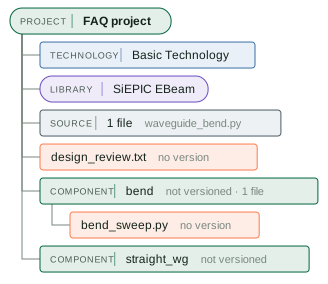
Now there is one file on the project and one file on the bend. Neither file belongs to a version yet (“no version”).
[15]:
project.tree()
[15]:
8. How do I give a component a version?
add_version() gives the current save of the component a number and a message. It also puts the version tag on each file of the component that has no version tag yet. So attach the files first, then make the version.
The printouts say that the version “labels” a file: it puts the version tag on the file. The tree as text shows the result, before and after. The sweep script changes from “no version” to “1.0.0”.
[16]:
print(project.tree(target="bend"))   # before
# also tags the files of the bend that have no version tag
project.add_version("1.0.0", target="bend", message="first bend, radius 3 um")
print(project.tree(target="bend"))   # after
FAQ project
└── component: bend  · not versioned · 1 file · radius=3, width=0.5
    └── file: bend_sweep.py  (no version)
FAQ project
└── component: bend  · 1.0.0 · 1 file · radius=3, width=0.5
    └── file: bend_sweep.py  (1.0.0)
The history now shows one lane for each component and one dot for each version.
[17]:
project.version_history()
[17]:
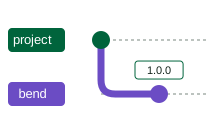
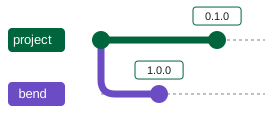
9. How do I give the whole project a version?
Do not give a target. A project version keeps every component, the technology, the source and the libraries as they are now. It tags only the files that belong to the project itself. You can add a project that has a version to another project as a library, as question 5 adds a PDK.
[18]:
project.add_version("0.1.0", message="first draft of the FAQ project")
project.version_history()
[18]:
10. How do I keep a DRC rule deck with the technology?
A rule deck belongs to the process, not to one component. So keep the deck with the technology: use the name of the technology as the target. Then give the technology a version, as question 8 does for a component. The deck gets the version tag of that version.
Our components use the demo stack of PhotonForge, “Basic Technology”. Its deck, data/basic_technology.drc, is a KLayout DRC script. It checks the minimum width and spacing of the waveguide core, the slab width, the metal width, and the distance from metal to waveguide core.
[19]:
tech_name = pf.config.default_technology.name   # "Basic Technology"
# the deck belongs to the technology
project.attach("data/basic_technology.drc", target=tech_name, tags=["drc"])
# the version also tags the deck
project.add_version(
    "1.0.0", target=tech_name, message="demo stack and its first DRC deck"
)
[19]:
project.version_history("Basic Technology")The fab changes a rule: the minimum core width changes from 0.18 µm to 0.2 µm. A file does not change after you attach it. So the new deck is a new file, and the technology gets a new version. The old deck stays, with the version tag version:1.0.0. Use it to check a component that was taped out with that deck.
[20]:
# Watch out: attach the new deck BEFORE you make the new version.
# If not, the deck has no version tag.
project.attach("data/basic_technology_v2.drc", target=tech_name, tags=["drc"])
project.add_version(
    "1.1.0", target=tech_name, message="core width rule 0.18 -> 0.2 um"
)

project.tree(target=tech_name)   # the technology and its two decks
[20]:
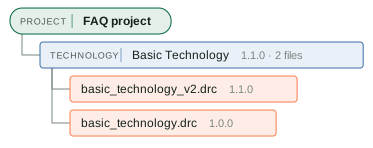
To run the deck of one version, find the deck by its tags and download it. Then run KLayout on your GDS file:
[21]:
# the deck of version 1.1.0
deck = project.attachments(target=tech_name, tags=["drc", "version:1.1.0"])[0]
Path("drc_rules.drc").write_bytes(project.download_attachment(deck))
print("downloaded", deck["filename"], "as drc_rules.drc")
# Then, in a terminal:
#   klayout -b -r drc_rules.drc -rd input=chip.gds -rd report=drc.lyrdb
downloaded basic_technology_v2.drc as drc_rules.drc
C. Work with your team
11. How do I share the project?

To share with one colleague, you need their user id, not their email address. The colleague runs pda.user_info() and sends you the id. To share with your whole organization, you need no id. The roles are viewer (read only) and editor.
[22]:
my_user_id, my_org_id = pda.user_info()
print("my user id:", my_user_id)

# To share with one colleague:
#   project.grant_permission(
#       visibility="private", grantee_id="<their user id>", role="editor"
#   )
# To share with your whole organization:
#   project.grant_permission(visibility="organization", role="viewer")

for p in project.list_permissions():   # who can open the project now: only you
    print(p["role"], p["visibility"], p["granteeId"])
my user id: <your user id>
owner private <your user id>
12. How do I know that a colleague changed a component?
Take a marker with latest_head(). Later, changed_since(marker) lists each save after the marker. To get a message at the time of a save, use watch(). It runs a function of yours for each save.
Here the colleague is a real second Python program, as on a different computer (run_colleague() from the setup). It opens the project and saves the bend two times, each time with a larger width. This notebook watches.
[23]:
marker = project.latest_head("bend")   # where the bend is now
told = []                              # the times at which we get a message


def tell_me(changes):
    """Runs in the background for each save to the bend. Keep it short."""
    told.append(time.time())


# start to watch the bend, then let the colleague save two times
watcher = project.watch("bend", on_change=tell_me, fields="parameters")
saved = run_colleague(project.id, "bend", "width=0.7", "width=0.9")
time.sleep(3)
watcher.cancel()   # stop the watcher

for saved_at, told_at in zip(saved, told):
    print(f"the colleague saved; we were told {told_at - saved_at:.1f} s later")
the colleague saved; we were told 0.8 s later
the colleague saved; we were told 0.9 s later
The marker finds each save after it, also the saves that nobody watched. fields="parameters" counts only changes to the parameters of the PCell.
[24]:
project.changed_since(marker, fields="parameters")
[24]:
| save | session | field | change | note |
|---|---|---|---|---|
| 2 | 9ae4 | width | 0.5 (default) -> 0.7 | |
| 3 | 9ae4 | width | 0.7 -> 0.9 |
project.load_latest(), then look before you save13. How do I see every save?
edit_log() lists every save, oldest first. It also shows the values that later saves wrote over. It tells what changed and in which sequence. It does not tell who saved or when: a “session” is one run of Python, not a person.
[25]:
project.edit_log("bend", fields="parameters")
[25]:
| save | session | field | change | note |
|---|---|---|---|---|
| 1 | a9bc | parameters | set to {} | |
| 2 | 9ae4 | width | 0.5 (default) -> 0.7 | |
| 3 | 9ae4 | width | 0.7 -> 0.9 |
project.component("bend", save=<n>) rebuilds it as it was after save n14. What if two people change the same parameter?
Alice sets the bend radius to 5 µm. Bob works on an older copy and sets the radius to 10 µm. The last save wins, and the save gives no warning. But nothing is lost. Alice’s 5.0 stays in the edit log, and Bob can see her save with changed_since() or edit_log().

In this example, this notebook is Bob. Alice is the second program again.
[26]:
project.load_latest()                  # Bob gets the latest saves of everyone
marker = project.latest_head("bend")   # and takes a marker
bobs_copy = project.component("bend")

run_colleague(project.id, "bend", "radius=5.0")   # Alice saves radius 5.0

bobs_copy.update(radius=10.0)   # Bob sets 10.0 on his older copy
project.update(bobs_copy)       # and saves: the last save wins, with no warning
time.sleep(3)

project.changed_since(marker, fields="parameters")   # both saves are in the log
[26]:
| save | session | field | change | note |
|---|---|---|---|---|
| 4 | 935c | radius | 3.0 (default) -> 5.0 | |
| 5 | a9bc | radius | 5.0 -> 10.0 |
project.load_latest(), then look before you saveYou can rebuild each save with component(name, save=...). These two lines show what each save left:
[27]:
# the two saves after the marker
alices, bobs = project.changed_since(marker, fields="parameters")
print("after Alice's save:",
      project.component("bend", save=alices).parametric_kwargs)
print("after Bob's save  :",
      project.component("bend", save=bobs).parametric_kwargs)
after Alice's save: {'radius': 5.0, 'width': 0.9}
after Bob's save  : {'radius': 10.0, 'width': 0.9}
To prevent this, look for new saves immediately before you save:
if project.changed_since(marker, fields="parameters"):
    print("someone saved after you looked: call load_latest(), then look again")
Also, update() saves your whole copy. If your copy is old, update() also writes back the old values that you did not change. So call load_latest() before you edit.
D. Go back to an earlier state
15. How do I go back to a version?
Rebuild the component as it was at that version. Then save it as the current component. The later saves stay in the edit log. Nothing is deleted.
[28]:
project.load_latest()                               # the latest saves of everyone
now = project.component("bend")
back = project.component("bend", version="1.0.0")   # the bend at version 1.0.0
compare(("now", now), ("at version 1.0.0", back))   # the two bends, same scale
[28]:

[29]:
project.update(back)   # save the bend of version 1.0.0 as the current bend
time.sleep(3)
# Watch out: give a version only to what is on the server. Here our copy is
# current, because we saved it above. If not, call project.load_latest() first.
project.add_version("1.1.0", target="bend", message="back to the 1.0.0 bend")
print("the bend now:", project.component("bend").parametric_kwargs)
the bend now: {'radius': 3.0, 'width': 0.5}
Call load_latest() before you give something a version. Then the version is of what is on the server.
16. How do I see a component at any save?
You can rebuild any save with component(name, save=...), with or without a version. Here are the bends that Alice and Bob saved in question 14. Neither save has a version:
[30]:
compare(("Alice's save", project.component("bend", save=alices)),
        ("Bob's save", project.component("bend", save=bobs)))
[30]:

E. See the whole project
17. What is “the latest” bend?
There are two meanings, and they can be different:
the latest saves of everyone:
load_latest(), thencomponent("bend"),the newest version: the newest entry in
version_history().
[31]:
project.load_latest()
print("the latest saves :", project.component("bend").parametric_kwargs)

# the number of the newest version
newest = project.version_history("bend", kinds=["version"], limit=1)[0].label
print(f"version {newest}   :",
      project.component("bend", version=newest).parametric_kwargs)
the latest saves : {'radius': 3.0, 'width': 0.5}
version 1.1.0   : {'radius': 3.0, 'width': 0.5}
18. How do I keep measurements, and get the files of one version?
Attach the measurement data to the component that you measured. In its tags, write the version of the chip that you measured. A file with no version tag gets the next version that you make. That version can be different from the chip that you measured.
[32]:
# Watch out: without "version:1.0.0" here, the next add_version() gives
# this file the wrong version tag.
project.attach(
    "data/bend_loss.csv", target="bend", tags=["measurement", "version:1.0.0"]
)

# Download all files of version 1.0.0
folder = Path("downloads/bend-1.0.0")
folder.mkdir(parents=True, exist_ok=True)
for f in project.attachments(target="bend", tags=["version:1.0.0"]):
    (folder / f["filename"]).write_bytes(project.download_attachment(f))
    print("downloaded", f["filename"])
downloaded bend_loss.csv
downloaded bend_sweep.py
traceability_matrix() shows which file belongs to which version. ✓ is the version that a file belongs to. · is a version of its component or technology that the file does not belong to.
[33]:
project.traceability_matrix()
[33]:
| file | target | 0.1.0 | 1.0.0 | 1.1.0 | note |
|---|---|---|---|---|---|
| design_review.txt | the project | ✓ | |||
| bend_loss.csv | bend | ✓ | · | ||
| bend_sweep.py | bend | ✓ | · | ||
| basic_technology_v2.drc | Basic Technology | · | ✓ | ||
| basic_technology.drc | Basic Technology | ✓ | · |
project.trace(<file>) rebuilds the component a file belongs to19. How do I see the whole history?
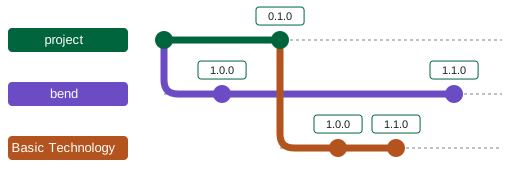
version_history() draws all the versions. .table() gives the same history as a table, with dates and messages. .mermaid() gives the source of the drawing, which you can paste into a wiki or a Markdown page.
[34]:
project.version_history()
[34]:
[35]:
project.version_history().table()
[35]:
| when | target | version | message | files labelled | by |
|---|---|---|---|---|---|
| 30 Sep 2026 16:26 (1 min ago) | bend | 1.1.0 | back to the 1.0.0 bend | - | you |
| 30 Sep 2026 16:25 (1 min ago) | Basic Technology | 1.1.0 | core width rule 0.18 -> 0.2 um | basic_technology_v2.drc | you |
| 30 Sep 2026 16:25 (1 min ago) | Basic Technology | 1.0.0 | demo stack and its first DRC deck | basic_technology.drc | you |
| 30 Sep 2026 16:25 (1 min ago) | the project | 0.1.0 | first draft of the FAQ project | design_review.txt | you |
| 30 Sep 2026 16:25 (1 min ago) | bend | 1.0.0 | first bend, radius 3 um | bend_loss.csv, bend_sweep.py | you |
project.load("bend", version="1.1.0") rebuilds a version20. How do I see everything in the project at one time?
tree() shows the technology with its DRC decks, the library, the source, each component with its newest version, and each file with the version that it belongs to.
[36]:
project.tree()
[36]:
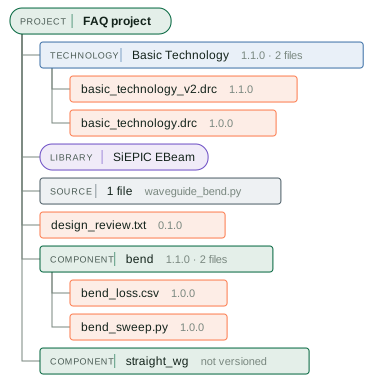
The same tree as text. You can search it, copy it, or paste it into an email:
[37]:
print(project.tree())
FAQ project
├── technology: Basic Technology  · 1.1.0 · 2 files
│   ├── file: basic_technology_v2.drc  (1.1.0)
│   └── file: basic_technology.drc  (1.0.0)
├── library: SiEPIC EBeam
├── source: 1 file  (waveguide_bend.py)
├── file: design_review.txt  (0.1.0)
├── component: bend  · 1.1.0 · 2 files
│   ├── file: bend_loss.csv  (1.0.0)
│   └── file: bend_sweep.py  (1.0.0)
└── component: straight_wg  · not versioned
In a large project, the tree shows the files and the cells of a component as one row, for example “9 cells”. The row gives the call that lists them. To see all of one component, use target:
[38]:
project.tree(target="bend")
[38]:
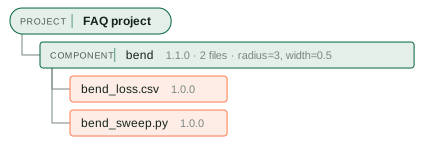
Watch out: a summary
The server gets each save immediately.
add()andupdate()are the saves. There is no separate upload step.add()returns a moment before the server has the component. Wait a moment before you read the component back.add()works one time for each name. Useupdate()for later changes.Each component needs its own name. A PCell must give each variant a name that it makes from its parameters.
Attach the files first, then make the version.
add_version()tags each file that has no version tag.Give measurement data the version tag of the chip that you measured, for example
version:1.0.0. If not, the file gets the next version that you make.update()saves your whole copy. An old copy writes back values that you did not change. Callload_latest()before you edit.The last save wins, with no warning. Look at
changed_since(marker)before you save.Call
load_latest()before you make a version, so that the version is of what is on the server.add_module_file()stops with an error if the project code changed after you opened the project. Callload_latest()first.import_module(globals())adds a module with the name of each project, for examplefaq_project. If you have a variable with the same name, the module replaces it.Open a project with its id. A search by name opens every project that you can see, so it is slow. Find a library by its name one time, and keep its id.
A file does not change after you attach it. For a new edition of a file, attach a new file, with a tag that tells the two files apart.
A change to the project code counts only after you save it, as for a component.
add_module_file()saves a new file.save_module()saves changed and deleted files. The tree shows unsaved changes in orange.A
targetis a component, a technology, or nothing. Use the name or the object. A placed reference is not a target: usereference.component.
When you are done
Each run of this notebook makes a new project in your account. To remove the project, retire it:
pda.retire_project(project_id=project.id)
To bring it back, use pda.restore_project(project_id=...).