
Custom Component Library in the GUI

PhotonForge’s web GUI (PhotonicCanvas) and the Python API share the same PDA projects: a component uploaded from Python appears in the GUI with its layout, ports, and models. If the component is parametric and its source code is stored in the project, the GUI additionally shows the component’s parameters as editable input fields. Changing a value there re-runs the Python function on the server and updates the component in place, exactly as update does in Python.
This guide shows that complete workflow for a small custom library with one component, a thermal phase shifter:
write a parametric component in a plain Python file, with photonforge.typing annotations that become labeled, unit-aware fields in the GUI,
store the file in a PDA project’s own module, where the server can import it,
upload the component and edit its parameters in the GUI.
Writing parametric components is covered in Custom Parametric Components, and projects, versioning, and sharing are covered in the PDA guide. This guide connects the two.
Setup
The library is built on the SiEPIC EBeam PDK, imported into the project directly from the sync server, so no PDK package installation is needed.
[1]:
import shutil

import numpy as np
from matplotlib import pyplot as plt

import photonforge as pf
import photonforge.pda as pda
from photonforge.live_viewer import LiveViewer

# the waveguide mode in this guide is simple enough to solve locally
pf.config.use_local_mode_solver = True

viewer = LiveViewer()
LiveViewer started at http://127.0.0.1:36495. Call its 'stop()' method to free the port.
The component library is a Python file
A component library destined for the GUI is a plain Python module: a file with one function per component. Three details in this file matter specifically for the GUI:
Parameter annotations come from photonforge.typing (imported as
pft):pft.Dimensionrenders as a length field in micrometers,pft.Temperatureas a field in kelvin, and pft.annotate attaches a custom label and units to any base type. A parameter annotated with a plainfloatgets no input field at all: the GUI cannot build a form for it and drops it with a “No schema” notice in the logs. Annotate every parameter, includingnameandtechnology.A module-level ``__version__`` (any PEP 440 version string) versions the parameter schema, so the project can track upgrades to the library.
The module must be self-contained: the server re-runs it in a fresh process, so any constants and data the functions use are defined inside the file, not in the notebook. The technology is the exception: it enters through the
technologyparameter, and the GUI passes the component’s current technology when it re-runs a function.
The component itself is a thermal phase shifter: a resistive metal strip above a waveguide that shifts the optical phase through the thermo-optic effect (\(dn/dT = 1.86 \times 10^{-4}\,\mathrm{K}^{-1}\) for silicon). The layout uses the SiEPIC M1_heater layer over a strip waveguide, with M2_router pads for probing, and the behavior comes from an AnalyticWaveguideModel, which includes the thermo-optic effect through its
dn_dT and temperature parameters.
[2]:
%%writefile heater_lib.py
# Custom component library for the "component-library-guide" project.
# The GUI re-runs these functions on the server when a parameter is
# edited, so everything they need is defined inside this file. The
# technology is the exception: it arrives through the "technology"
# argument, falling back to the default technology when it is None.
import photonforge as pf
import photonforge.typing as pft

# version of the parameter schema (any PEP 440 version string)
__version__ = "1.0.0"

f0 = pf.C_0 / 1.55  # reference frequency (1550 nm)
dn_dt = 1.86e-4  # silicon thermo-optic coefficient (1/K)


@pf.parametric_component
def thermal_phase_shifter(
    *,
    length: pft.Dimension = 50.0,
    temperature: pft.Temperature = 293.0,
    name: str = "heater",
    technology: pf.Technology = None,
):
    # effective and group indices of the strip waveguide (the mode
    # solver result is cached, so repeated builds stay fast)
    mode_solver = pf.port_modes(
        "TE_1550_500", [f0], group_index=True, technology=technology,
        verbose=False, show_progress=False,
    )
    n_eff = mode_solver.data.n_eff.isel(mode_index=0).item()
    n_group = mode_solver.data.n_group.isel(mode_index=0).item()

    # strip waveguide that the heater sits on
    c = pf.parametric.straight(
        port_spec="TE_1550_500", length=length, name=name, technology=technology
    )
    # heater metal on top of the waveguide
    c.add("M1_heater", pf.Rectangle((0, -2), (length, 2)))
    # probe pads at both ends
    c.add(
        "M2_router",
        pf.Rectangle((-4, -6), (2, 6)),
        pf.Rectangle((length - 2, -6), (length + 4, 6)),
    )
    # thermo-optic compact model
    c.add_model(
        pf.AnalyticWaveguideModel(
            n_eff=n_eff,
            n_group=n_group,
            length=length,
            reference_frequency=f0,
            dn_dT=dn_dt,
            temperature=temperature,
        ),
        "Analytic",
    )
    return c
Overwriting heater_lib.py
Create a project
pda.create_project registers the project on the sync server. Re-running this notebook reuses the existing project instead of creating a duplicate.
[3]:
project_name = "component-library-guide"

# load the project if it already exists, otherwise create it
existing = {p["name"]: p["documentId"] for p in pda.list_projects()}
if project_name in existing:
    project = pda.load_project(project_id=existing[project_name])
else:
    project = pda.create_project(project_name, description="Custom component library guide")

print(f"Project '{project.name}' (id={project.id})")
Project 'component-library-guide' (id=4TvAZtfuDVPQunvgSng8Za877M4h)
Import the PDK from a library
The SiEPIC EBeam PDK is available as a public library on the sync server. add_library imports it into the project, making its technologies and components available, and technologies retrieves the PDK technology, which we set as the session default. Because the technology comes from a library within the project, the server can regenerate it on its own, with no PDK package installed.
[4]:
# import the PDK library (skipped when re-running on an existing project)
if not any(lib["name"] == "SiEPIC EBeam" for lib in project.get_library_info()):
    project.add_library(name="SiEPIC EBeam", version="1.2.2")

tech = project.technologies(name="SiEPIC EBeam Si", origin="SiEPIC EBeam")
pf.config.default_technology = tech
print(f"Using technology: {tech.name} v{tech.version}")
Using technology: SiEPIC EBeam Si v1.2.2
Store the library in the project’s module
Why a file, and not simply a function defined in this notebook? A function defined here belongs to the notebook’s __main__ module, and the component built from it records "__main__.thermal_phase_shifter" as its parametric function. The server has no way to import that, so editing the component in the GUI fails with Parametric function __main__.thermal_phase_shifter not found: component cannot be updated.
Every project owns a Python module for exactly this purpose: a package directory at project.module_path / project.module_name whose source is stored on the server along with the components. We copy the library file into it and re-export the component function from the package’s __init__.py:
[5]:
module_dir = project.module_path / project.module_name
shutil.copy("heater_lib.py", module_dir / "heater_lib.py")

# re-export the library's components at the module's top level
(module_dir / "__init__.py").write_text("from .heater_lib import thermal_phase_shifter\n")

# import the module back: functions obtained this way belong to the
# project's module instead of this notebook's "__main__"
project.import_module(globals())

# the module is now available directly under the project's module name
print("function module:", componentlibraryguide.thermal_phase_shifter.__module__)
function module: componentlibraryguide.heater_lib
Build a component from the library
Components are built by calling the function from the imported module. The parametric function recorded in the component now points inside the project’s module, which is what makes it editable later:
[6]:
heater = componentlibraryguide.thermal_phase_shifter()
print("parametric function:", heater.parametric_function)
viewer(heater)
parametric function: componentlibraryguide.heater_lib.thermal_phase_shifter
[6]:

The compact model comes along
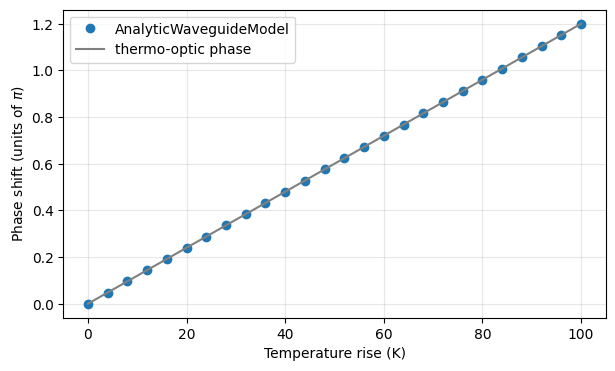
The component is fully functional locally, of course. As a quick check of the thermo-optic model, we sweep the heater temperature through model_kwargs, which overrides model parameters at simulation time without rebuilding the component, and read the transmission phase at 1550 nm. The thermo-optic phase \(2 \pi L \, (dn/dT) \, \Delta T / \lambda\) is plotted for reference.
[7]:
f0 = pf.C_0 / 1.55  # 1550 nm

temperatures = np.linspace(293, 393, 26)
angles = []
for t in temperatures:
    # override the model temperature at simulation time
    s = heater.s_matrix([f0], model_kwargs={"temperature": t}, show_progress=False)
    angles.append(np.angle(s[("P0@0", "P1@0")][0]))

# accumulated phase shift relative to the first temperature
phase_shift = np.unwrap(angles)
phase_shift -= phase_shift[0]

# thermo-optic phase for reference
delta_t = temperatures - temperatures[0]
reference = 2 * np.pi * 50.0 * 1.86e-4 * delta_t / 1.55

plt.figure(figsize=(7, 4))
plt.plot(delta_t, phase_shift / np.pi, "o", label="AnalyticWaveguideModel")
plt.plot(delta_t, reference / np.pi, "-", color="gray", label="thermo-optic phase")
plt.xlabel("Temperature rise (K)")
plt.ylabel("Phase shift (units of $\\pi$)")
plt.legend()
plt.grid(True, alpha=0.3)
plt.show()
Upload the component and the library source
Two separate things are stored on the server: add uploads the built component (geometry, ports, models, and the parameter values it was built with), and save_module uploads the module source itself, so the server can re-run thermal_phase_shifter at new parameters. With that, everything the heater depends on lives within the
project: the module provides the function, and the imported library provides the technology.
[8]:
# upload the component (or refresh it on re-runs), then the module source
stored = dict(project.components(origin="self"))
if heater.name in stored:
    project.update(heater)
else:
    project.add(heater)
project.save_module()

print(f"Components in '{project.name}':", sorted(dict(project.components(origin="self"))))
Components in 'component-library-guide': ['heater']
Edit the component in the GUI
Opening the web GUI now shows the component-library-guide project with the heater in it, layout, ports, and models included. The component’s parameter panel is built from the annotations in heater_lib.py: length appears as a dimension in micrometers and temperature as a value in kelvin.

Editing a value and saving triggers the server to import the project module and re-run thermal_phase_shifter with the new parameters, exactly like calling heater.update(...) here. Each edit creates a new component version, so the full parameter history stays tracked, as described in the PDA guide.
Notes:
Annotate every parameter. A parameter without a usable annotation is silently dropped from the GUI form; the only signal is a “No schema for …” notice in the logs.
Ship data files next to the module. If a component needs a GDS file or other data, place it in the same directory and load it with
Path(__file__).parent / "file.gds";save_modulestores those files too.Composite components should call their siblings. A component that contains other library components (say, an MZI using this phase shifter) should call
thermal_phase_shifter(...)inside its own function rather than capture a pre-built component, so the whole module regenerates from source on its own.