

PDK Components
Components are individual building blocks that make photonic integrated circuits. Components could be as simple as a straight waveguide or as complex as an optical phase array with thousands of active and passive sub-components. In PhotonForge, all devices are represented by a Component object, and are described by 2D layouts that can be easily exported to GDSII or OASIS files.
Technologies in PhotonForge represent a foundry PDK, and they can include a library of components, either represented by a fixed geometry layout or as a parametric component function (or even as a black-box, that does not disclose the physical layout of the component, but offers a model for simulation). Accessing the components of a PDK library can vary from one library to another, but the general idea is exemplified in this How-To.
We will use the SiEPIC OpenEBL PDK through the siepic_forge module, which includes both a parametric technology functions and fixed library components that we want to use.
import photonforge as pfimport siepic_forge as siepic
# Set the default technology for this project from the PDK librarypf.config.default_technology = siepic.ebeam()pf.config.svg_labels = False
Available Components
Section titled “Available Components”The siepic_forge module lists all available component names in the component_names module attribute:
siepic.component_names{'GC_TE_1310_8degOxide_BB', 'GC_TE_1550_8degOxide_BB', 'GC_TM_1310_8degOxide_BB', 'GC_TM_1550_8degOxide_BB', 'ebeam_adiabatic_te1550', 'ebeam_adiabatic_tm1550', 'ebeam_bdc_te1550', 'ebeam_crossing4', 'ebeam_gc_te1550', 'ebeam_gc_tm1550', 'ebeam_routing_taper_te1550_w=500nm_to_w=3000nm_L=20um', 'ebeam_routing_taper_te1550_w=500nm_to_w=3000nm_L=40um', 'ebeam_splitter_swg_assist_te1310', 'ebeam_splitter_swg_assist_te1550', 'ebeam_terminator_te1310', 'ebeam_terminator_te1550', 'ebeam_terminator_tm1550', 'ebeam_y_1310', 'ebeam_y_1550', 'ebeam_y_adiabatic', 'ebeam_y_adiabatic_500pin', 'taper_si_simm_1310', 'taper_si_simm_1550'}Here we see that this PDK contains various components like grating couplers, splitters, couplers, and so on at both O and C band.
We can easily load one of those components for use in our project with the component function:
y_branch = siepic.component("ebeam_y_1550")y_branch
The component already includes ports for connection and models, which we can inspect:
y_branch.models{'Tidy3D': Tidy3DModel(run_time=None, medium=None, symmetry=(0, 0, 0), boundary_spec=None, monitors=(), structures=(), grid_spec=None, shutoff=None, subpixel=None, courant=None, port_symmetries=[('P1', 'P2', {'P0': 'P0', 'P2': 'P1'})], bounds=((None, None, None), (None, None, None)), source_gap=None, simulation_updates=None, autograd_config=None, verbose=True)}If we check the help from the component function, we’ll see that we can also provide extra keyword arguments for the component model we’re creating:
siepic.component?Let’s load another component and pass a model keyword argument to it:
crossing = siepic.component("ebeam_crossing4", tidy3d_model_kwargs={"verbose": False})crossing
Component Simulation
Section titled “Component Simulation”Because they already include ports and models, simulating a library component is usually very straightforward. Here we use the plot_s_matrix helper function to quickly compute and plot the scattering parameters for the cross.
import numpy as np
s_matrix = crossing.s_matrix(pf.C_0 / np.linspace(1.4, 1.6, 21))_ = pf.plot_s_matrix(s_matrix, input_ports=["P0"])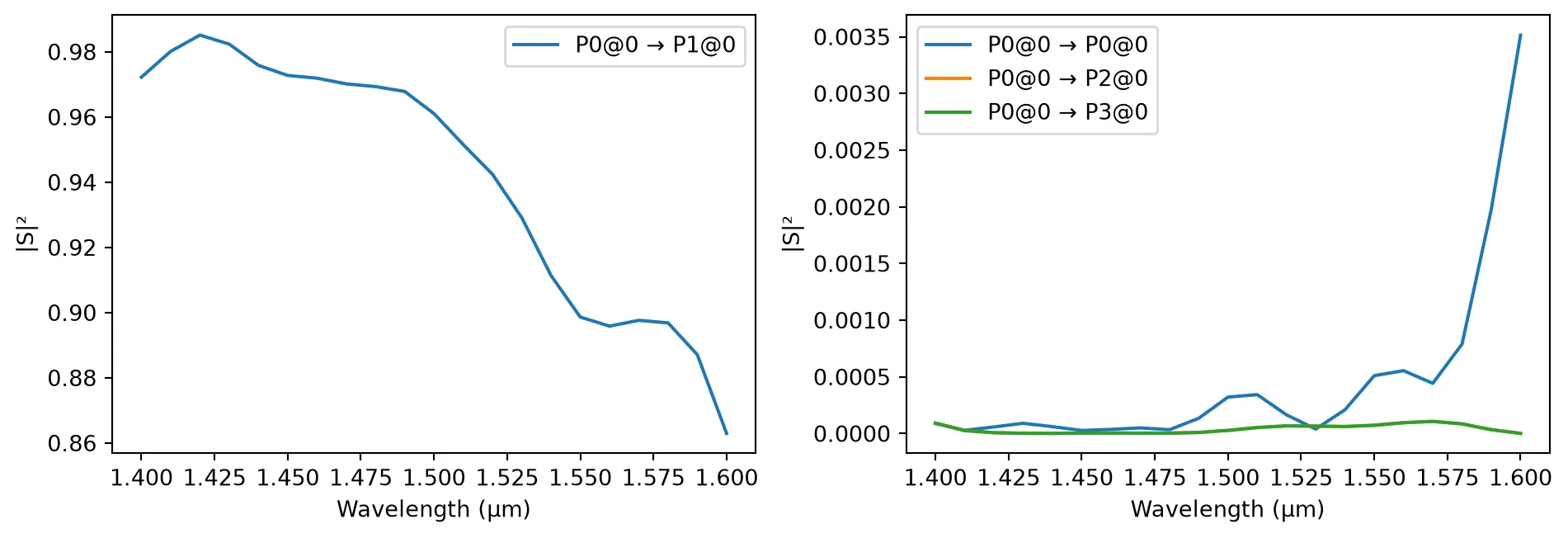
These components form the basic building blocks which can be used to create complex photonic integrated circuits.