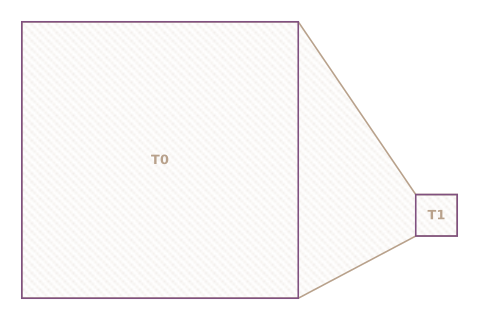

parametric.route_taper
route_taper( *, terminal1: photonforge.Terminal | tuple[photonforge.Reference, str] | tuple[photonforge.Reference, str, int] | None = None, terminal2: photonforge.Terminal | tuple[photonforge.Reference, str] | tuple[photonforge.Reference, str, int] | None = None, layer: Annotated[str | tuple[int, int], _] | None = None, offset_distance: Annotated[float, units='μm'] | Annotated[ collections.abc.Sequence[Annotated[float, units='μm']], maxItems=2, minItems=2, ] | None = None, use_box: bool | None = None, technology: photonforge.Technology | None = None, name: str | None = None,) -> photonforge.ComponentCreate a taper connecting 2 terminals.
Args
- terminal1: First terminal to be connected. The terminal can be specified as a
Terminalor as a tuple including aReference, the terminal name, and the repetition index (optional, only for array references). - terminal2: Second terminal to be connected.
- layer: Layer used for the connection. If
None, the routing layer of the first terminal is used. - offset_distance: Offset applied to the terminal structure before creating the envelope taper. If
None, defaults to 0. - use_box: Flag indicating whether to use the bounding box of the terminal structures or the structures themselves. If
None, defaults toTrue. - technology: Component technology. If
None, the default technology is used. - name: Component name.
Returns
Component with the route, including terminals.
Example
>>> terminal1 = pf.Terminal("METAL", pf.Rectangle((50, 50)))>>> terminal2 = pf.Terminal("METAL", pf.Rectangle(center=(100, -20), size=(15, 15)))>>> component = pf.parametric.route_taper(terminal1=terminal1, terminal2=terminal2)