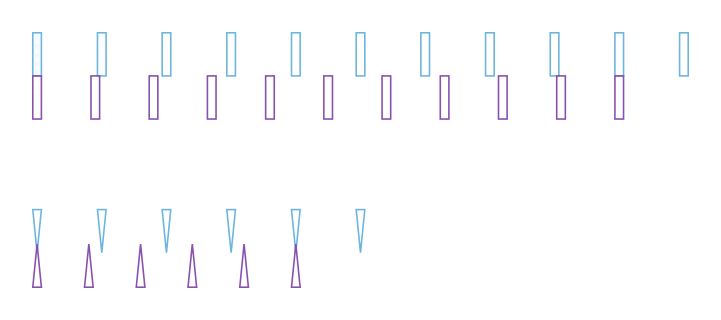

stencil.vernier_scale
vernier_scale( unit, marker_length, marker_width, divider=10, gap=0, triangular_marker=False,)Create a Vernier scale.
Args
- unit (float): Distance between markers in the main scale.
- marker_length (float): Length of the scale markers.
- marker_width (float): Width of the scale markers.
- divider (int): Divider used for the secondary scale. The Vernier constant will be
unit / divider(scale readability). - gap (float): Distance between the main and secondary scales.
- triangular_marker (bool): Flag indicating the use of triangular markers.
Returns
tuple[list[Rectangle | Polygon], list[Rectangle | Polygon]]: Markers for each ruler as a tuple of 2 lists.
Example
>>> scale_1um = pf.stencil.vernier_scale(15, 10, 2)>>> scale_2um = pf.stencil.vernier_scale(... 15, 10, 2, divider=5, gap=-2, triangular_marker=True... )>>> scale_2um = [[s.translate((0, -40)) for s in part] for part in scale_2um]>>> component = pf.Component().add(... "WG_CORE", *scale_1um[0], *scale_2um[0], "SLAB", *scale_1um[1], *scale_2um[1]... )