Flow360 API Quickstart#
Flow360 can be automatically driven via our powerful Python API. All the case setup parameters available in the WebUI are available in the Python API.
By starting from the same evtol_quickstart_grouped.csm, the EVTOL quickstart case shown previously can be easily launched.
Import necessary modules#
First, we import the required modules from the Flow360 library:
[1]:
from matplotlib.pyplot import show

import flow360 as fl
from flow360.examples import EVTOL
Step 1: Create a new project#
Create a new project from a predefined geometry file in the EVTOL example. This initializes a project with the specified geometry and assigns it a name.
[2]:
EVTOL.get_files()

project = fl.Project.from_geometry(
    EVTOL.geometry,
    name="Python Project (Geometry, from file)",
)
geo = project.geometry
[14:09:43] INFO: Geometry successfully submitted:
                   type        = Geometry
                   name        = Python Project (Geometry, from file)
                   id          = geo-4a2412d4-786e-4aa6-a7d1-1242a3e8ae63
                   status      = uploaded
                   project id  = prj-8d95954b-152d-4574-9f87-63e755a2bcb1
INFO: Waiting for geometry to be processed.
Step 2: Group faces by tag#
Group faces by a specific tag for easier reference in defining Surface objects:
[3]:
geo.group_faces_by_tag("groupName")
[14:11:32] INFO: Regrouping face entities under `groupName` tag (previous `_color`).
Step 3: Define simulation parameters#
Define simulation parameters within a specific unit system. This includes:
Meshing parameters (boundary layer and maximum edge length)
Reference geometry parameters
Operating conditions (velocity and angle of attack)
Time-stepping configuration
Boundary condition models
Output parameters
[4]:
with fl.SI_unit_system:
    far_field_zone = fl.AutomatedFarfield()

    params = fl.SimulationParams(
        meshing=fl.MeshingParams(
            defaults=fl.MeshingDefaults(
                boundary_layer_first_layer_thickness=0.001,
                surface_max_edge_length=1,
            ),
            volume_zones=[far_field_zone],
        ),
        operating_condition=fl.AerospaceCondition(
            velocity_magnitude=100,
            alpha=5 * fl.u.deg,
        ),
        time_stepping=fl.Steady(max_steps=1000),
        models=[
            fl.Wall(surfaces=[geo["*"]]),
            fl.Freestream(surfaces=[far_field_zone.farfield]),
        ],
        outputs=[
            fl.SurfaceOutput(
                surfaces=geo["*"],
                output_fields=["Cp", "Cf", "yPlus", "CfVec"],
            )
        ],
    )
INFO: using: SI unit system for unit inference.
Step 4: Run the simulation#
Run the simulation case with the specified parameters:
[5]:
case = project.run_case(params=params, name="Case of EVTOL from Python")
INFO: using: SI unit system for unit inference.
[14:11:35] INFO: Successfully submitted:
                   type        = Case
                   name        = Case of EVTOL from Python
                   id          = case-9a16e08c-935c-41bd-8ffc-a9095f7ba0e6
                   status      = pending
                   project id  = prj-8d95954b-152d-4574-9f87-63e755a2bcb1
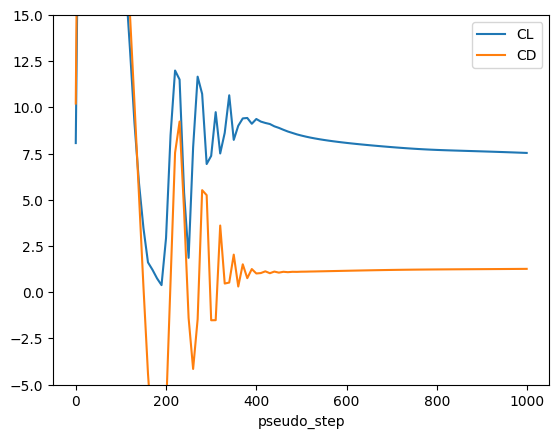
Step 5: Wait for results and plot convergence#
Wait for the simulation to complete and plot the lift (CL) and drag (CD) coefficient convergence:
[6]:
case = project.case
case.wait()

total_forces = case.results.total_forces.as_dataframe()
total_forces.plot("pseudo_step", ["CL", "CD"], ylim=[-5, 15])
show()
[14:15:41] INFO: Saved to /tmp/tmpjrj0fzrd/5734bde9-ec89-4ef8-9609-75c75887efdf.csv