
Propeller Models and Rotational Volume Zones#
Actuator Disk (AD)#
This is the simplest modeling technique where the propeller’s effect on the flow is modeled as a momentum source. It is useful when the propeller performance is known and thus the simulation is more focused on the effects of the propeller wash on items downstream. It assumes a circumferentially uniform pressure change so it cannot be used when the propeller disk is not aligned with the incoming flow, i.e. when the thrust and torque distribution is not circumferentially uniform across the propeller disk.
The Actuator Disk (AD) implementation requires a thrust vs radius and a torque vs radius list. This information usually comes from other modeling codes. Please refer to actuator disc gui page or python class ActuatorDisk class in Solver Configuration for the expected format of the input data.
The AD is a simple way to add the effects of a known propeller into a flow field (see this paper) but it does have a couple of drawbacks:
The fact that it assumes a circumferentially uniform thrust and torque distribution means it cannot simulate any asymmetry in the flow field approaching the propeller disk (e.g., due to angle of attack, angle of yaw, body upstream deforming the incoming flow, etc.)
The input values need to be updated for each case configuration. You will need to update the thrust and torque values when changing any relevant simulation parameters.
Reference Velocity for Power Calculations#
By default, the actuator disk power output is computed using the local flow velocity at the disk:
where \(\vec{F}\) is the force defined by the actuator disk and \(\vec{v}_{\text{local}}\) is the local flow velocity at the disk.
Another option is to supply an explicit reference velocity vector via the reference_velocity parameter:
fl.ActuatorDisk(
    entities=[volume_entity],
    force_per_area=fl.ForcePerArea(
        radius=[0.01, 0.05, 0.1],
        thrust=[0.001, 0.02, 0],
        circumferential=[-0.0001, -0.003, 0],
    ),
    reference_velocity=[0, 0, -10] * fl.u.m / fl.u.s,
)
When reference_velocity is set, the solver uses that fixed vector instead of the local flow velocity when calculating the actuator disk power output. When omitted (the default), the local flow velocity is used.
Left-handed and Right-handed Rotors#
an actuator disk modelling of left-hand-rotation rotor in quiescent flow:
volume_entity.axis = [0,0,1]
fl.ActuatorDisk(
    entities = [volume_entity],
    force_per_area=fl.ForcePerArea(
        radius=[0.01, 0.05, 0.1],
        thrust=[0.001, 0.02, 0],
        circumferential=[-0.0001, -0.003, 0]
    )
)
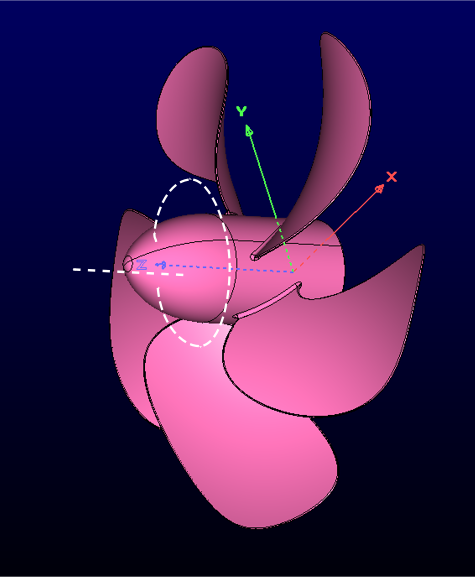
an actuator disk modelling of right-hand-rotation rotor in quiescent flow:
volume_entity.axis = [0,0,-1]
fl.ActuatorDisk(
    entities = [volume_entity],
    force_per_area=fl.ForcePerArea(
        radius=[0.01, 0.05, 0.1],
        thrust=[0.001, 0.02, 0],
        circumferential=[0.0001, 0.003, 0]
    )
)
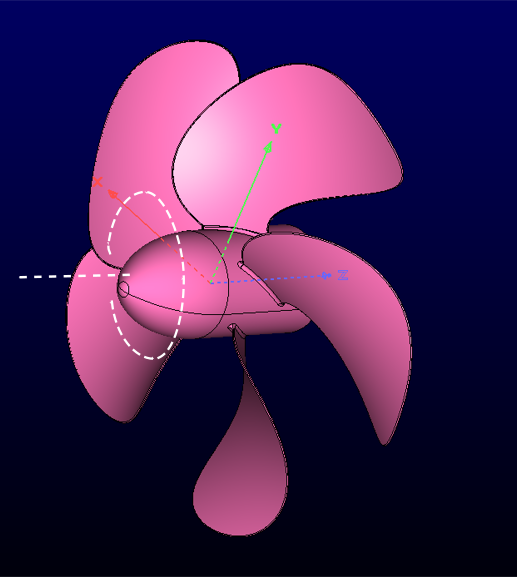
Blade Element Theory Disk (BET Disk)#
This is one of the most commonly used propeller modeling techniques.
It captures almost all of the physics without requiring an actual propeller geometry.
Input requirements are a set of radial geometric details and associated 2D Cl and Cd polar information.
Please refer to BET disk gui page or python class BETDisk class in Solver Configuration for the expected format of the input data.
From that data the BET Disk implementation calculates how a propeller would affect the flow locally and assigns the correct forcing terms.
This is very useful for understanding propeller behavior and how the propeller wake will affect objects downstream.
BET Disk is useful at all steps of the design cycle, from propeller design to propulsion integration for a full vehicle. It is the best simulation technique if there is no available CAD model of the propeller geometry and when reduced computational costs are required. Overall the BET Disk modeling approach strikes an appropriate balance between ease of use, cost to run, and accuracy.
rotation_direction_rule#
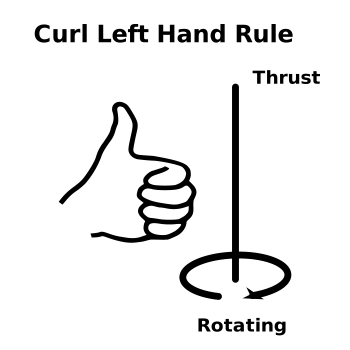
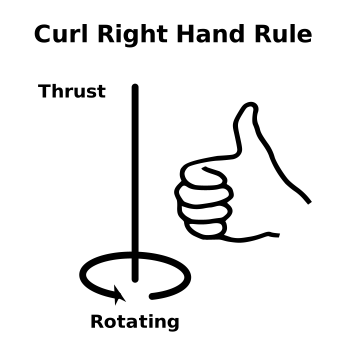
leftHand or rightHand. It depends on the design of the rotor blades: whether the blades follow curl left hand rule or the curl right hand rule to generate positive thrust. The following 2 figures show the curl left hand rule and curl right hand rule. The fingers follow the spinning of the blades and the thumb points to the thrust direction. By default, it is rightHand.
omega#
The nondimensional rotating speed. It should be positive in most cases, which means the leading edge moves in front and the rotation direction of the blades in BET simulations is consistent with the curling fingers described in “rotationDirectionRule” to generate positive thrust. A negative “omega” means the blades rotate in a reverse direction, hence in an opposite direction to the curling fingers, where the trailing edge moves in front.
The following 4 pictures give some examples of different rotationDirectionRule and axisOfRotation with positive omega. The curved arrow follows the same direction in which rotor spins. The straight arrow points to the direction of thrust.
volume_entity.axis = (0,0,1)
fl.BETDisk(
    rotation_direction_rule="leftHand",
    omega=0.3 * fl.u.deg / fl.u.s,
    entities=[volume_entity]
)
volume_entity.axis = (0,0,-1)
fl.BETDisk(
    rotation_direction_rule="leftHand",
    omega=0.5 * fl.u.deg / fl.u.s,
    entities=[volume_entity]
)
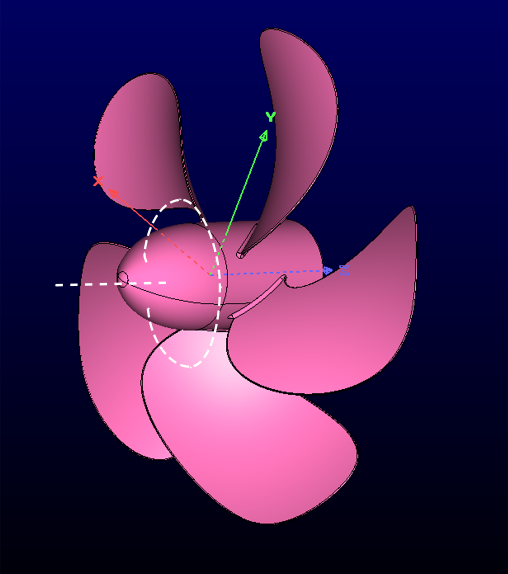
volume_entity.axis = (0,0,1)
fl.BETDisk(
    rotation_direction_rule="rightHand",
    omega=0.5 * fl.u.deg / fl.u.s,
    entities=[volume_entity]
)
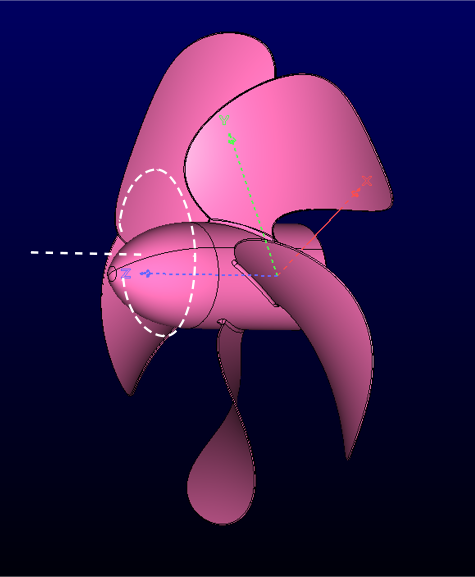
volume_entity.axis = (0,0,-1)
fl.BETDisk(
    rotation_direction_rule="rightHand",
    omega=0.5 * fl.u.deg / fl.u.s,
    entities=[volume_entity]
)
chords and twists#
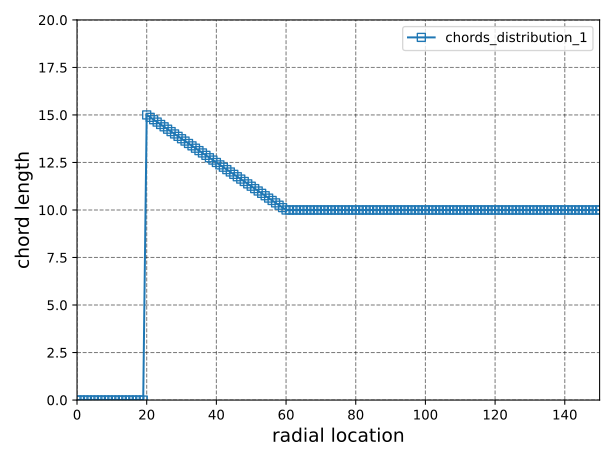
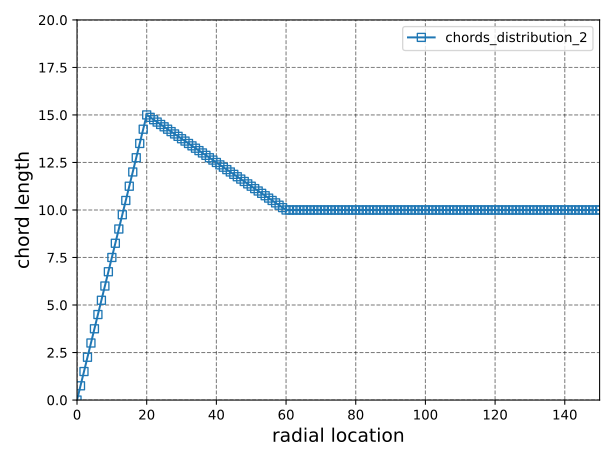
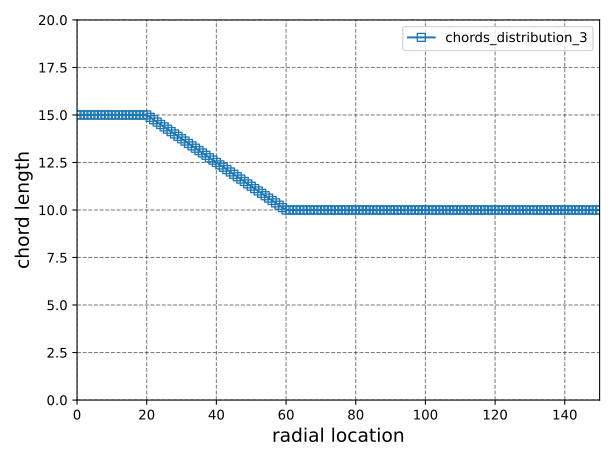
The sampled radial distribution of chord length and geometric twist angle. The “twist” affects the local pitch angle. The “chords” affects the amount of lift and drag imposed on the blade (or fluid). For a radial location where chord=0, there is no lift or drag imposed. It should be noted that for any radial location within the given sampling range, the chord or twist is linearly interpolated between its two neighboring sampled data points. For any radial location beyond the given sampling range, the chord or twist is set to be the nearest sampled chord or twist, i.e. constant extrapolation. In the Flow360 python client, the chords and twists can be set up using BETDiskChord and BETDiskTwist, respectively. Here are 3 examples of the given “chords” and the corresponding radial distribution of chord length:
Example 1. The root of blade starts at r=20 with chord length=15. The chord shrinks to 10 linearly up to r=60. The chord keeps as 10 for the rest of blade. In this setting, the chord=0 for r in [0,20], there is no aerodynamic lift and drag imposed no matter what the twist angle it has, so this setting fits the rotor without hub.
chords = []
radial_loc_value_for_chord =[19.9999, 20, 60, 150]
radial_chords_value = [0, 15, 10, 10]
for radius, chord in zip(radial_loc_value_for_chord, radial_chords_value):
    betDiskChord = fl.BETDiskChord(radius=radius * fl.u.inch, chord=chord * fl.u.inch)
    chords.append(betDiskChord)
Example 2. The root of blade starts at r=0 with chord=0. The chord expands to 15 linearly up to r=20, then shrinks to 10 linearly up to r=60. The chord keeps as 10 for the rest of blade. This setting could be used for a mesh with the geometry of hub. Because the chord length changes gradually near the root region, there won’t be tip vortices in root region.
chords = []
radial_loc_value_for_chord =[0, 20, 60, 150]
radial_chords_value = [0, 15, 10, 10]
for radius, chord in zip(radial_loc_value_for_chord, radial_chords_value):
    betDiskChord = fl.BETDiskChord(radius=radius * fl.u.inch, chord=chord * fl.u.inch)
    chords.append(betDiskChord)
Example 3. This is an example of a wrong setting of chords, because the chord length at r=0 is not 0, so the local solidity is infinity, which is not realistic.
chords = []
radial_loc_value_for_chord =[20, 60, 150]
radial_chords_value = [15, 10, 10]
for radius, chord in zip(radial_loc_value_for_chord, radial_chords_value):
    betDiskChord = fl.BETDiskChord(radius=radius * fl.u.inch, chord=chord * fl.u.inch)
    chords.append(betDiskChord)
Note
The number of sampling data points in chords and twists doesn’t have to be the same. They are served as sampled data for interpolation of chord length and twist angle respectively and separately.
n_loading_nodes#
This parameter defines the number of loading nodes used to compute the sectional thrust and torque coefficients \(C_t\) and \(C_q\), defined in BET Loading. The recommended value is 20 to ensure sufficient resolution of the sectional loading distributions.
blade_line_chord#
When the value of blade_line_chord is zero, a steady-state BET Disk simulation is performed. If non-zero, this value defines the nondimensional chord for unsteady BET Line simulations. The recommended value is 1-2x the physical mean aerodynamic chord (MAC) of the blade for an unsteady BET Line simulation.
initial_blade_direction#
For unsteady BET Line simulations (non-zero blade_line_chord), this vector sets the direction of the first blade at the initial time.
Components are expressed in the global mesh (inertial) coordinate system—the same convention as center and axis on the BET volume—not in a local BET or disk-fixed reference frame. It is a common mistake to assume a “blade-wise / axial / tangential” triad defined only by the BET inputs; do not interpret initial_blade_direction that way.
The vector must lie in the rotor disk plane: it must be orthogonal to the rotation axis (the cylinder axis). Only the direction is used; the vector need not be unit length (magnitude is ignored). For example, if the rotation axis is tilted in the mesh, e.g. \((\cos 30^\circ,\,0,\,\sin 30^\circ)\), choose any non-zero vector perpendicular to that axis—for instance by crossing the axis with a coordinate direction that is not parallel to it.
tip_gap#
The tip_gap is the nondimensional distance between blade tips and peripheral geometry (e.g., duct, shroud, cowling, nacelle, etc.). The peripheral structures must be effective at reducing blade tip vortices as this parameter affects the tip loss effect. Being close to a fuselage or to another blade is not a cause to enable this parameter, because they won’t effectively reduce the tip loss. tip_gap = 0 means there is no tip loss effect in the solver. It is \(\infty\) (default) for open propellers.
Blade Element Theory Line (BET Line)#
This is a similar implementation as the steady BET Disk above but in a time resolving fashion. Transient effects due to individual rotating blades and vortex shedding are captured in time instead of being averaged out as with the steady BET Disk method.
It allows for accurate simulations of transient propeller effects without the need for propeller CAD. Even if a CAD model is available, the BET Line method can be less mesh intensive than meshing the propeller details and its associated rotational volume zone method.
Rotational Volume Zone#
Rotational volume zones allow for the movement of different regions of a multi-domain mesh relative to one another. A rotational volume zone can be any circular shape (e.g., cylinder, sphere, etc.) for which one side is stationary relative to the other that rotates. Nested rotational volume zones are possible to allow for complex cyclical motions.
For propellers, this is the most accurate of all modeling options. It is also the most costly in terms of resources because it requires an accurate mesh of the propeller geometry, adding mesh count and modeling effort. Also, relatively small time steps are usually required to accurately capture the propeller’s forces as well as extended time spans to sufficiently develop the propeller’s wake far downstream. Various solver settings and solution strategies can be applied to improve simulation efficiency. Please reference the XV-15 BET tutorial and this publication for example processes and techniques
Note
The time-accurate rotating geometry option can simulate a lot more then just propellers. Anything that moves in a rotational frame of reference can be simulated: dynamic derivatives, airplane spin, on-the-fly control surface deflections are but a few examples of what can be done with this approach.
parent_volume#
The parent_volume is required for nested rotational volume zones. If zoneA is a rotational zone and zoneB rotates relative to zoneA, zoneB is treated as a nested rotational volume zone. In such a scenario, zoneB’s frame of reference is built upon zoneA’s frame of reference, so in zoneB’s Rotation configuration, it is required to set parent_volume=volume_mesh["zoneA"].
Caution
If a volume zone rotates with respect to the inertial frame of reference, the parent_volume should not be specified. An example can be found at XV15 rotor blade resolved tutorial. Any volume zone, assigned as parent of another volume zone, has to be a rotational volume zone, otherwise the validation during case submission will report errors.
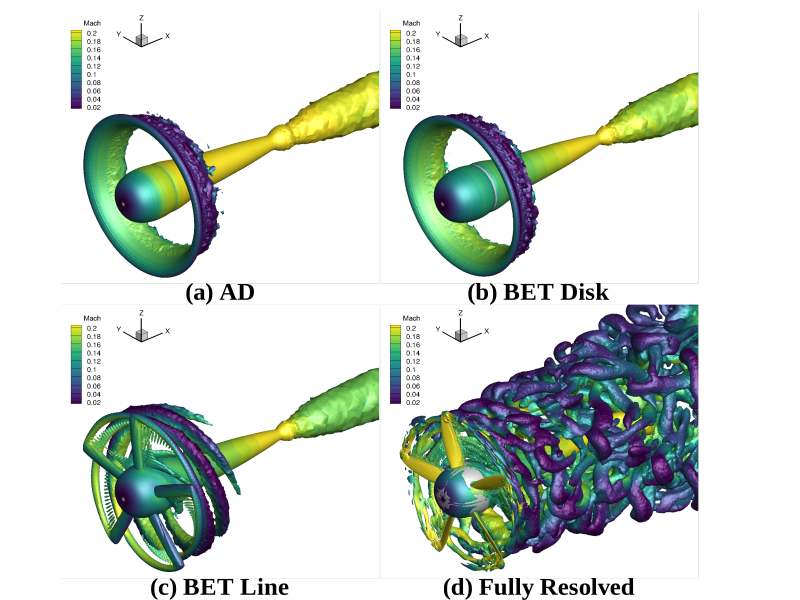
Four different techniques for modeling the same propeller. In this case the AD and BET disk look similar because the flow is circumferentially uniform.#
Multiple Reference Frame (MRF)#
The MRF (Multiple Reference Frame) method is an efficient approach for simulating rotating machinery, offering significant computational advantages when contrasted with the unsteady sliding interfaces, as the flow field can be solved using the steady state flow solver. Unlike the unsteady sliding interfaces approach, where the mesh rotates alongside the rotor, the steady state MRF employs a different strategy. Here, both the mesh and the rotor remain stationary in space, while the impact of rotation is considered by incorporating centrifugal and Coriolis source terms into the Navier Stokes equations, within individual volume zones. This approach is recommended for steady simulations of rotating components such as rotors, turbomachinery, wind turbines over the SRF approach.
Important
The formulation is ONLY exact when the flow field is rotationally invariant on the interface. Any variation in the circumferential direction would lead to non-physical behavior across the interface such as the discontinuous rotor wake. When using MRF to pursue high-fidelity results, we need larger sliding zone in the wake region than the unsteady simulation/blade resolve simulation.
Single Reference Frame (SRF)#
In contrast to the Multiple Reference Frame (MRF) method, where both stationary and rotating volume zones coexist, the Single Reference Frame (SRF) approach involves the entire simulation domain rotating around an axis. This approach is recommended for steady simulations involving maneuvers (pitch/roll/yaw), over the MRF approach. In SRF simulations, the “velocityType” parameter under the “NoSlipWall” and “Freestream” boundary conditions offers two options: “relative” (enforcing zero relative velocity) or “absolute” (enforcing zero absolute velocity). For NoSlipWall, “relative” is used for the rotating surfaces (e.g., blades of a rotor), whereas “absolute” is used for fixed surfaces (e.g., wind tunnel walls).