
Status Bar#
The Status Bar at the bottom of the screen provides real-time information about simulation parameters and execution progress. It consists of two main components: the Inspector and Run Status panels.
Available Components#
Component |
Icon |
Description |
|---|---|---|
Inspector |
|
Displays and validates required simulation parameters |
Run Status |
|
Shows simulation progress, job status, and execution information |


Detailed Descriptions#
Inspector#
The Inspector panel validates and displays essential simulation parameters that must be defined or corrected before running the simulation.
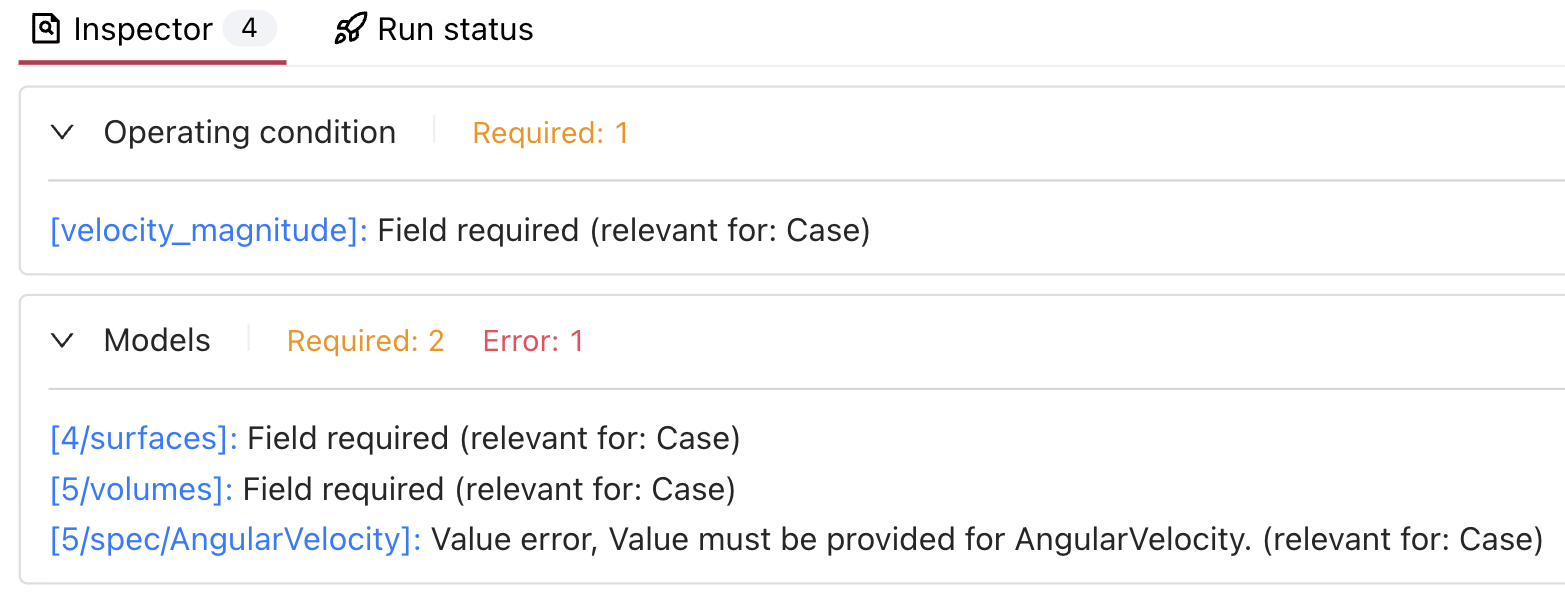
Important: A simulation cannot be started until all required fields are filled and all errors are resolved (Inspector shows 0).
The Inspector provides comprehensive validation feedback:
Required fields (orange): Shows count of missing required parameters
Error states (red): Indicates validation errors that must be fixed
Field paths (blue): Links to specific parameters needing attention
Parameter path (e.g.,
[velocity_magnitude],[4/surfaces])Validation status (“Field required”, “Value error”)
Context information (“relevant for: Case”)
Detailed error messages when applicable
Run Status#
The Run Status panel provides a hierarchical view of simulation execution stages and progress.
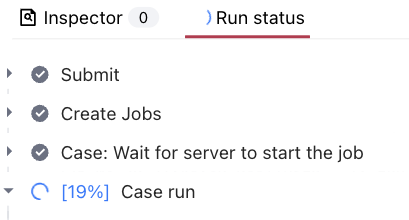
Status Information:
Real-time simulation logs
Current execution phase
Detailed progress tracking
Status Icons and Their Applicability:
Icon
Status
Surface Meshing
Volume Meshing
Case Run

Finished
✓
✓
✓

Failed
✓
✓
✓

Running
✓
✓
✓

Diverged
-
-
✓
Note: The “Diverged” status is specific to case runs only and indicates numerical instability in the simulation.
💡 Tips
Monitor the Inspector panel for any missing required parameters
Use the Run Status panel to track simulation progress
Check simulation logs for detailed execution information
Pay attention to validation errors in the Inspector panel
Remember: The simulation cannot be started if the Inspector shows an error or a required field.
❓ Frequently Asked Questions
What does the percentage in Run Status indicate?
The percentage shows the current progress of the component run.
Why are some fields marked as required?
Required fields contain essential parameters necessary for the simulation to run correctly.
What should I do if the Run Status shows an error?
Check the simulation logs for detailed error information.