

Quickstart Demonstration
On this page, we will construct a simple 3D microwave simulation with Flexcompute RF (also Flex RF) to demonstrate the typical workflow.
For a more detailed discussion, please refer to our User Guide.
We begin with the Python imports. We will also make use of third-party packages numpy and matplotlib. Basic familiarity with these packages is assumed.
# Import main flex_rf packageimport flex_rf.tidy3d as rf
# Import web module for cloud job managementimport flex_rf.web as web
# Import third-party math and plotting librariesimport numpy as npimport matplotlib.pyplot as plt
Next, we define the simulation frequency range and design parameters.
# Frequencyf_min, f_max = (1e9, 20e9)f0 = (f_min + f_max)/2freqs = np.linspace(f_min, f_max, 401)
# Geometry dimensionsmm = 1000                                       # conversion factor from default unit (microns)Lsub, Wsub = (20 * mm, 20 * mm)                 # substrate dimensionsHsub = 1.5 * mm                                 # substrate thicknessHmetal = 0.035 * mm                             # metal thicknessLpatch, Wpatch = (8 * mm, 12 * mm)              # patch dimensionsLfeed, Wfeed = ((Lsub - Lpatch) / 2, 2.9 * mm)  # feedline size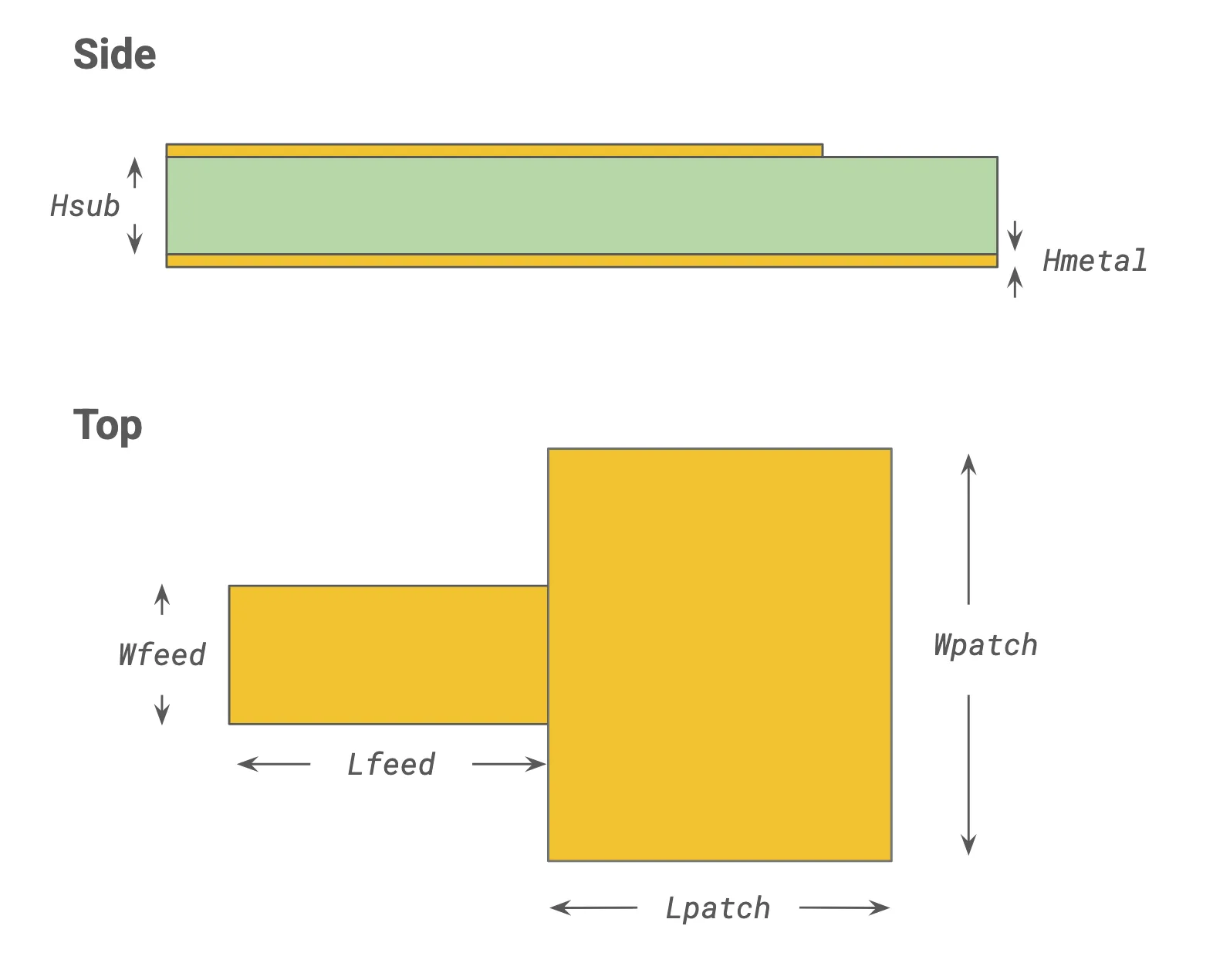
We set up the physical scene next. A physical structure is defined by the Structure object, which is composed of a geometry and a medium (material model).
# Define mediums (material models)metal = rf.LossyMetalMedium(conductivity=58, frequency_range=(f_min, f_max))  # [S/um]dielectric = rf.Medium(permittivity=4.3)
# Define physical structuressubstrate = rf.Structure(    geometry=rf.Box(center=(0, 0, -Hsub / 2), size=(Lsub, Wsub, Hsub)),    medium=dielectric)
ground = rf.Structure(    geometry=rf.Box(center=(0, 0, -Hsub - Hmetal / 2), size=(Lsub, Wsub, Hmetal)), medium=metal)feed = rf.Structure(    geometry=rf.Box(center=(-Lpatch / 2 - Lfeed / 2, 0, Hmetal / 2), size=(Lfeed, Wfeed,Hmetal)),    medium=metal)patch = rf.Structure(    geometry=rf.Box(center=(0, 0, Hmetal / 2), size=(Lpatch, Wpatch, Hmetal)),    medium=metal)
structure_list = [substrate, ground, feed, patch]
The patch is excited via the feed line. Excitations in Flex RF are also known as ports. We connect the end of the feed line to a LumpedPort. The default impedance of a lumped port is 50 Ohms.
# Define portport_1 = rf.LumpedPort( center=(-Lsub / 2, 0, -Hsub / 2), size=(0, Wfeed, Hsub), voltage_axis=2, # axis of voltage drop (2 = Z-axis) name="port_1")The simulation will automatically calculate S-parameters for all included ports. Port voltages, currents, and impedances are also available.
By default, the electric and magnetic fields are not stored. To record the fields within a specific region, we define a FieldMonitor.
# Define field monitor to record at the z=0 planemon_1 = rf.FieldMonitor(size=(rf.inf, rf.inf, 0), freqs=[f0], name="field (z=0)")The simulation grid is automatically generated based on the wavelength in the dielectric medium. For RF/microwave problems, it is typically also important to resolve the field near metallic structures.
# Define layer refinement around metallic structureslayer_ref_1 = rf.LayerRefinementSpec.from_structures(structures=[feed, patch])layer_ref_2 = rf.LayerRefinementSpec.from_structures(structures=[ground])
# Define overall grid specification (auto based on wavelength)grid_spec = rf.GridSpec.auto(    wavelength=rf.C_0 / f0,       # Reference wavelength for automesher    min_steps_per_wvl=15,         # Minimum grid steps per wavelength    layer_refinement_specs=[layer_ref_1, layer_ref_2],)
Finally, all of the components are assembled into a base Simulation. Then, the TerminalComponentModeler object implements a port/frequency sweep around the base Simulation to obtain the full S-matrix.
# Define base simulationsim = rf.Simulation(    size=(30 * mm, 30 * mm, 8 * mm),    structures=structure_list,    monitors=[mon_1],    grid_spec=grid_spec,    run_time=5e-9,    plot_length_units="mm",)
# Define TerminalComponentModelertcm = rf.TerminalComponentModeler(    simulation=sim,    ports=[port_1],    freqs=freqs)
The simulation is ready to submit to the cloud.
# Send the job to the cloud and await resultstcm_data = web.run(tcm, task_name='Quickstart demo')Once the job is completed, we can extract the S-parameters and plot them.
# Extract S-matrixs_matrix = tcm_data.smatrix()
# Extract S11 (dB)S11 = s_matrix.data.sel(port_in='port_1', port_out='port_1')S11dB = 20*np.log10(np.abs(S11))
# Plot S11 (dB)fig, ax = plt.subplots(figsize=(10, 4), tight_layout=True)ax.plot(S11dB.f / 1e9, S11dB, label='|S11|$^2$ (dB)')ax.legend()ax.grid()ax.set(xlabel="f (GHz)", ylabel="dB")plt.show()
We can also plot the field in the included FieldMonitor.
# Get simulation data corresponding to 'port_1' excitationsim_data = tcm_data.data['port_1']
# Plot the electric field amplitudefig, ax = plt.subplots(figsize=(6,4), tight_layout=True)sim_data.plot_field("field (z=0)", field_name="E", val="abs", ax=ax)plt.show()