

Intro to Antenna Modeling
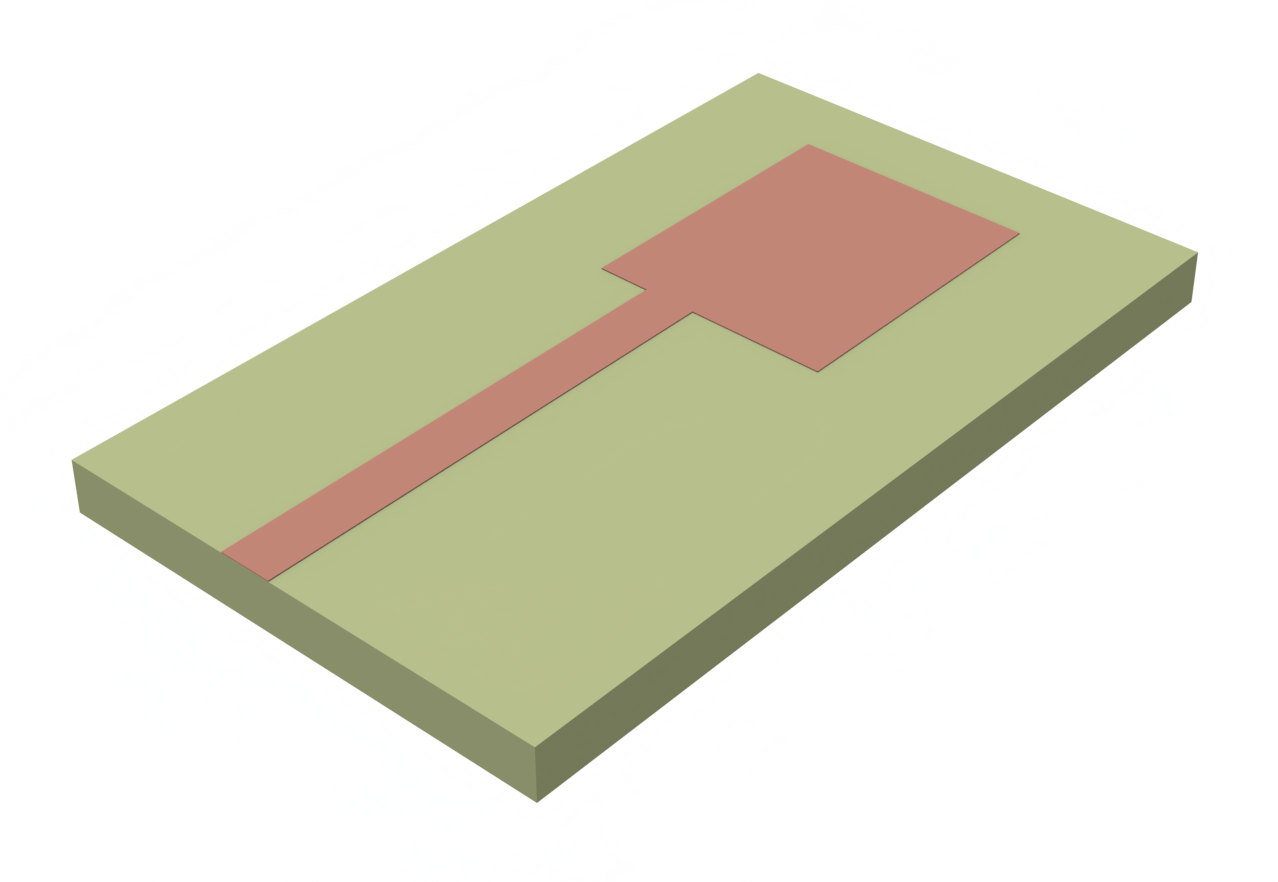
In this notebook, we will demonstrate how to simulate a simple RF antenna and compute key antenna metrics, such as:
- S-parameters
- Impedance
- Field profile
- Directivity and Gain
- Axial Ratio
We will use the patch antenna model designed by Sheen et al. in Reference [1]. A rectangular patch antenna is a type of microstrip antenna consisting of a rectangular conductive patch placed on a dielectric substrate with a ground plane on the opposite side. These antennas are widely used in wireless communication applications due to their simple design, ease of fabrication, and low profile.
import flex_rf.tidy3d as rfimport flex_rf.web as webimport matplotlib.colors as colorsimport matplotlib.pyplot as pltimport numpy as npimport plotly.graph_objects as goimport plotly.io as piorf.config.logging.level = 'ERROR'
# Set plotly default rendererspio.renderers.default = "plotly_mimetype+notebook_connected"
Building the Model
Section titled “Building the Model”Units and Frequency Settings
Section titled “Units and Frequency Settings”The antenna has a primary resonance at f ~ 7.5 GHz and a secondary resonance near f ~ 10 GHz. We will choose a frequency range that encompasses both resonances.
# Frequency and wavelength parametersfreq_start = 5e9freq_stop = 11e9freq0 = (freq_start + freq_stop) / 2wavelength0 = rf.C_0 / freq0
# Target frequencies (also used to define field monitors)freqs_target = [7.5e9, 10e9]
# Frequency sweep points (also append target frequencies)freqs =  np.unique(np.append(np.linspace(freq_start, freq_stop, 201), freqs_target))
In Flex RF, the default units are micrometers (µm) and Hertz (Hz). To work in different length units, we introduce a scaling factor.
# Scaling used for millimetersmm = 1e3Materials
Section titled “Materials”The dielectric substrate has a constant relative permittivity of 2.2. The metal structures are represented by the perfect electric conductor (PEC) medium.
# Materials presentmedium_air = rf.Medium(permittivity=1.0, name="Air")medium_sub = rf.Medium(permittivity=2.2, name="Substrate")medium_metal = rf.PECMedium()Geometry and Structures
Section titled “Geometry and Structures”We follow the dimensions outlined in Reference [1] to create the patch antenna.
# Metal thicknessth = 0.05 * mm
# Substrate parameterssub_x = 23.34 * mmsub_y = 40 * mmsub_z = 0.794 * mm
# Patch parameterspatch_x = 12.45 * mmpatch_y = 16 * mm
# Feed line parametersfeed_x = 2.46 * mmfeed_y = 20 * mmfeed_offset = 2.09 * mm
The structures are created below.
# Create substratesubstrate = rf.Structure(    geometry=rf.Box(center=[0, 0, 0], size=[sub_x, sub_y, sub_z]),    medium=medium_sub,    name="Substrate",)
# Create ground planeground_plane = rf.Structure(    geometry=rf.Box(center=[0, 0, -(sub_z + th) / 2], size=[sub_x, sub_y, th]),    medium=medium_metal,    name="Ground",)
# Create feed linefeed_line = rf.Structure(    geometry=rf.Box.from_bounds(        rmin=[-patch_x / 2 + feed_offset, -sub_y / 2, sub_z / 2],        rmax=[-patch_x / 2 + feed_offset + feed_x, -sub_y / 2 + feed_y, sub_z / 2 + th],    ),    medium=medium_metal,    name="Feed line",)
# Create patch antennapatch = rf.Structure(    geometry=rf.Box.from_bounds(        rmin=[-patch_x / 2, -sub_y / 2 + feed_y, sub_z / 2],        rmax=[patch_x / 2, -sub_y / 2 + feed_y + patch_y, sub_z / 2 + th],    ),    medium=medium_metal,    name="Patch",)
The structures are consolidated into a list below. In Flex RF, overlapping structures are resolved according to their medium type by default: PEC overrides lossy metal overrides dielectrics. Within each medium type, later structures in the list override earlier ones.
# List of structures for the simulationsstructures_list = [substrate, ground_plane, feed_line, patch]Monitors
Section titled “Monitors”We define a FieldMonitor to observe the field distribution in the patch antenna plane.
# Field monitor to view the electromagnetic fields in the patch planemonitor_field = rf.FieldMonitor( center=(0, 0, sub_z / 2), size=(rf.inf, rf.inf, 0), freqs=freqs_target, name="field",)To obtain radiation characteristics such as directivity and gain, use a DirectivityMonitor. The DirectivityMonitor is set up to surround the entire radiating structure and automatically calculates far-field information through a near-to-far field transformation.
# Define elevation and azimuthal angular observation points# Theta is the elevation angle and defined relative to global +z axistheta = np.linspace(0, np.pi, 101)# Phi is the azimuthal angle and defined relative to global +x axisphi = np.linspace(0, 2*np.pi, 201)
# Create the DirectivityMonitormonitor_directivity = rf.DirectivityMonitor(    size=(30 * mm, 45 * mm, 4 * mm),    freqs=freqs,    name="radiation",    phi=phi,    theta=theta,)
Boundaries
Section titled “Boundaries”The simulation is truncated by Perfectly Matched Layers (PMLs) on all sides by default. PMLs absorb any outgoing radiation. Additionally, we introduce air padding of quarter wavelength thickness around the antenna so that the PMLs do not distort the near field.
# Padding distancepadding = rf.C_0 / freq_start / 4
# Adding padding on each sidesim_x = sub_x + 2 * paddingsim_y = sub_y + 2 * paddingsim_z = sub_z + 2 * padding
Grid/Mesh
Section titled “Grid/Mesh”The grid specification controls how the simulation domain is discretized. We make use of LayerRefinementSpec to automatically refine the grid near the metal layers. Otherwise, the grid size in the rest of the domain is set automatically according to the wavelength.
# Define layer refinement around antenna planelr_spec_1 = rf.LayerRefinementSpec.from_structures( structures=[feed_line, patch], # Refine around these structures axis=2, # Layer normal is oriented along the z-axis min_steps_along_axis = 1, # 1 grid step along normal direction (thickness) corner_refinement=rf.GridRefinement( # Refined cell size and number around in-plane metal corners dl=0.2 * mm, num_cells=2 ),)# Define overall grid specificationgrid_spec = rf.GridSpec.auto( wavelength=wavelength0, min_steps_per_wvl=20, layer_refinement_specs=[lr_spec_1])Lumped Port
Section titled “Lumped Port”The antenna will be excited by a LumpedPort positioned at the end of the feed line.
# Create a lumped port excitationport = rf.LumpedPort( name="lumped_port", center=[-patch_x / 2 + feed_offset + feed_x / 2, -sub_y / 2, 0], size=[feed_x, 0, sub_z], voltage_axis=2, # port is aligned with z-axis impedance=50, # port impedance is 50 Ohms)Define Simulation and TerminalComponentModeler
Section titled “Define Simulation and TerminalComponentModeler”The base Simulation object contains all necessary information about the simulation domain that we have defined thus far. Note that the lumped port and the radiation monitor are added later.
The simulation run_time is automatically determined by RunTimeSpec based on the structure quality_factor. For most structures, a value in the range of 3-10 is sufficient. Increase the value for strongly resonant structures, or if high-frequency ripples are present in the S-parameter data.
# Create the simulation objectsim = rf.Simulation( size=[sim_x, sim_y, sim_z], structures=structures_list, monitors=[monitor_field], # Only near-field monitors; directivity monitor will be added later sources=[], # Sources not needed; lumped port will be added later grid_spec=grid_spec, run_time=rf.RunTimeSpec(quality_factor=5), # Automatic run time plot_length_units="mm", # This option will make plots default to units of millimeters.)The TerminalComponentModeler automatically conducts a port sweep of the base Simulation in order to generate the full S-parameter matrix as a function of frequency. We specify the port and radiation monitor information here.
# Define TerminalComponentModelertcm = rf.TerminalComponentModeler( simulation=sim, # Base simulation to run freqs=freqs, # Sweep frequencies points ports=[port], # Include ports here radiation_monitors=[monitor_directivity], # Include radiation monitors here)Examine Structures and Mesh
Section titled “Examine Structures and Mesh”Before running the simulation, it is advisable to inspect the created structure and mesh.
Here, we examine the simulation domain in the antenna plane, and in the cross-section plane at the terminated end of the feed line (port shown with arrow).
# Create plotfig, (ax1, ax2) = plt.subplots(1, 2, figsize=(12, 6))
# Plot the structure and mesh in the x-y planetcm.plot_sim(    z=sub_z / 2,    ax=ax1,    monitor_alpha=0.2,)sim.plot_grid(z=sub_z / 2, ax=ax1, hlim=[-20 * mm, 20 * mm], vlim=[-25 * mm, 25 * mm])
# Plot the structure and mesh in the x-z planetcm.plot_sim(    y=-sub_y / 2,    ax=ax2,    monitor_alpha=0.2,)sim.plot_grid(y=-sub_y / 2, ax=ax2, hlim=[-15 * mm, 15 * mm], vlim=[-1 * mm, 5 * mm])ax2.set_aspect(5)
plt.show()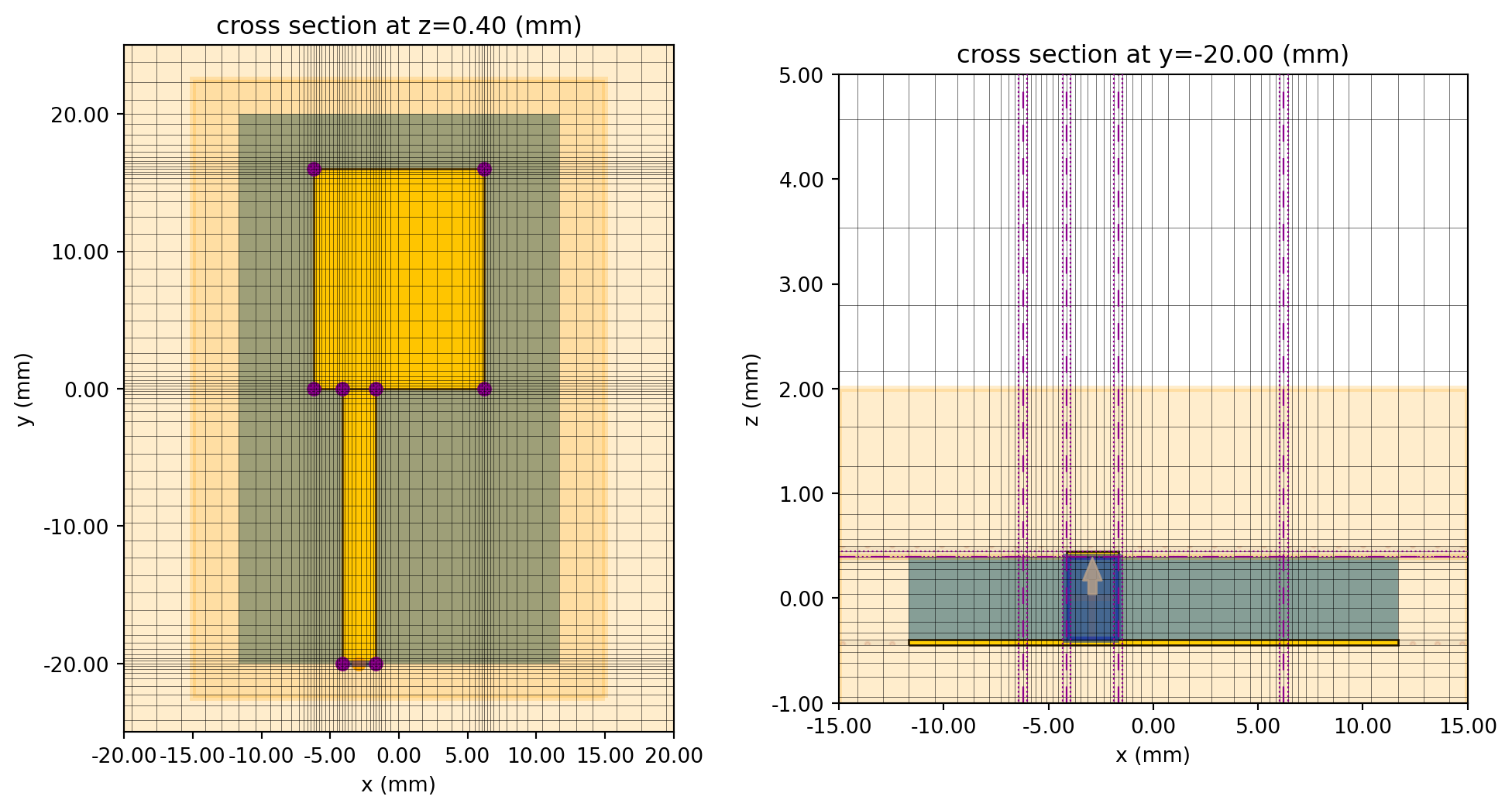
Run simulation
Section titled “Run simulation”Use the web.run() method to submit the simulation job to the cloud and await results. Switch the verbose flag to True for live job updates.
tcm_data = web.run(tcm, task_name='Antenna tutorial', path='./data/antenna_tutorial.hdf5', verbose=False)Results
Section titled “Results”S-parameters
Section titled “S-parameters”The S-matrix returned by the TerminalComponentModeler is in the shape of fxNxN, where f is the number of frequency points and N is the number of ports. In this case, there is only one port.
Note that Tidy3D uses the physics phase convention. We apply complex conjugate to the calculated S-parameter in order to convert it to the engineering convention.
# Extract the S-matrix from the result datas_matrix = tcm_data.smatrix()# Specify port_in and port_out to get the specific S_ijS11 = np.conjugate(s_matrix.data.isel(port_out=0, port_in=0))
# Transform to dBS11dB = 20 * np.log10(np.abs(S11))# Plot S11dBfig, ax = plt.subplots()ax.plot(S11dB.f / 1e9, S11dB, "-b",)ax.set_xlabel("Frequency (GHz)")ax.set_ylabel("$|S_{11}|$ (dB)")ax.grid(True)plt.show()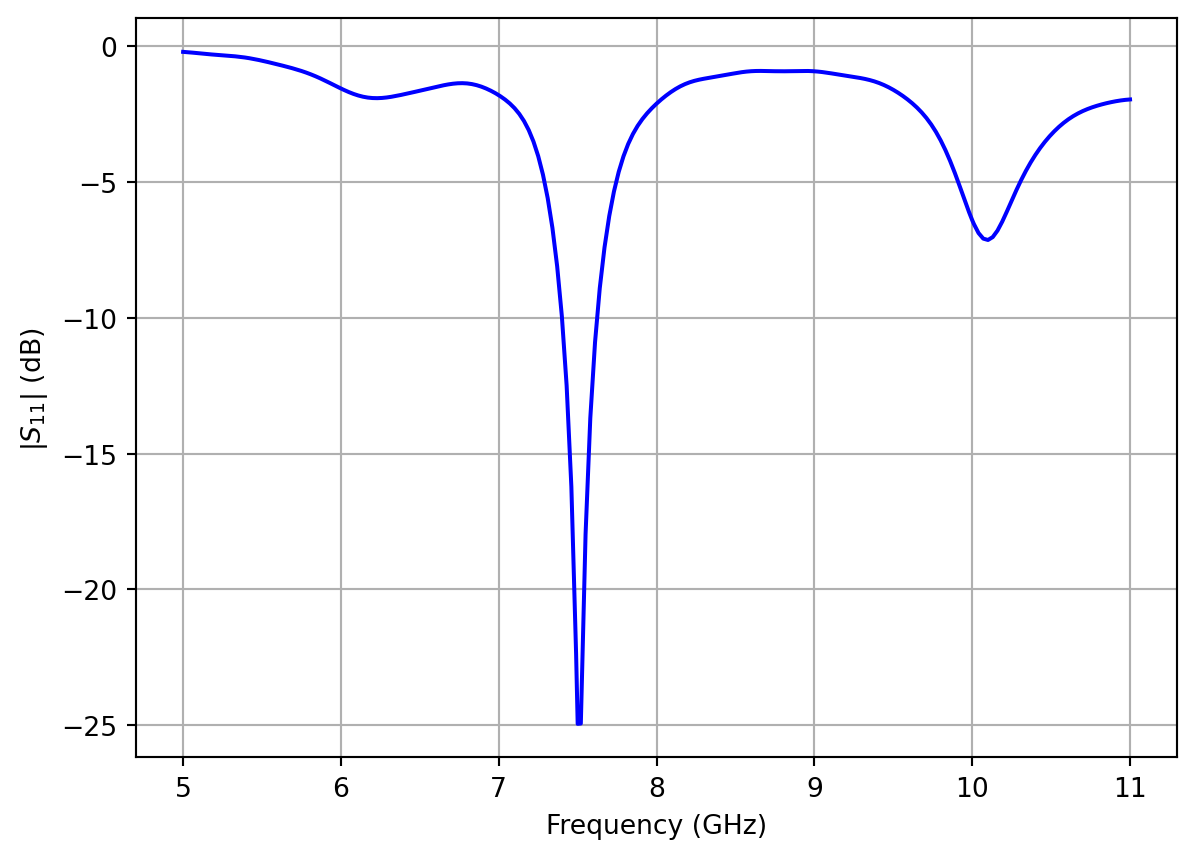
The first and second resonances are clearly visible in the S11 spectrum. Let’s examine the field profile next.
Field Distributions
Section titled “Field Distributions”User-defined monitors record data for every port in the TerminalComponentModeler port sweep. Use a specific port name to access the monitor data corresponding to the port excitation.
# Get simulation data associated with the lumped port excitationsim_data = tcm_data.data["lumped_port"]Below, we plot the fields at the first two resonances.
# Plot field monitor dataf, (ax1, ax2) = plt.subplots(1, 2, figsize=(11, 4))sim_data.plot_field(    field_monitor_name="field", field_name="Ez", val="abs", f=freqs_target[0], ax=ax1)ax1.set_xlim([-10 * mm, 10 * mm])ax1.set_ylim([-20 * mm, 20 * mm])ax1.set_title("Electric field distribution at 7.5 GHz")
sim_data.plot_field(    field_monitor_name="field", field_name="Ez", val="abs", f=freqs_target[1], ax=ax2)ax2.set_xlim([-10 * mm, 10 * mm])ax2.set_ylim([-20 * mm, 20 * mm])ax2.set_title("Electric field distribution at 10 GHz")plt.show()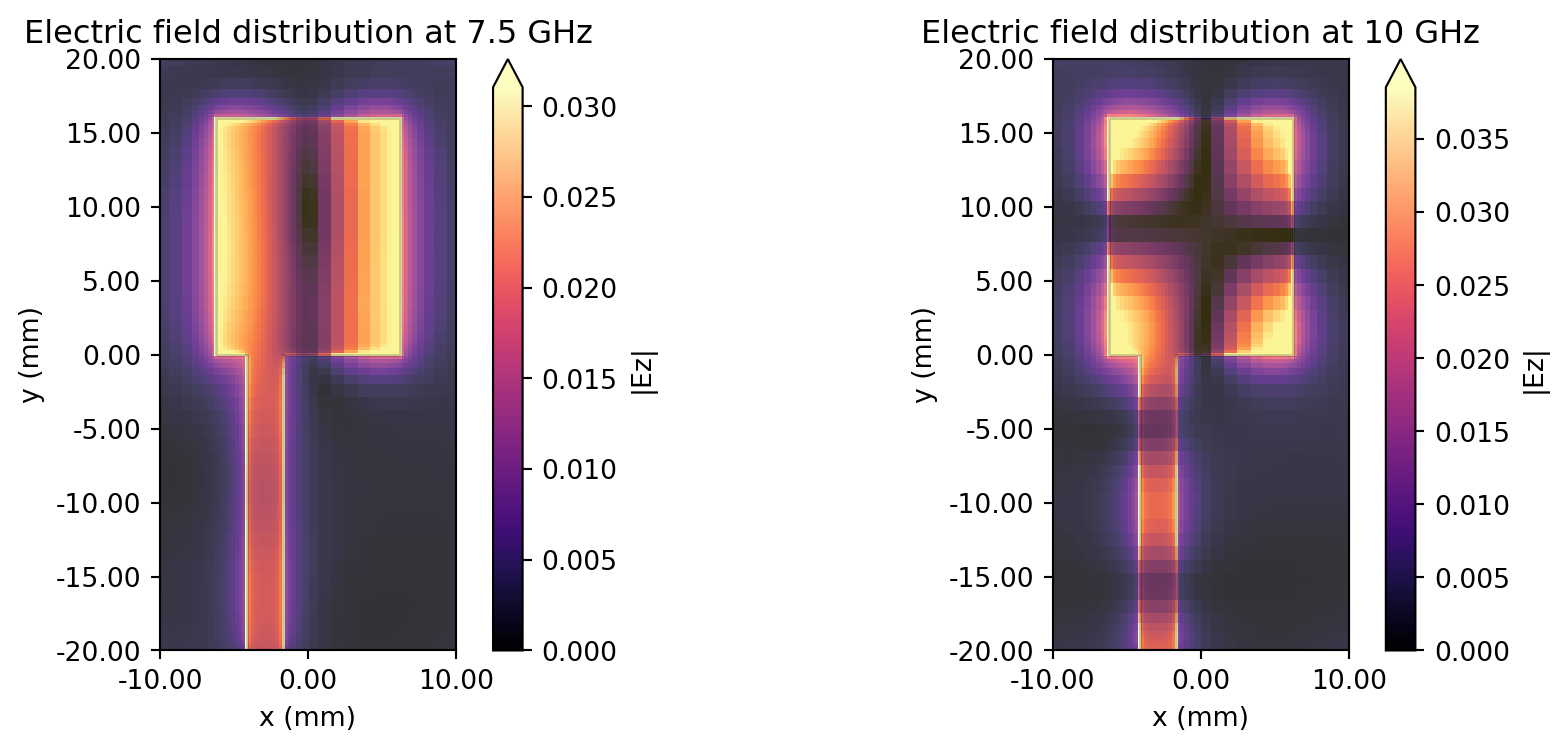
Impedance
Section titled “Impedance”The antenna impedance can be calculated from S11.
First, we need to de-embed S11 to account for the length of the feed line. The de-embedding calculation shifts the S11 reference plane from the location of the lumped port ( mm) to the end of the feed line where it connects to the patch ( mm).
In general terms, the de-embedded S-parameter
where is the original S-parameter, is the waveguide wavenumber, and is the shift distance. For simplicity, we assume that the microstrip feed line has a constant effective permittivity of and characteristic impedance of Ohms.
# Wavenumber associated with microstrip feed linek_microstrip = 2 * np.pi * freqs * np.sqrt(1.9) / rf.C_0
# De-embedded S-parameterS11_deembedded = S11 * np.exp(1j * 2 * k_microstrip * feed_y)
The antenna impedance can then be calculated using the de-embedded S11.
# Antenna impedanceZ_ant = 50 * (1 + S11_deembedded) / (1 - S11_deembedded)Let’s plot the antenna impedance near the first resonance. We observe a very good match with at resonance.
# Plot antenna impedance near first resonance f=7.5 Ghzfig, ax = plt.subplots()ax.plot(freqs / 1e9, np.real(Z_ant), label="Re Z")ax.plot(freqs / 1e9, np.imag(Z_ant), label="Im Z")ax.axline((7.5, -50), (7.5, 50), ls="--", color="#555555", label="f=7.5 GHz")ax.set_xlim(7, 8)ax.set_ylim(-40, 60)ax.legend()ax.set_xlabel("f (GHz)")ax.set_ylabel("Impedance (Ohms)")ax.grid()plt.show()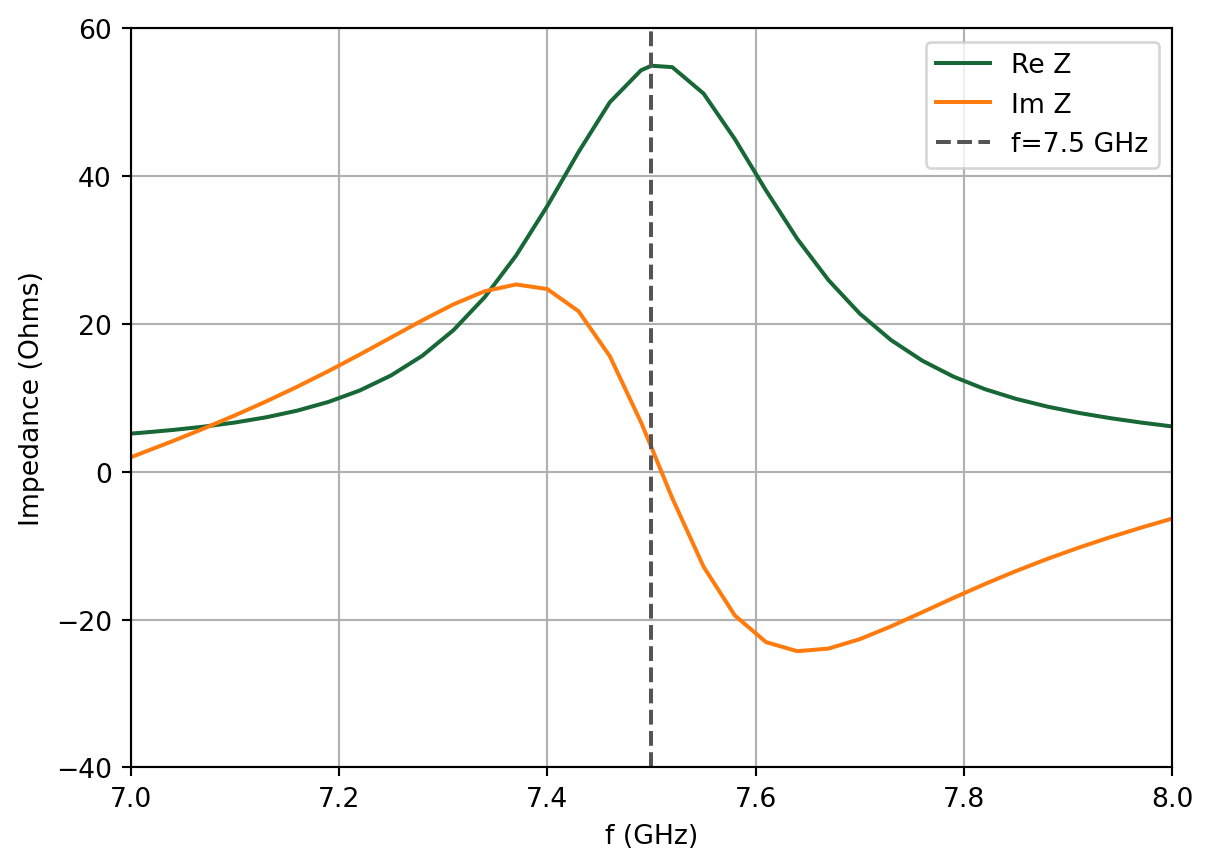
Far-field Metrics
Section titled “Far-field Metrics”Directivity, gain and other commonly used antenna metrics are automatically calculated when one or more radiation_monitor is defined. The user can obtain the far-field metrics by calling the get_antenna_metrics_data() method on the TCM data object.
# Get antenna metricsantenna_metrics = tcm_data.get_antenna_metrics_data()Below, we list all of the available antenna far-field metrics for the user’s reference.
# The available antenna metrics quantities are listed below:
# Directivitydirectivity = antenna_metrics.directivity
# Radiation efficiency: efficiency accounting for material lossesradiation_efficiency = antenna_metrics.radiation_efficiency
# Gain: radiation efficiency * directivitygain = antenna_metrics.gain
# Reflection efficiency: efficiency accounting for impedance mismatchreflection_efficiency = antenna_metrics.reflection_efficiency
# Realized gain: reflection efficiency * gainrealized_gain = antenna_metrics.realized_gain
# Supplied power: power supplied to antennasupplied_power = antenna_metrics.supplied_power
# Radiated power: power radiated by antennaradiated_power = antenna_metrics.radiated_power
# Radiation intensity: radiated intensity as a function of angleradiation_intensity = antenna_metrics.radiation_intensity
# Axial ratio: ratio of major axis to minor axis of polarization ellipseaxial_ratio = antenna_metrics.axial_ratio
# Left and right circular polarization field componentsleft_polarization = antenna_metrics.left_polarizationright_polarization = antenna_metrics.right_polarization
In the following sections, we will demonstrate how to plot the gain and axial ratio.
Antenna Gain
Section titled “Antenna Gain”Let’s plot the gain at the first resonance (f=7.5 GHz).
# Plot gain in elevation plane at f=7.5 GHz
# First, extract gain data in the forward and backward directionsgain_F = gain.sel(f=freqs_target[0], phi=0, method="nearest").squeeze()gain_B = gain.sel(f=freqs_target[0], phi=-np.pi, method="nearest").squeeze()
# Create plotfig = plt.figure(figsize=(8, 6), tight_layout=True)ax = fig.add_subplot(111, projection="polar")
# Plot gain in dBax.set_theta_direction(-1)ax.set_theta_offset(np.pi / 2.0)ax.plot(theta, 10 * np.log10(np.abs(gain_F)), "-b")ax.plot(-theta, 10 * np.log10(np.abs(gain_B)), "-b")ax.set_title("Antenna Gain (dB) in XZ plane", y=1.08)plt.show()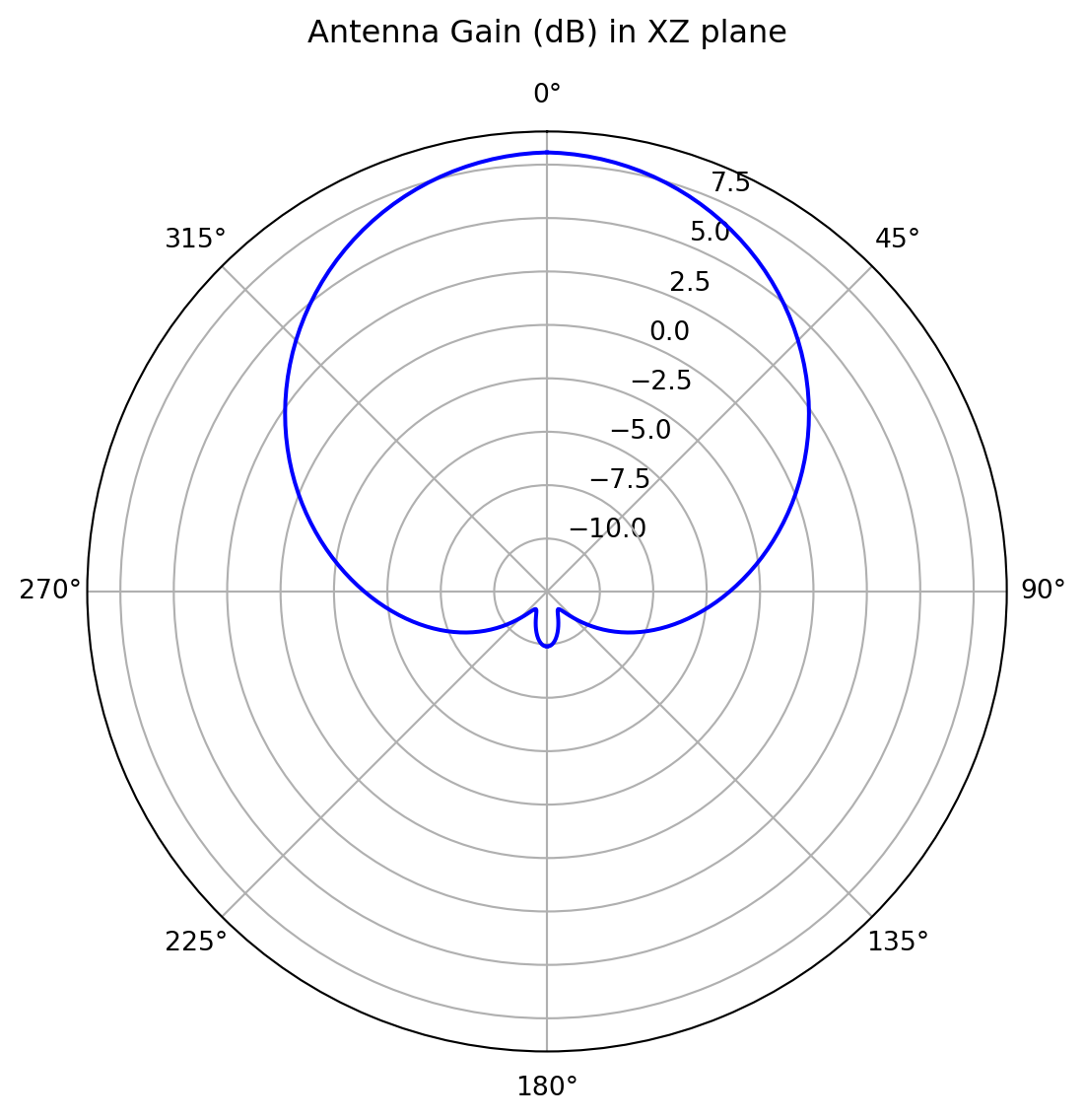
# Plot gain in azimuthal plane at f=7.5 GHz
# Extract gain in azimuthal planegain_azi = gain.sel(f=freqs_target[0], theta=np.pi / 2, method="nearest").squeeze()
# Create plotfig = plt.figure(figsize=(8, 6), tight_layout=True)ax = fig.add_subplot(111, projection="polar")
# Plot gain in dBax.plot(phi, 10 * np.log10(np.abs(gain_azi)), "-b")ax.set_title("Antenna Gain (dB) in XY plane", y=1.08)plt.show()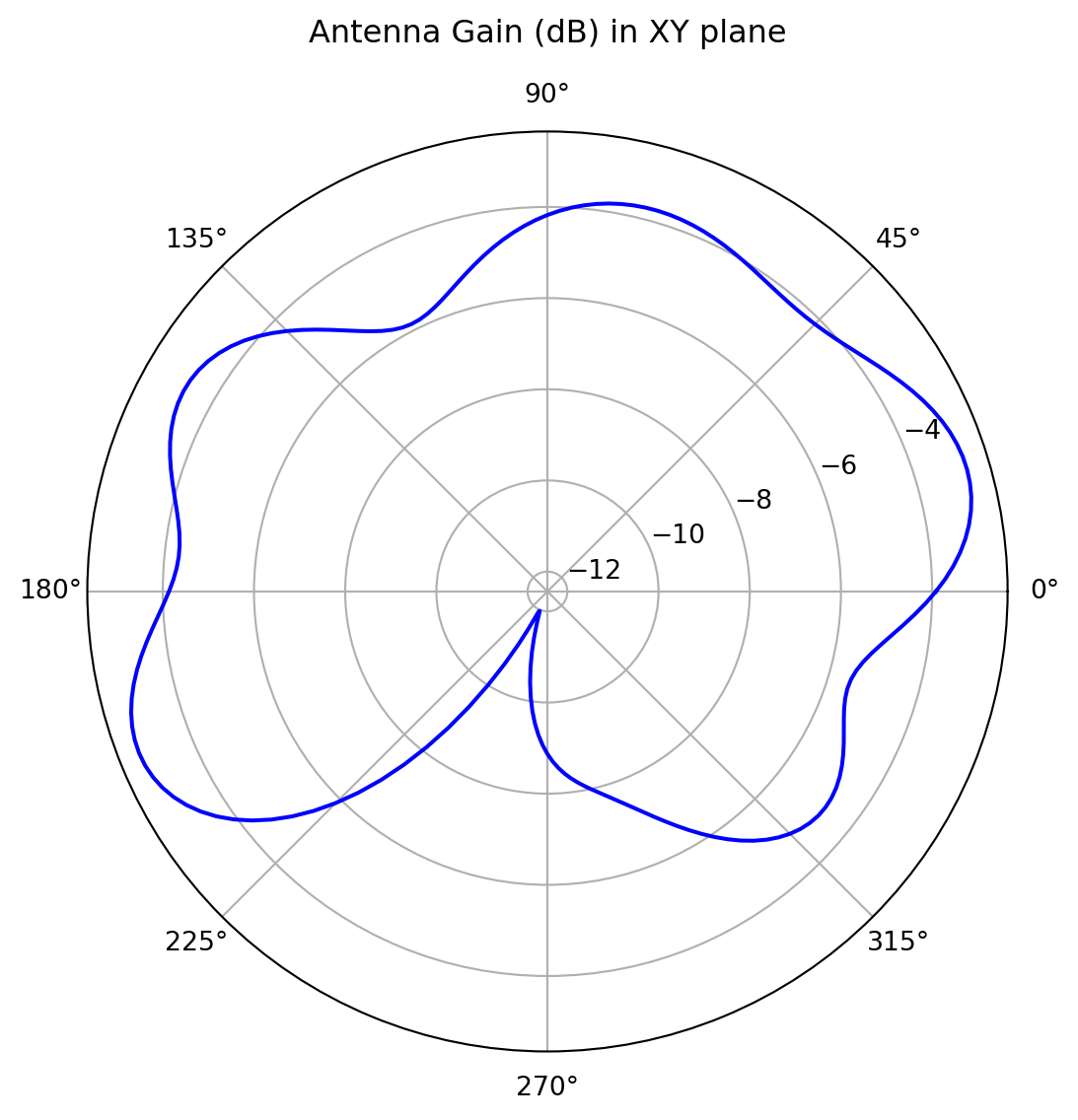
We can also create an interactive 3D plot of the gain.
# Rescale gain according to max and min dB valuesdB_min, dB_max = (-20, 10)G = 10 * np.log10(np.abs(gain.sel(f=7.5e9, method="nearest").squeeze()))G_scaled = np.clip((G - dB_min) / (dB_max - dB_min), a_min=0, a_max=1)
# Build the gain-radius surface in cartesian coordinatesphi_s, theta_s = np.meshgrid(phi, theta)X = G_scaled * np.cos(phi_s) * np.sin(theta_s)Y = G_scaled * np.sin(phi_s) * np.sin(theta_s)Z = G_scaled * np.cos(theta_s)
# Color the surface by gain in dB (clipped to the chosen range)G_clipped = np.clip(G, dB_min, dB_max)
fig_3d = go.Figure(    data=go.Surface(        x=X,        y=Y,        z=Z,        surfacecolor=G_clipped,        cmin=dB_min,        cmax=dB_max,        colorscale="Jet",        colorbar=dict(title="G (dB)"),    ))fig_3d.update_layout(    scene=dict(        xaxis=dict(title="x", showticklabels=False, range=[-1, 1]),        yaxis=dict(title="y", showticklabels=False, range=[-1, 1]),        zaxis=dict(title="z", showticklabels=False, range=[-1, 1]),        aspectmode="cube",        camera=dict(eye=dict(x=1.6, y=1.6, z=1.2)),    ),    margin=dict(l=20, r=20, t=20, b=20),    height=500,)
fig_3d.show()
Axial Ratio
Section titled “Axial Ratio”Let’s plot the axial ratio vs frequency for the main lobe (phi, theta = 0)
# Extract axial ratio at main lobeaxial_ratio_main_lobe = axial_ratio.sel(theta=0, phi=0, method="nearest").squeeze()# Plot main lobe axial ratio vs frequencyfig, ax = plt.subplots()ax.plot(freqs / 1e9, 20 * np.log10(axial_ratio_main_lobe))ax.grid()ax.set_xlabel("f (GHz)")ax.set_ylabel("Axial ratio (dB)")plt.show()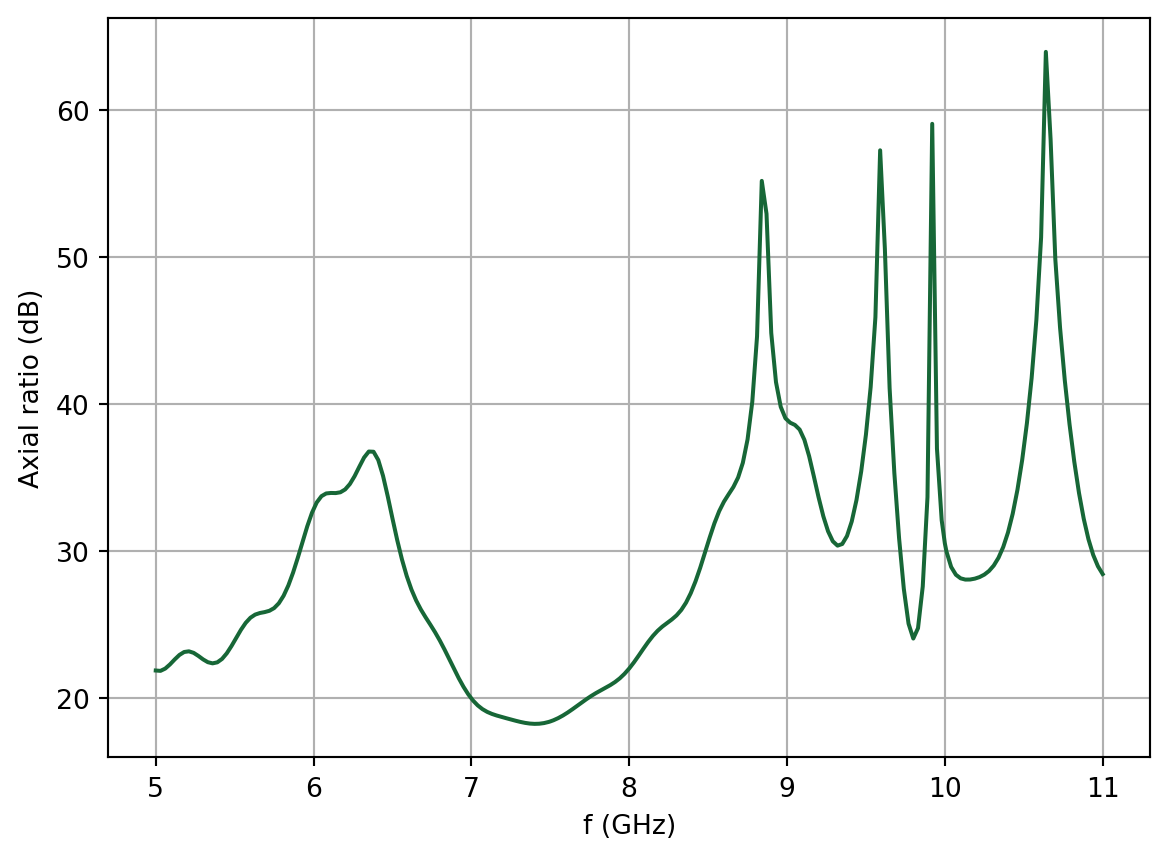
Reference
Section titled “Reference”[1] Sheen, D.M., Ali, S.M., Abouzahra, M.D. and Kong, J.A., 1990. Application of the three-dimensional finite-difference time-domain method to the analysis of planar microstrip circuits. IEEE Transactions on microwave theory and techniques, 38(7), pp.849-857.