

Edge-feed Patch Antenna
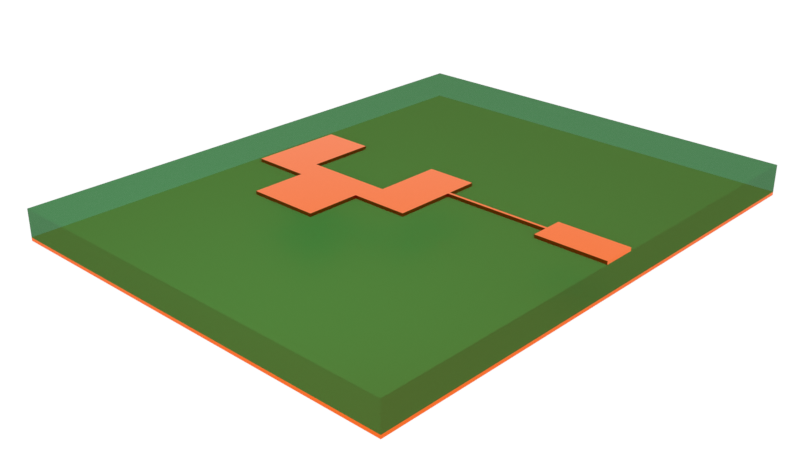
The patch antenna is a ubiquitous antenna type used in modern wireless communication systems. In this notebook, we demonstrate how to simulate a patch antenna using the Flexcompute RF solver and compute key metrics, such as return loss and antenna gain profile.
import matplotlib.pyplot as pltimport numpy as npimport flex_rf.tidy3d as rfimport flex_rf.web as webimport plotly.graph_objects as goimport plotly.io as piorf.config.logging.level = 'ERROR'
# Set plotly renderer defaultpio.renderers.default = "plotly_mimetype+notebook_connected"General Parameters
Section titled “General Parameters”We will conduct a broadband sweep from 10 MHz to 40 GHz to scan for the resonance(s) of this patch antenna. The target operating frequency of the antenna is around 35.3 GHz.
# Frequency rangef_min, f_max = (0.01e9, 40e9)
# Target operating frequencyf_target = 35.3e9
# Frequency sample points (including f_target)freqs = np.sort(np.append(np.linspace(f_min, f_max, 301), f_target))
Material and Structures
Section titled “Material and Structures”Both the substrate and conductor materials are assumed to be lossy and have constant loss parameters over the frequency range.
# Lossy substrate (rel. epsilon = 2.2, loss tangent = 0.0009)med_sub = rf.FastDispersionFitter.constant_loss_tangent_model(    2.2, 0.0009, (f_min, f_max), tolerance_rms=2e-4)
# Lossy metal (conductivity = 58e6 S/m)med_metal = rf.LossyMetalMedium(conductivity=58, frequency_range=(f_min, f_max))
Best weighted RMS error: 0.000152 ━━━━━━━━━━━━━━━━━━━━━━━━━━━━━━━━━ 100% 0:00:00
The geometry is constructed below. Note that the default length unit is microns. We introduce a scaling factor mm for convenience.
# Geometry parametersmm = 1000t = 0.02 * mm # Metal thicknessh = 0.254 * mm # Substrate thickness# Create substrate and ground planesstr_sub = rf.Structure( geometry=rf.Box(center=(0, 0, -h / 2), size=(6 * mm, 10 * mm, h)), medium=med_sub)str_gnd = rf.Structure( geometry=rf.Box(center=(0, 0, -h - t / 2), size=(6 * mm, 10 * mm, t)), medium=med_metal)
# Create feed structurestr_feed1 = rf.Structure( geometry=rf.Box.from_bounds(rmin=(2 * mm, -0.31 * mm, 0), rmax=(3 * mm, 0.31 * mm, t)), medium=med_metal,)str_feed2 = rf.Structure( geometry=rf.Box.from_bounds(rmin=(0.5 * mm, -0.05 * mm, 0), rmax=(2 * mm, 0.05 * mm, t)), medium=med_metal,)
# Create antenna structureant_vertices = ( np.array( [ [-1.3, -2.1], [-0.3, -2.1], [-0.3, -1.1], [0.5, -1.1], [0.5, 0.6], [-0.19, 0.6], [-0.19, -0.62], [-1.4, -0.62], [-1.4, 0.6], [-2.1, 0.6], [-2.1, -1.1], [-1.3, -1.1], ] ) * mm)str_ant = rf.Structure( geometry=rf.PolySlab(axis=2, slab_bounds=[0, t], vertices=ant_vertices), medium=med_metal)
# Full structure liststr_list_full = [str_sub, str_gnd, str_feed1, str_feed2, str_ant]Grid and Boundary
Section titled “Grid and Boundary”The perfectly matched layer (PML) boundary is applied by default on all external boundaries. As is standard practice for radiation problems, we also include an air buffer region around the antenna.
# Define simulation size with paddingpadding = rf.C_0 / f_target / 4sim_LX = 6 * mm + 2 * paddingsim_LY = 10 * mm + 2 * paddingsim_LZ = 2 * t + h + 2 * paddingThe grid size in dielectric media is typically determined by the propagating wavelength. Thus, in the overall grid specification, we set the maximum grid step size to be wavelength/20.
That said, it is also important to refine the grid near the metallic structures, as they are responsible for the resonant behavior of the antenna. The LayerRefinementSpec serves this purpose. We define a function that creates LayerRefinementSpec objects in the top layer (feed structure and antenna) and bottom layer (ground plane) respectively.
Within each layer, the grid is refined in the normal direction (z) as well as around any metal corners. These are controlled by the min_steps_along_axis and corner_refinement parameters respectively.
# Define layer refinement on metallic structuresdef create_layer_refinement(structure_list):    """Create predefined layer refinement spec for input structure list"""    return rf.LayerRefinementSpec.from_structures(        structures=structure_list,        min_steps_along_axis=2,        corner_refinement=rf.GridRefinement(dl=0.05*mm, num_cells=2),    )
lr1 = create_layer_refinement([str_gnd])lr2 = create_layer_refinement([str_feed1, str_feed2, str_ant])# Define grid specificationgspec = rf.GridSpec.auto( wavelength=rf.C_0 / f_target, min_steps_per_wvl=20, layer_refinement_specs=[lr1, lr2],)Excitation
Section titled “Excitation”The antenna is fed using a 50-ohm microstrip line. We excite the microstrip line with a lumped port of the corresponding impedance, connected to the end of the feed structure.
# Define lumped port excitationLP1 = rf.LumpedPort( center=(3 * mm, 0, -h / 2), size=(0, 0.62 * mm, h), voltage_axis=2, impedance=50, name="LP1")Monitors
Section titled “Monitors”We define two field monitors to visualize the near-field profile at the target resonance frequency.
# Define near field monitorsmon1 = rf.FieldMonitor( center=(0, 0, 0), size=(rf.inf, 0, rf.inf), freqs=[f_target], name="xz plane")mon2 = rf.FieldMonitor( center=(0, 0, 0), size=(rf.inf, rf.inf, 0), freqs=[f_target], name="xy plane")Far-field radiation data is calculated by the DirectivityMonitor that encloses the whole antenna structure.
# Define elevation and azimuthal angular observation points# Theta is the elevation angle and defined relative to global +z axistheta = np.linspace(0, np.pi, 91)# Phi is the azimuthal angle and defined relative to global +x axisphi = np.linspace(0, 2*np.pi, 181)
# The DirectivityMonitor calculates the radiation pattern using a near-to-far-field transformationmon_radiation = rf.DirectivityMonitor(    center=(0, 0, 0),    size=(        0.9 * sim_LX,        0.9 * sim_LY,        0.9 * sim_LZ,    ),  # The monitor should enclose the whole structure of interest    freqs=[f_target],    name="radiation",    phi=phi,    theta=theta,)
Simulation and TerminalComponentModeler
Section titled “Simulation and TerminalComponentModeler”The base Simulation object gathers all the relevant settings so far.
# Define simulation objectsim = rf.Simulation( size=(sim_LX, sim_LY, sim_LZ), structures=str_list_full, grid_spec=gspec, monitors=[mon1, mon2], run_time=3e-9, shutoff=1e-7, plot_length_units="mm",)The TerminalComponentModeler (TCM) is a wrapper object that automatically runs a port sweep on the simulation using user-defined ports and constructs the full S-parameter matrix. In this case there is only 1 port. The radiation_monitors setting is where we include the previously defined DirectivityMonitor.
Note that when the minimum frequency is less than 1 GHz, we recommend setting remove_dc_component to False and increasing the run_time setting in Simulation.
# Define TerminalComponentModelertcm = rf.TerminalComponentModeler( simulation=sim, ports=[LP1], radiation_monitors=[mon_radiation], freqs=freqs, remove_dc_component=False,)Plotting
Section titled “Plotting”Before running, we should plot the simulation and check the grid.
# Visualize the simulation in 3D (ports and radiation monitor not shown)sim.plot_3d()# Plot structures and grid at z=0 and y=0 cross sectionsfig, ax = plt.subplots(2, 1, figsize=(8, 10), tight_layout=True)tcm.plot_sim(z=0, ax=ax[0], monitor_alpha=0)sim.plot_grid(z=0, ax=ax[0])ax[0].set_xlim(-4 * mm, 4 * mm)ax[0].set_ylim(-6 * mm, 6 * mm)tcm.plot_sim(y=0, ax=ax[1], monitor_alpha=0)sim.plot_grid(y=0, ax=ax[1])ax[1].set_xlim(-4 * mm, 4 * mm)ax[1].set_ylim(-0.5 * mm, 0.25 * mm)ax[1].set_aspect(3)plt.show()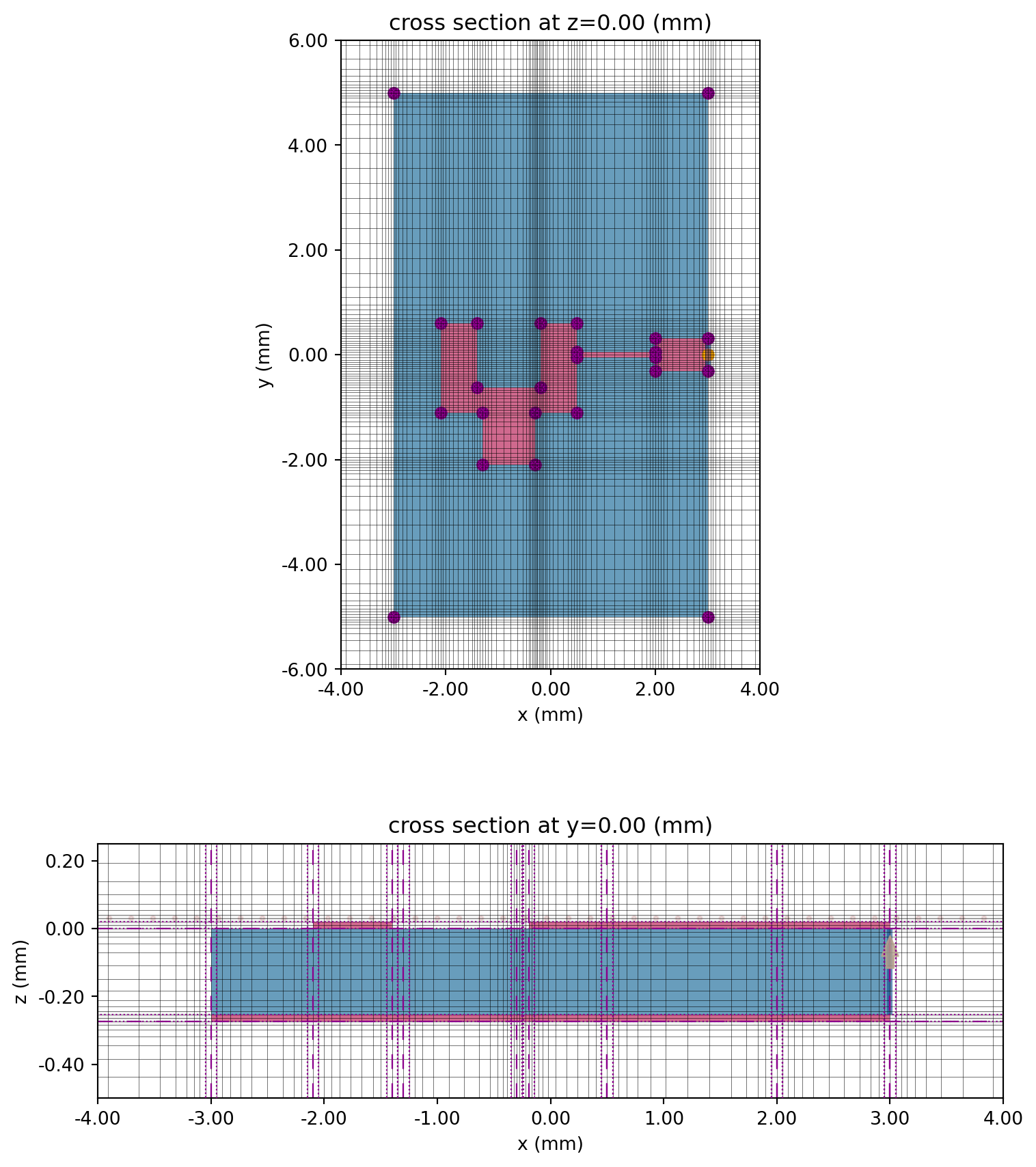
# Plot lumped portfig, ax = plt.subplots(figsize=(6, 4))tcm.plot_sim(x=3 * mm, ax=ax, monitor_alpha=0)sim.plot_grid(x=3 * mm, ax=ax)ax.set_xlim(-0.5 * mm, 0.5 * mm)ax.set_ylim(-0.5 * mm, 0.3 * mm)plt.show()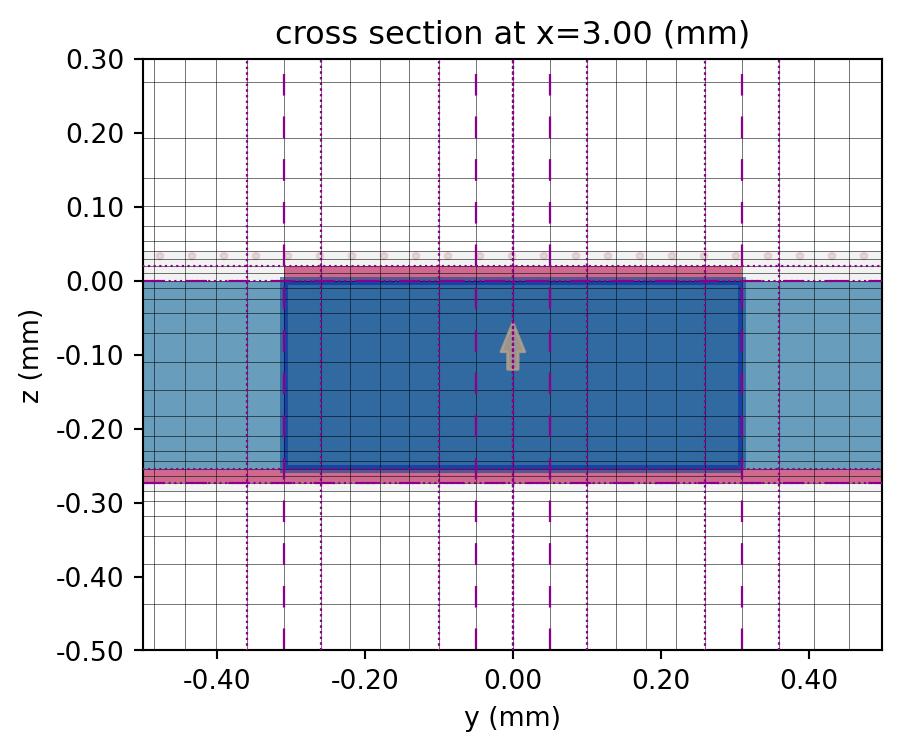
Running the Simulation
Section titled “Running the Simulation”Use web.run() to send the job to the cloud and await results.
tcm_data = web.run(tcm, task_name="edge_feed_antenna", path='./data/edge_feed_patch_antenna.hdf5', verbose=False)Results
Section titled “Results”S-parameter
Section titled “S-parameter”Below, we extract and plot the simulated S11.
# Extract S-matrix and S11smat = tcm_data.smatrix()S11 = np.conjugate(smat.data.isel(port_in=0, port_out=0))# Plot S11 in dBfig, ax = plt.subplots(figsize=(8, 4), tight_layout=True)ax.plot(freqs / 1e9, 20 * np.log10(np.abs(S11)))ax.grid()ax.set_xlabel("f (GHz)")ax.set_ylabel("|S11| (dB)")ax.set_title("Return loss")plt.show()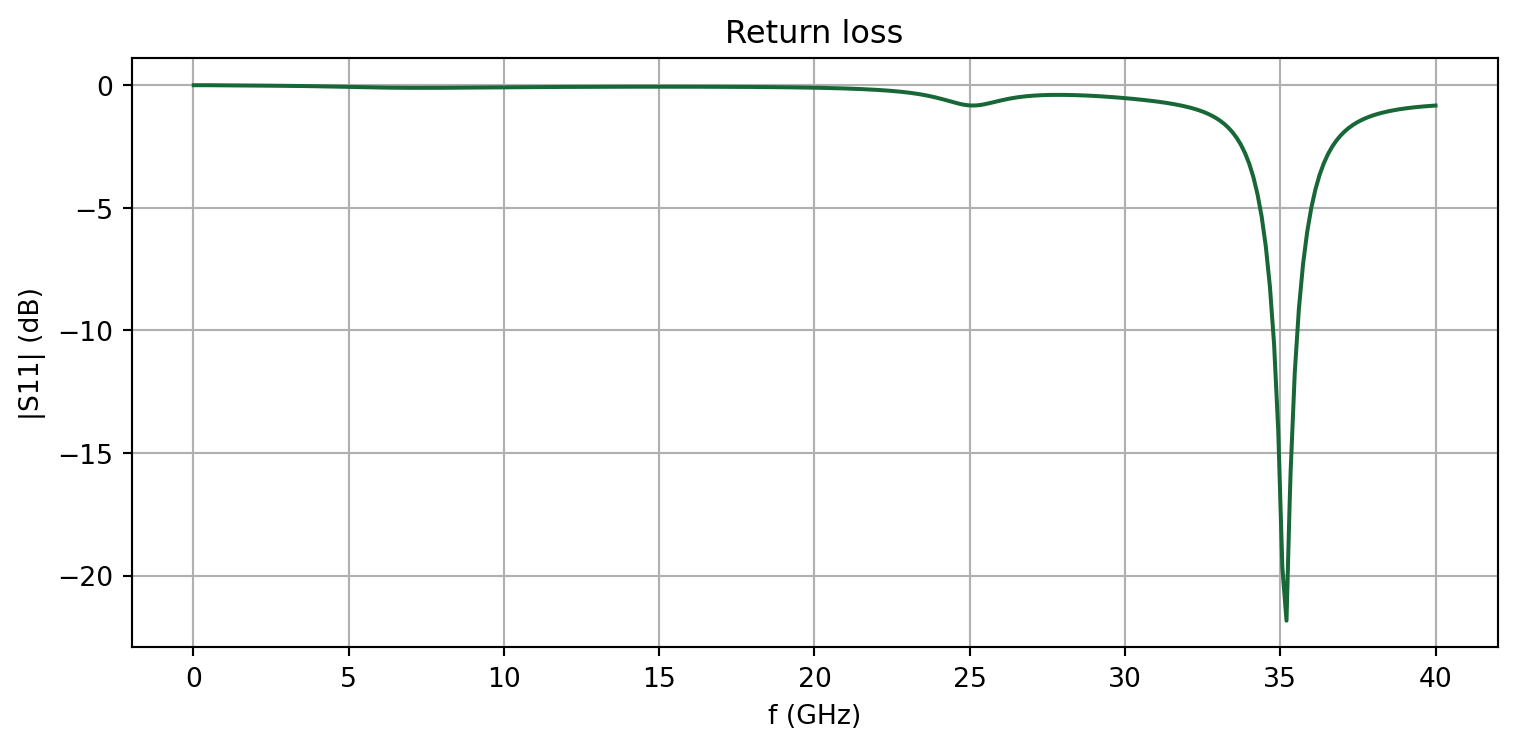
Field profiles
Section titled “Field profiles”Data for user-defined monitors are recorded for every port in the TerminalComponentModeler. Use a specific port name as the dictionary key to access the monitor data corresponding to that port excitation.
# Access the simulation data for port 1 excitationsim_data = tcm_data.data["LP1"]We plot the field profiles at f=f_target below.
# Visualize near-field profilesfig, ax = plt.subplots(1, 2, figsize=(10,3), tight_layout=True)sim_data.plot_field( "xz plane", field_name="E", val="abs", scale="dB", f=f_target, ax=ax[0], vmax=0, vmin=-60)ax[0].set_title("Near-field magnitude (dB) in elevation plane")ax[0].set_xlim(-6 * mm, 5 * mm)ax[0].set_ylim(-1 * mm, 5 * mm)sim_data.plot_field("xy plane", field_name="E", val="abs", scale="lin", f=f_target, ax=ax[1])ax[1].set_title("Near-field magnitude (abs) in antenna plane")ax[1].set_xlim(-3 * mm, 3.2 * mm)ax[1].set_ylim(-2.6 * mm, 1.3 * mm)plt.show()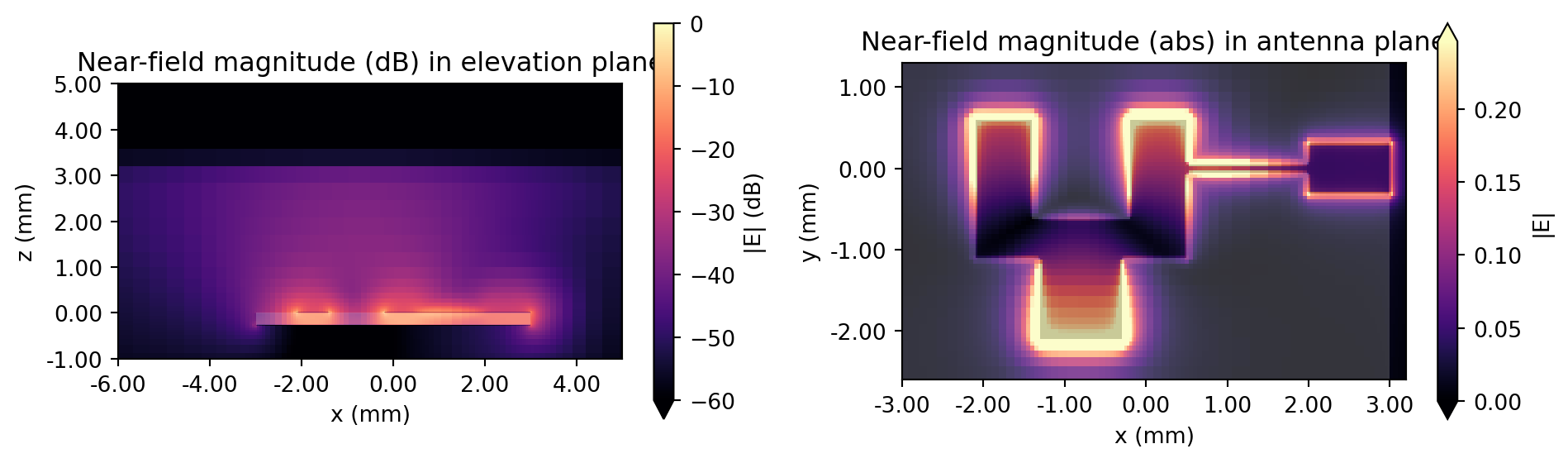
Antenna Gain
Section titled “Antenna Gain”The get_antenna_metrics_data() method of the TCM data object calculates and returns common antenna metrics.
# Get antenna metrics from simulation dataantenna_metrics = tcm_data.get_antenna_metrics_data()
# Extract gain datagain = antenna_metrics.gain
Below is a convenience function that collects the gain data for forward and backward directions (phi and phi-180 degrees) into a single array.
def get_full_elevation_plane_data(data, phi_forward, phi_backward):    """Get full elevation plane data for given phi (azimuth) forward and backward angle"""    # Assemble full theta (elevation angle) coordinate    thetas = data.theta    thetas_full = np.unique(np.append(-thetas, thetas))
    # Assemble data    data_forward = data.sel(phi=phi_forward, method="nearest").squeeze()    data_backward = data.sel(phi=phi_backward, method="nearest").squeeze()    data_full = np.append(data_backward[:0:-1], data_forward)
    return thetas_full, data_full
The gain data for the elevation planes phi=0 degrees and phi=90 degrees are collected below.
# Get gain in the elevation plane for phi = 0 and 90 degreestheta_elev, gain_elev = get_full_elevation_plane_data(gain, phi_forward=0, phi_backward=np.pi)_, gain_elev_90 = get_full_elevation_plane_data( gain, phi_forward=np.pi / 2, phi_backward=3*np.pi / 2)We plot the antenna gain below.
# Gain comparison plotfig, ax = plt.subplots(1, 2, figsize=(10, 8), tight_layout=True, subplot_kw={"projection": "polar"})
# Plot gain for phi =0ax[0].plot(theta_elev, 10 * np.log10(gain_elev))ax[0].set_title("Gain (dB) in elevation plane ($\\phi=0$ deg)", pad=30)
# Plot gain for phi = 90degax[1].plot(theta_elev, 10 * np.log10(gain_elev_90))ax[1].set_title("Gain (dB) in elevation plane ($\\phi=90$ deg)", pad=30)
for axis in ax:    axis.set_theta_direction(-1)    axis.set_theta_offset(np.pi / 2.0)
plt.show()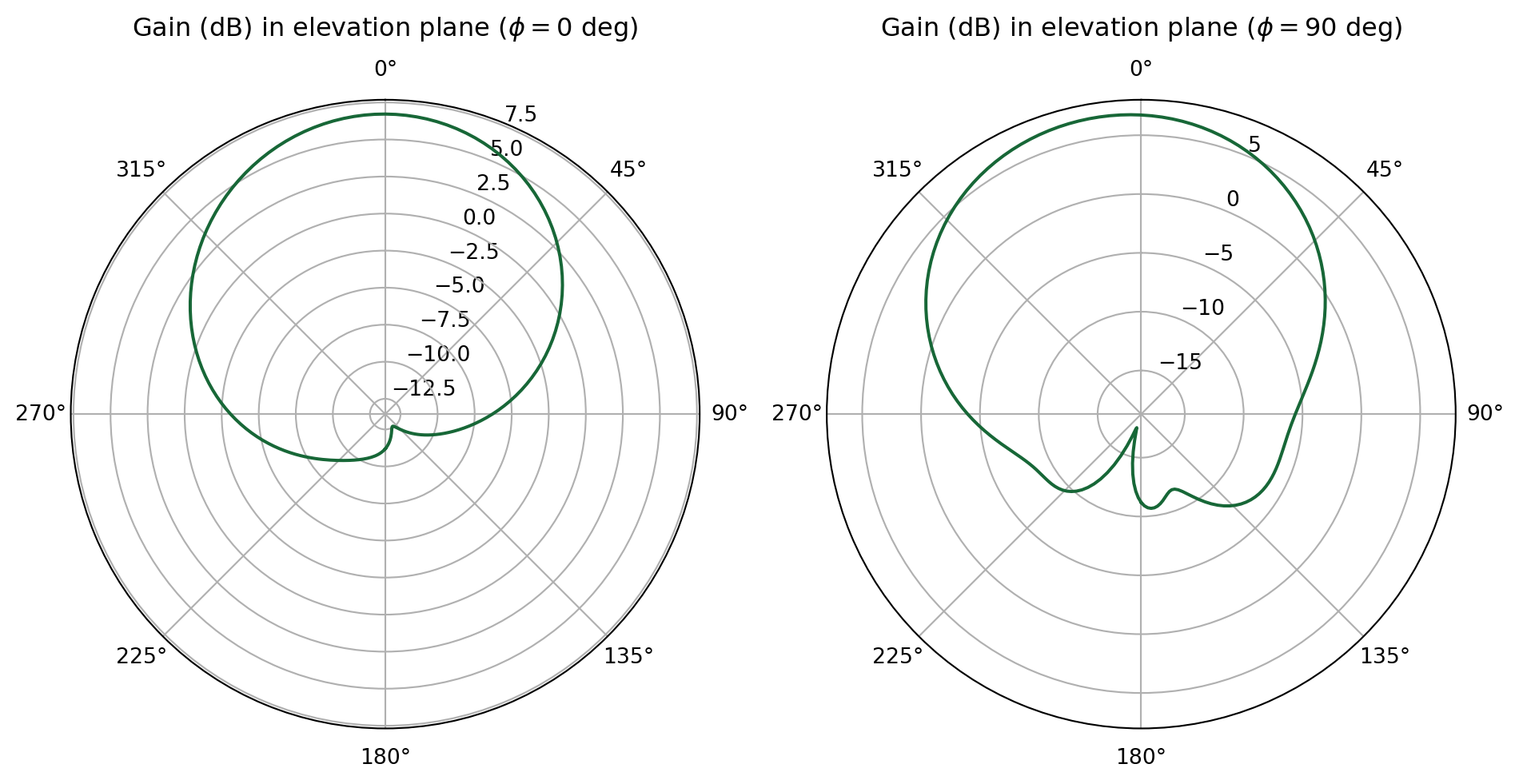
The LobeMeasurer is a post-processing tool that automatically calculates lobe measurements based on a radiation profile.
# Calculate radiation lobe propertieslobes = rf.LobeMeasurer(angle=theta_elev, radiation_pattern=gain_elev, apply_cyclic_extension=False)The properties of the main lobe are reported below. Angle units are radians. In addition to the main_lobe property, users can also view lobe_measures for a summary table of all detected lobes, side_lobes for side lobe properties, and sidelobe_level.
# Report main lobe propertieslobes.main_lobedirection -0.0magnitude 4.696953beamwidth 1.469637beamwidth magnitude 2.348476beamwidth bounds (-0.7799961382054892, 0.6896404398825705)FNBW NaNFNBW bounds (nan, nan)Name: 0, dtype: objectThe LobeMeasurer.plot() method automatically adds markers to indicate main lobe direction and -3 dB beamwidth. This is demonstrated below.
# Gain comparison plotfig, ax = plt.subplots(figsize=(6, 6), tight_layout=True, subplot_kw={"projection": "polar"})ax.set_theta_direction(-1)ax.set_theta_offset(np.pi / 2.0)
# Plot gain for phi =0ax.plot(theta_elev, 10 * np.log10(gain_elev / np.max(gain_elev)), color="black")lobes.plot(lobe_index=0, ax=ax)ax.set_ylim(-20, 1)ax.set_title("Normalized gain (dB) with -3 dB beamwidth markers", pad=30)plt.show()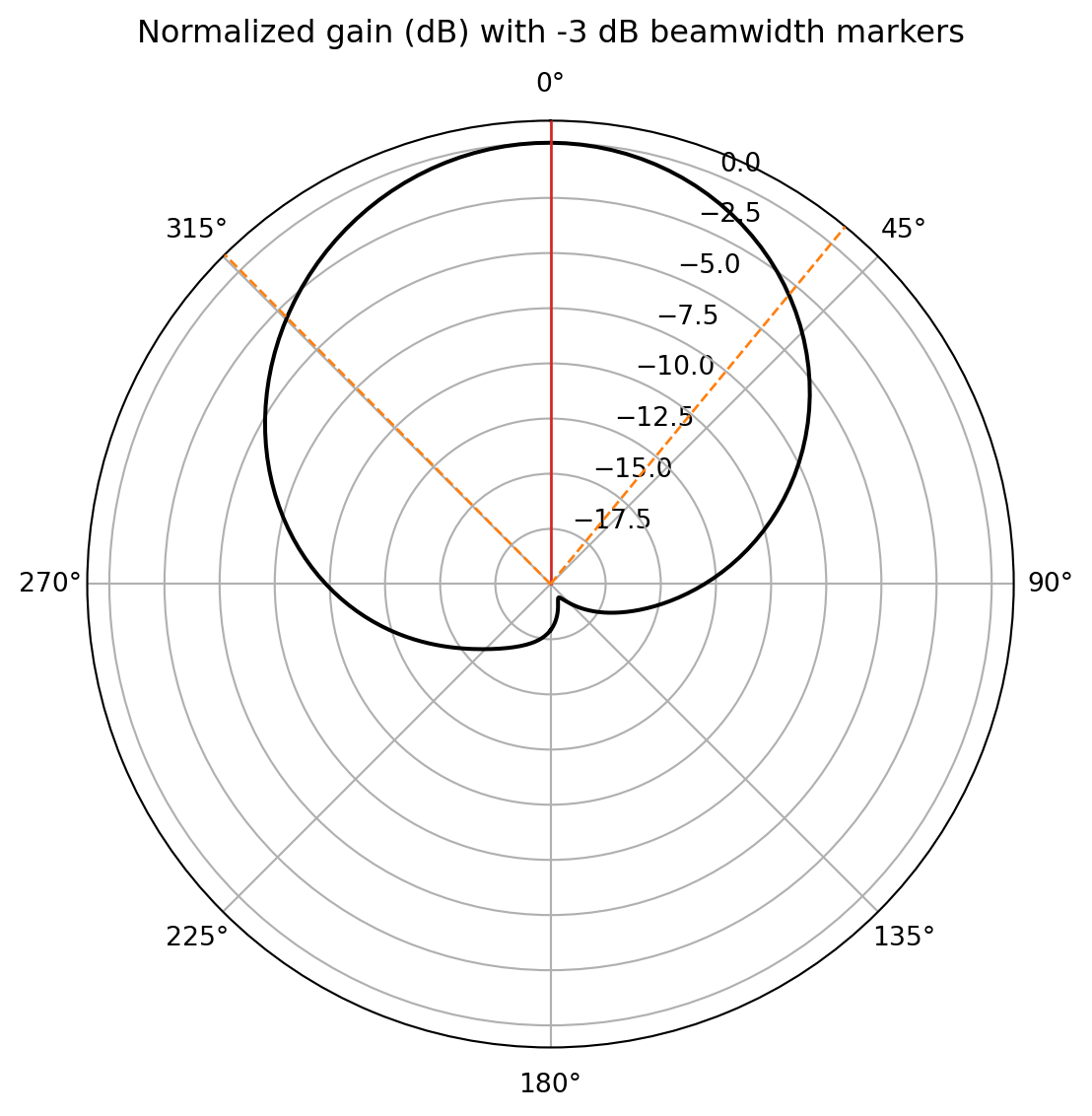
3D Radiation Pattern
Section titled “3D Radiation Pattern”In this section, we demonstrate how to plot the radiation pattern in 3D.
# Rescale gain according to max and min dB valuesdB_min, dB_max = (-40, 25)G = 10 * np.log10(np.abs(gain.squeeze()))G_scaled = np.clip((G - dB_min) / (dB_max - dB_min), a_min=0, a_max=1)
# Build the gain-radius surface in cartesian coordinatesphi_s, theta_s = np.meshgrid(phi, theta)X = G_scaled * np.cos(phi_s) * np.sin(theta_s)Y = G_scaled * np.sin(phi_s) * np.sin(theta_s)Z = G_scaled * np.cos(theta_s)
# Color the surface by gain in dB (clipped to the chosen range)G_clipped = np.clip(G, dB_min, dB_max)
fig_3d = go.Figure(    data=go.Surface(        x=X,        y=Y,        z=Z,        surfacecolor=G_clipped,        cmin=dB_min,        cmax=dB_max,        colorscale="Jet",        colorbar=dict(title="G (dB)"),    ))fig_3d.update_layout(    scene=dict(        xaxis=dict(title="x", showticklabels=False, range=[-1, 1]),        yaxis=dict(title="y", showticklabels=False, range=[-1, 1]),        zaxis=dict(title="z", showticklabels=False, range=[-1, 1]),        aspectmode="cube",        camera=dict(eye=dict(x=1.6, y=1.6, z=1.2)),    ),    margin=dict(l=20, r=20, t=20, b=20),    height=500,)fig_3d.show()
Reference
Section titled “Reference”[1] Khan, J., Ullah, S., Ali, U., Tahir, F. A., Peter, I., & Matekovits, L. (2022). Design of a Millimeter-Wave MIMO Antenna Array for 5G Communication Terminals. Sensors, 22(7), 2768.