

Designing a Power Divider for Wireless Communications 1: Low-pass Filter
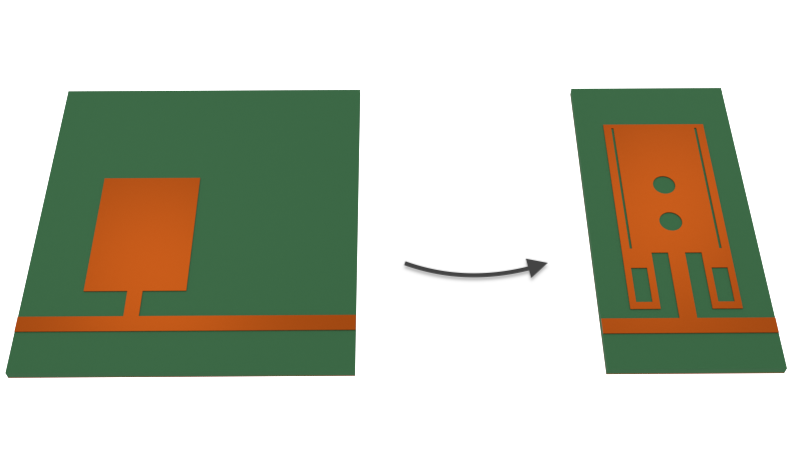
The power divider is a key component in modern wireless communications systems. It is usually subject to key performance metrics such as low insertion loss, minimal crosstalk between output ports, and a small footprint. In addition, low pass or bandpass filters are typically incorporated in order to suppress unwanted harmonics and noise in wireless signals. These filters should have a sharp response, quantified by the roll-off rate (ROR), and a wide stopband.
In this 3-part notebook series, we will simulate various stages of the design process of a Wilkinson power divider (WPD) created by Moloudian et al in [1].
- In part one (this notebook), we start with a simple low pass filter design and improve its filter response in order to achieve a higher roll-off rate (ROR).
- In part two, we will add a harmonic suppression circuit to the low pass filter to achieve a wide stopband.
- In part three, we will implement the full WPD design and compare its performance to a conventional WPD.
import matplotlib.pyplot as pltimport numpy as npimport flex_rf.tidy3d as rfimport flex_rf.web as webrf.config.logging.level = 'ERROR'General Parameters and Mediums
Section titled “General Parameters and Mediums”The target cutoff frequency of the low pass filter is 1.8 GHz (within the GSM band) and the simulation will cover 0.1 to 8 GHz. The bandwidth of the simulation is defined using the FreqRange utility class.
(f_min, f_max) = (0.1e9, 8e9)bandwidth = rf.FreqRange.from_freq_interval(f_min, f_max)f0 = bandwidth.freq0freqs = bandwidth.freqs(num_points=401)The substrate is FR4 and the metallic traces are copper. We assume both materials have constant non-zero loss across the bandwidth: loss tangent of 0.022 for FR4 and conductivity of 6E7 S/m (i.e. 60 S/um) for copper.
med_FR4 = rf.FastDispersionFitter.constant_loss_tangent_model(4.4, 0.022, (f_min, f_max), tolerance_rms=0.003)med_Cu = rf.LossyMetalMedium(conductivity=60, frequency_range=(f_min, f_max))Best weighted RMS error: 0.00282 ━━━━━━━━━━━━━━━━━━━━━━━━━━━━━━━━━━ 100% 0:00:00
Basic resonator
Section titled “Basic resonator”The basic low pass filter uses a LC resonator design shown below. The geometric lengths and widths of each metallic patch determine its equivalent inductance and capacitance.
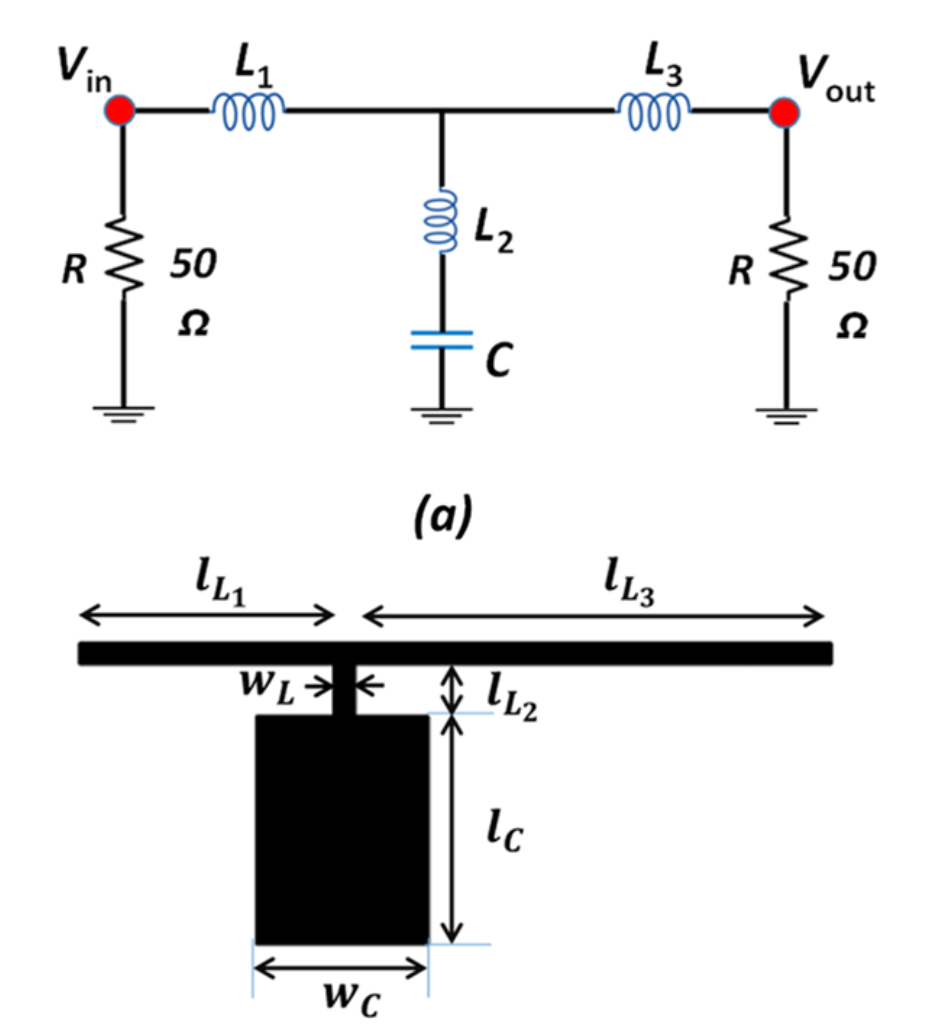
The figure above is taken from Figure 2 in [1].
Geometry and Structure
Section titled “Geometry and Structure”Using the dimensions provided in [1], we recreate the resonator structure below.
# Geometry dimensionsmm = 1000 # Conversion factor micron to mmH = 0.8 * mm # Substrate thicknessT = 0.035 * mm # Metal thicknessWL = 0.5 * mm # Line widthLL1, LL2, LL3 = (5.8 * mm, 1.2 * mm, 11.1 * mm) # Line lengthsWC, LC = (4 * mm, 5.3 * mm) # Patch dimensionsLsub, Wsub = (LL1 + WL + LL3, 2 * (LC + WL + LL2)) # Substrate dimensions# Resonator geometrygeom_C = rf.Box.from_bounds(rmin=(-WC / 2, 0, 0), rmax=(WC / 2, LC, T))geom_L2 = rf.Box.from_bounds(rmin=(-WL / 2, -LL2 - WL, 0), rmax=(WL / 2, 0, T))geom_L1 = rf.Box.from_bounds(rmin=(-WL / 2 - LL1, -LL2 - WL, 0), rmax=(-WL / 2, -LL2, T))geom_L3 = rf.Box.from_bounds(rmin=(WL / 2, -LL2 - WL, 0), rmax=(WL / 2 + LL3, -LL2, T))geom_resonator_basic = rf.GeometryGroup(geometries=[geom_C, geom_L1, geom_L2, geom_L3])
# Substrate and ground plane geometryx0, y0, z0 = geom_resonator_basic.bounding_box.center # center (x,y) with circuitgeom_gnd = rf.Box(center=(x0, y0, -H - T / 2), size=(Lsub, Wsub, T))geom_sub = rf.Box(center=(x0, y0, -H / 2), size=(Lsub, Wsub, H))# create structuresstr_sub = rf.Structure(geometry=geom_sub, medium=med_FR4)str_gnd = rf.Structure(geometry=geom_gnd, medium=med_Cu)str_resonator_basic = rf.Structure(geometry=geom_resonator_basic, medium=med_Cu)
str_list_basic = [str_sub, str_gnd, str_resonator_basic] # List of structuresMonitors and Ports
Section titled “Monitors and Ports”We define an in-plane field monitor for visualization purposes.
# Field Monitorsmon_1 = rf.FieldMonitor( center=(0, 0, 0), size=(rf.inf, rf.inf, 0), freqs=[f_min, f0, f_max], name="field in-plane",)The structure is terminated with two 50 ohm lumped ports.
# Lumped portlp_options = {"size": (0, WL, H), "voltage_axis": 2, "impedance": 50}LP1 = rf.LumpedPort(center=(-WL / 2 - LL1, -WL / 2 - LL2, -H / 2), name="LP1", **lp_options)LP2 = rf.LumpedPort(center=(WL / 2 + LL3, -WL / 2 - LL2, -H / 2), name="LP2", **lp_options)port_list = [LP1, LP2] # List of portsGrid and Boundary
Section titled “Grid and Boundary”By default, the simulation boundary is open (PML) on all sides. We add quarter-wavelength padding on all sides to ensure the boundaries do not encroach on the near-field.
# Add paddingpadding = rf.C_0 / f0 / 4sim_LX = Lsub + 2* paddingsim_LY = Wsub + 2* paddingsim_LZ = H + 2* paddingWe use LayerRefinementSpec to automatically refine the grid along corners and edges of the metallic resonator. The rest of the grid is automatically created with the minimum grid size determined by the wavelength.
# Layer refinement on resonatorlr_spec = rf.LayerRefinementSpec.from_structures(    structures=[str_resonator_basic],    min_steps_along_axis=1,    corner_refinement=rf.GridRefinement(dl=T, num_cells=2),)
# Define overall grid specgrid_spec = rf.GridSpec.auto(    wavelength=rf.C_0 / f0,    min_steps_per_wvl=15,    layer_refinement_specs=[lr_spec],)
Simulation and TerminalComponentModeler
Section titled “Simulation and TerminalComponentModeler”We define the Simulation and TerminalComponentModeler objects below. The latter facilitates a batch port sweep in order to compute the full S-parameter matrix.
# Define simulation objectsim = rf.Simulation( center=(x0, y0, z0), size=(sim_LX, sim_LY, sim_LZ), structures=str_list_basic, grid_spec=grid_spec, monitors=[mon_1], run_time=5e-9, plot_length_units="mm",)# Define TerminalComponentModelertcm = rf.TerminalComponentModeler( simulation=sim, ports=port_list, freqs=freqs, remove_dc_component=False,)Visualization
Section titled “Visualization”Before running, it is a good idea to check the structure layout and simulation grid.
# In-planefig, ax = plt.subplots(figsize=(8, 6))tcm.plot_sim(z=0, ax=ax, monitor_alpha=0)tcm.simulation.plot_grid(z=0, ax=ax, hlim=(-10 * mm, 15 * mm), vlim=(-7.5 * mm, 10 * mm))plt.show()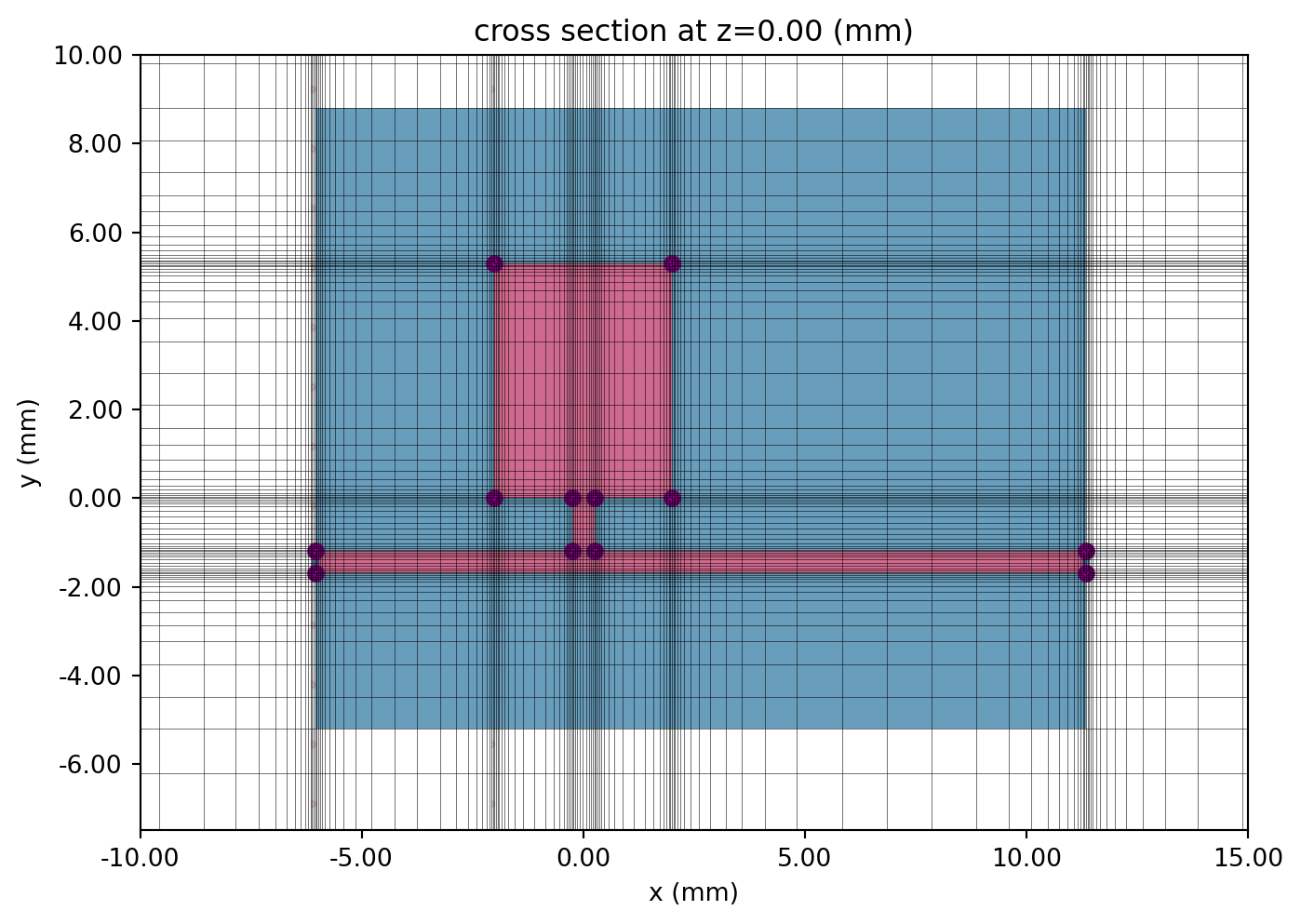
# Cross section and portfig, ax = plt.subplots(2, 1, figsize=(10, 6), tight_layout=True)tcm.plot_sim(x=-LL1 - WL / 2, ax=ax[0], monitor_alpha=0)tcm.simulation.plot_grid( x=-LL1 - WL / 2, ax=ax[0], hlim=(-3 * mm, 0 * mm), vlim=(-1 * mm, 0.1 * mm))tcm.plot_sim(y=-LL2 - WL / 2, ax=ax[1], monitor_alpha=0)tcm.simulation.plot_grid( y=-LL2 - WL / 2, ax=ax[1], hlim=(-8 * mm, 12 * mm), vlim=(-1 * mm, 0.1 * mm))ax[1].set_aspect(2)plt.show()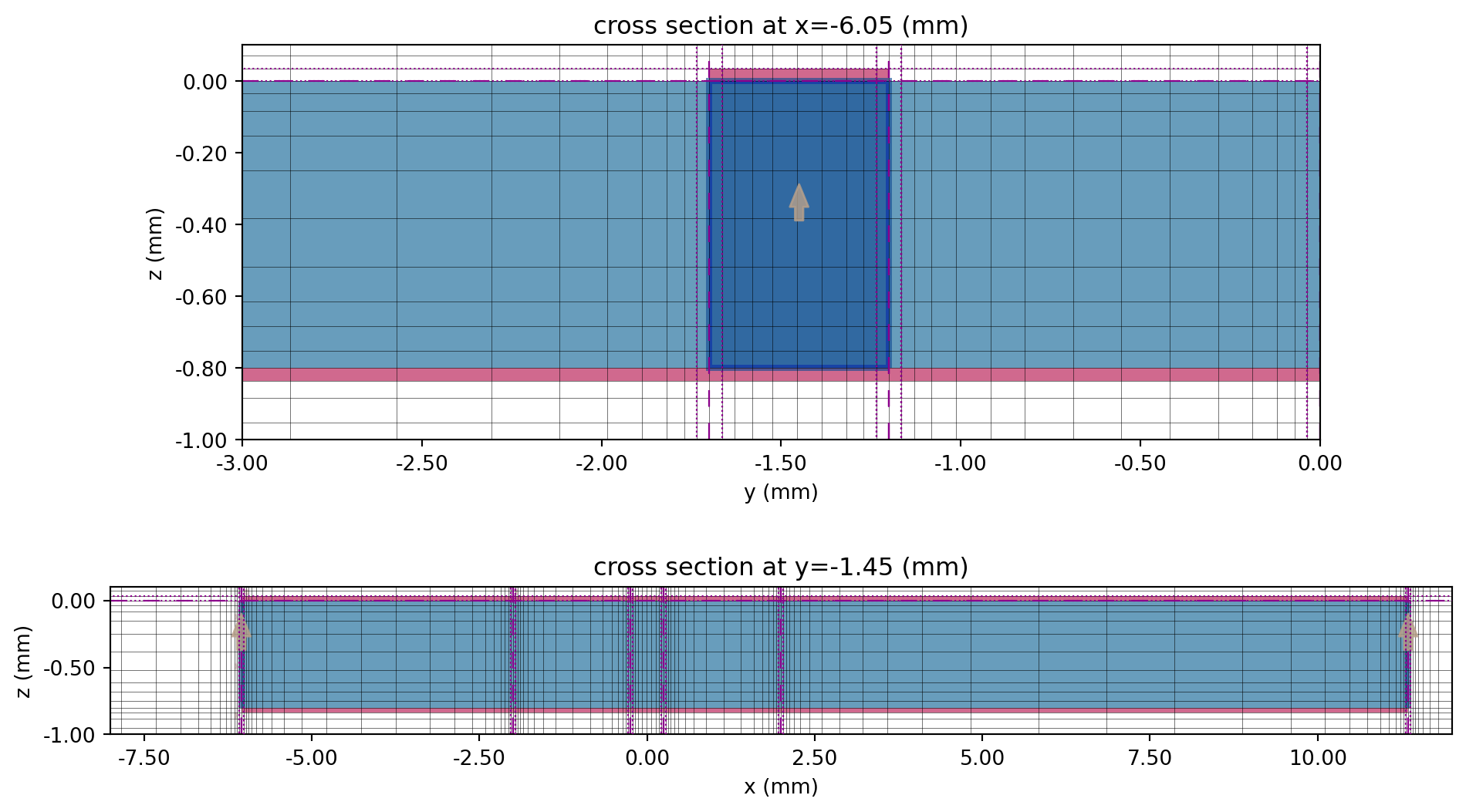
Running the Simulation
Section titled “Running the Simulation”The web.run() method executes the job and downloads the simulation data after completion.
tcm_data_basic = web.run(tcm, task_name="WPD basic resonator", path="data/tcm_data_basic.hdf5", verbose=False)Results
Section titled “Results”Field Profile
Section titled “Field Profile”Use a specific port name to access monitor data corresponding to that port excitation.
sim_data = tcm_data_basic.data["LP1"]The in-plane field magnitude is plotted below at f_min and f0, showing a clear difference between the pass- and stopbands.
# Field plotsfig, ax = plt.subplots(2, 1, figsize=(8, 10), tight_layout=True)sim_data.plot_field("field in-plane", "E", val="abs", f=f_min, ax=ax[0])ax[0].set_title(f"Field magnitude at f={f_min / 1e9:.1f} GHz")sim_data.plot_field("field in-plane", "E", val="abs", f=f0, ax=ax[1])ax[1].set_title(f"Field magnitude at f={f0 / 1e9:.1f} GHz")for axis in ax: axis.set_xlim(-10 * mm, 15 * mm) axis.set_ylim(-7.5 * mm, 10 * mm)plt.show()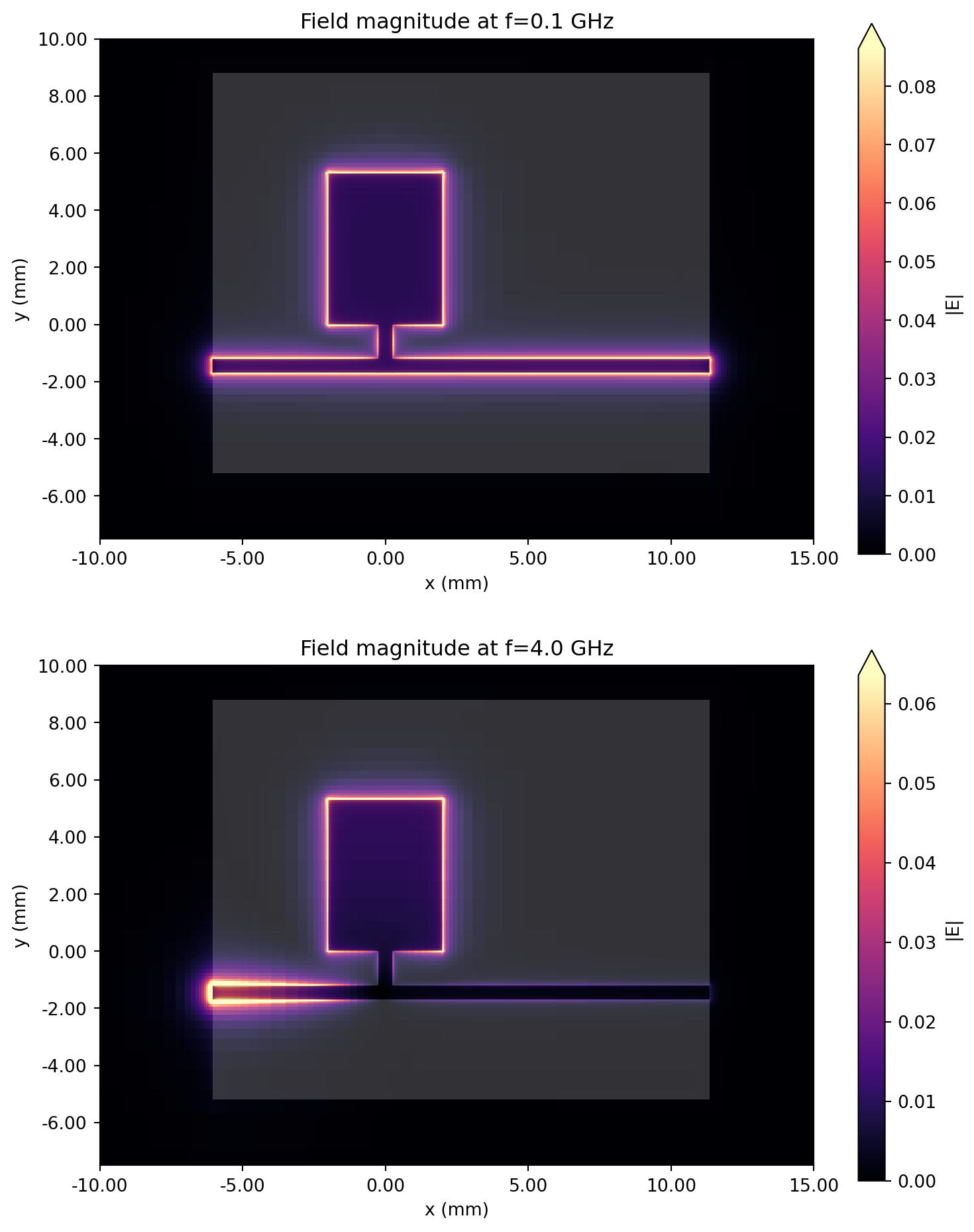
S-parameters
Section titled “S-parameters”Use the smatrix() method to calculate the S-matrix.
smat = tcm_data_basic.smatrix()We use the port_in and port_out coordinates to access the specific S-parameter from the full matrix. Note the use of np.conjugate() to convert from the default physics phase convention to the engineering convention.
S11 = np.conjugate(smat.data.isel(port_in=0, port_out=0))S21 = np.conjugate(smat.data.isel(port_in=0, port_out=1))S11dB = 20 * np.log10(np.abs(S11))S21dB = 20 * np.log10(np.abs(S21))The insertion and return losses are plotted below.
fig, ax = plt.subplots(figsize=(10, 5), tight_layout=True)ax.plot(freqs / 1e9, S11dB, "r", label="|S11|")ax.plot(freqs / 1e9, S21dB, "b", label="|S21|")ax.set_title("Insertion and return loss")ax.set_xlabel("f (GHz)")ax.set_ylabel("dB")ax.legend()ax.grid()plt.show()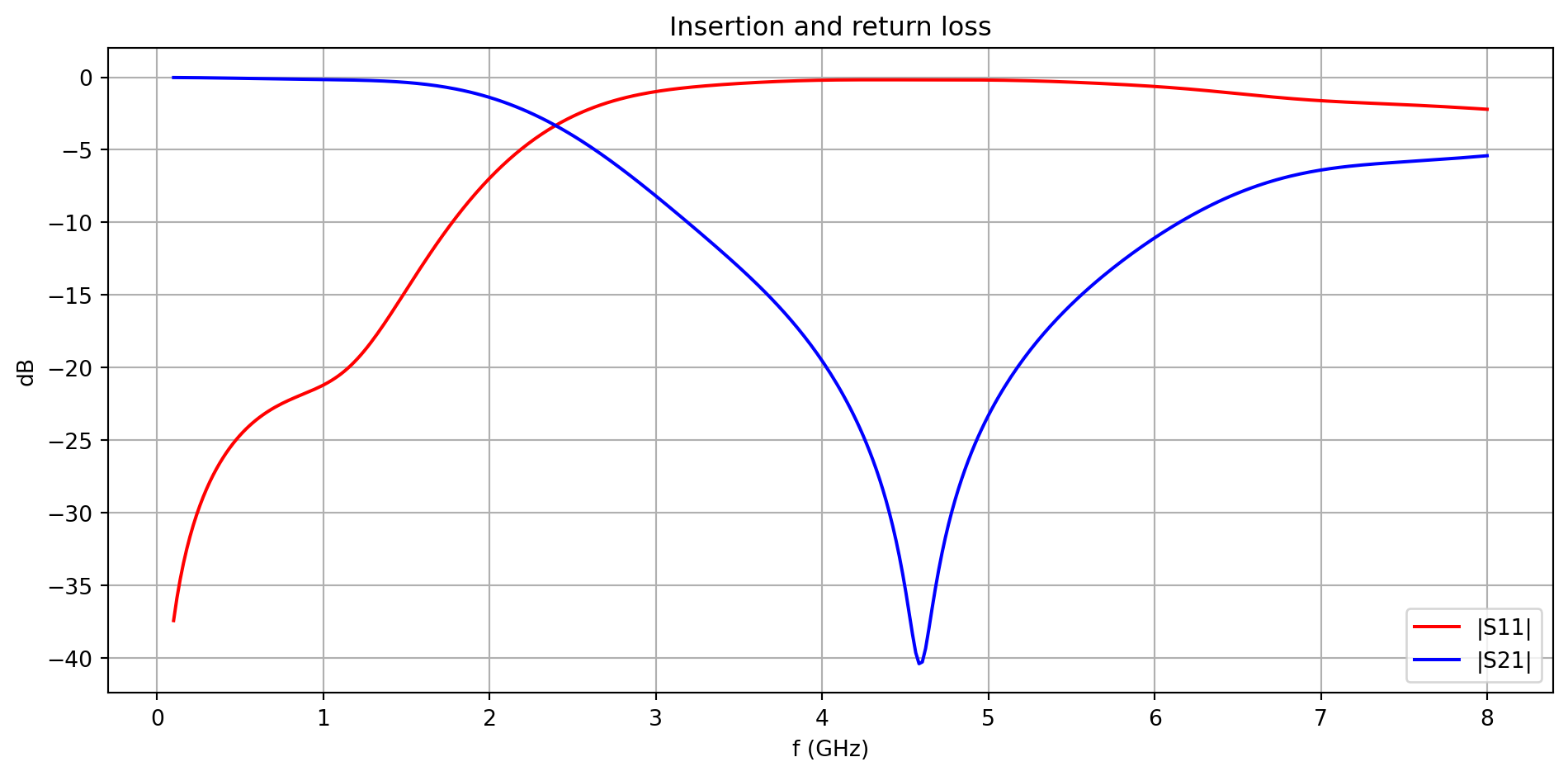
Roll-off rate
Section titled “Roll-off rate”The roll-off rate (ROR) is a figure of merit that quantifies the sharpness of the filter response. It is calculated by
where is the difference in insertion loss (in dB) between two reference levels and is the corresponding difference in frequency. We choose -3 and -30 dB to be the two reference levels for this calculation.
def calculate_ROR(SdB): """Calculates ROR from input S-parameter (in dB)""" refdB_1 = -3 refdB_2 = -30 f1 = np.min(freqs[np.argsort(np.abs(SdB - refdB_1))][:2]) f2 = np.min(freqs[np.argsort(np.abs(SdB - refdB_2))][:2]) return (refdB_2 - refdB_1) / (f1 - f2) * 1e9 # in dB/GHzprint(f"ROR of basic LC resonator: {calculate_ROR(S21dB):.2f} dB/GHz")ROR of basic LC resonator: 13.02 dB/GHzModified resonator
Section titled “Modified resonator”In the modified resonator, additional holes are cut into the resonator patch in order to create equivalent inductive and capacitive elements shown below. The patch is also adjusted to have a symmetric structure.
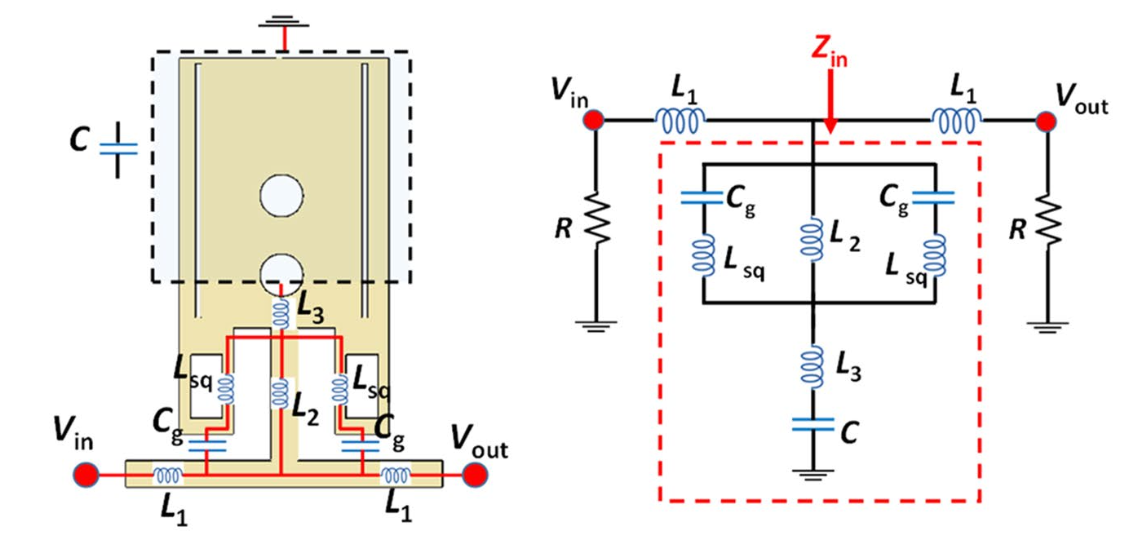
The figure above is taken from Figure 3 in [1].
Geometry and Structure
Section titled “Geometry and Structure”The dimensions of the resonator are mostly obtained from [1]. Missing dimensions are obtained via visual estimation.
# Modified resonator dimensionsMA, MB, MC, MD = (3.9 * mm, 7.1 * mm, 3.1 * mm, 2.3 * mm)ME, MF, MG, MH = (0.6 * mm, 0.2 * mm, 1.2 * mm, 0.5 * mm)MJ, MK, MM, MN = (4.8 * mm, 0.3 * mm, 0.1 * mm, 0.7 * mm)MP, MQ, MR, MS = (0.1 * mm, 0.7 * mm, 0.4 * mm, 0.3 * mm)Lsub2, Wsub2 = (2 * MC + MH, 2 * (MH + MK + MB))The geometry and structures are created below. To “cut” holes in the patch resonator, we first create the hole geometry, then use the - operator to apply the Boolean difference operation onto the main patch.
# Resonator geometrygeom_patch = rf.Box.from_bounds(rmin=(-MA / 2, MH / 2 + MK, 0), rmax=(MA / 2, MH / 2 + MK + MB, T))geom_hole1 = rf.Box.from_bounds(    rmin=(-MH / 2 - MN - MF - ME, MH / 2 + MK + MS, 0),    rmax=(-MH / 2 - MN - MF, MH / 2 + MK + MS + MG, T),)geom_hole2 = geom_hole1.translated(2 * (MF + MN) + MH + ME, 0, 0)geom_hole3 = rf.Cylinder(center=(0, MH / 2 + MD + MQ, T / 2), radius=MR, length=T, axis=2)geom_hole4 = geom_hole3.translated(0, MQ + 2 * MR, 0)geom_hole5 = rf.Box.from_bounds(    rmin=(-MA / 2 + 1.5 * MF, MH / 2 + MK + MS + MG + MQ, 0),    rmax=(-MA / 2 + 1.5 * MF + MM, MH / 2 + MK + MB - MP, T),)geom_hole6 = geom_hole5.translated(-2 * geom_hole5.center[0], 0, 0)geom_hole7 = rf.Box.from_bounds(    rmin=(-MH / 2 - MN, MH / 2 + MK, 0), rmax=(MH / 2 + MN, MH / 2 + MD, T))for hole in [geom_hole1, geom_hole2, geom_hole3, geom_hole4, geom_hole5, geom_hole6, geom_hole7]:    geom_patch -= hole
geom_line1 = rf.Box.from_bounds(rmin=(-MH / 2, MH / 2, 0), rmax=(MH / 2, MH / 2 + MD, T))geom_line2 = rf.Box.from_bounds(rmin=(-MH / 2 - MC, -MH / 2, 0), rmax=(MH / 2 + MC, MH / 2, T))geom_resonator_modified = rf.GeometryGroup(geometries=[geom_line1, geom_line2, geom_patch])
# Substrate and groundx1, y1, z1 = geom_resonator_modified.bounding_box.centergeom_sub2 = rf.Box(center=(x1, y1, -H / 2), size=(Lsub2, Wsub2, H))geom_gnd2 = rf.Box(center=(x1, y1, -H - T / 2), size=(Lsub2, Wsub2, T))
# Structuresstr_resonator_modified = rf.Structure(geometry=geom_resonator_modified, medium=med_Cu)str_sub2 = rf.Structure(geometry=geom_sub2, medium=med_FR4)str_gnd2 = rf.Structure(geometry=geom_gnd2, medium=med_Cu)str_list_modified = [str_sub2, str_gnd2, str_resonator_modified]As before, we use 50 ohm lumped ports to terminate both ends of the feed line. Their positions are slightly shifted to account for the modified geometry.
# Lumped portlp_options = {"size": (0, MH, H), "voltage_axis": 2, "impedance": 50}LP1 = rf.LumpedPort(center=(-MH / 2 - MC, 0, -H / 2), name="LP1", **lp_options)LP2 = rf.LumpedPort(center=(MH / 2 + MC, 0, -H / 2), name="LP2", **lp_options)port_list = [LP1, LP2] # List of portsGrid and Boundary
Section titled “Grid and Boundary”The grid and boundary specifications are largely unchanged from the previous section.
# Add paddingpadding = rf.C_0 / f0 / 2sim_LX = Lsub2 + paddingsim_LY = Wsub2 + paddingsim_LZ = H + padding# Layer refinement on resonatorlr_spec = rf.LayerRefinementSpec.from_structures( structures=[str_resonator_modified], min_steps_along_axis=1, corner_refinement=rf.GridRefinement(dl=T, num_cells=2),)
# Define overall grid specgrid_spec = rf.GridSpec.auto( wavelength=rf.C_0 / f0, min_steps_per_wvl=15, layer_refinement_specs=[lr_spec],)Simulation and TerminalComponentModeler
Section titled “Simulation and TerminalComponentModeler”The Simulation and TerminalComponentModeler objects are defined similarly to the previous section.
# Define simulation objectsim = rf.Simulation( center=(x1, y1, z1), size=(sim_LX, sim_LY, sim_LZ), structures=str_list_modified, grid_spec=grid_spec, monitors=[mon_1], run_time=5e-9, plot_length_units="mm",)# Define TerminalComponentModelertcm2 = rf.TerminalComponentModeler( simulation=sim, ports=port_list, freqs=freqs, remove_dc_component=False,)Visualization
Section titled “Visualization”The modified structure and simulation grid are visualized in the cells below.
# In-planefig, ax = plt.subplots(figsize=(8, 8))tcm2.plot_sim(z=0, ax=ax, monitor_alpha=0)tcm2.simulation.plot_grid(z=0, ax=ax, hlim=(-5 * mm, 5 * mm), vlim=(-5 * mm, 12 * mm))plt.show()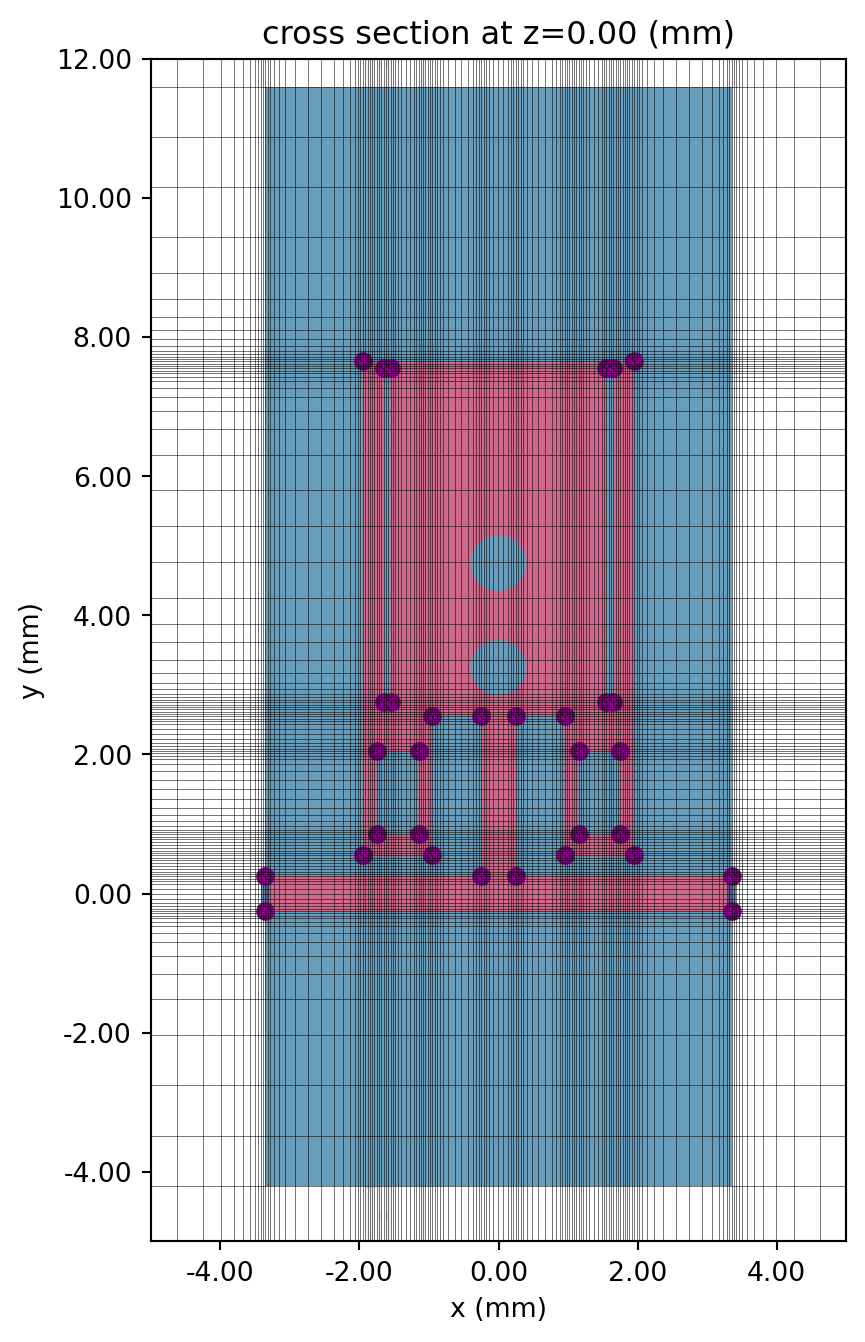
# Cross section and portfig, ax = plt.subplots(2, 1, figsize=(10, 6), tight_layout=True)tcm2.plot_sim(x=-MH / 2 - MC, ax=ax[0], monitor_alpha=0)tcm2.simulation.plot_grid( x=-MH / 2 - MC, ax=ax[0], hlim=(-2 * mm, 2 * mm), vlim=(-1 * mm, 0.1 * mm))tcm2.plot_sim(y=0, ax=ax[1], monitor_alpha=0)tcm2.simulation.plot_grid(y=0, ax=ax[1], hlim=(-5 * mm, 5 * mm), vlim=(-1 * mm, 0.1 * mm))ax[1].set_aspect(2)plt.show()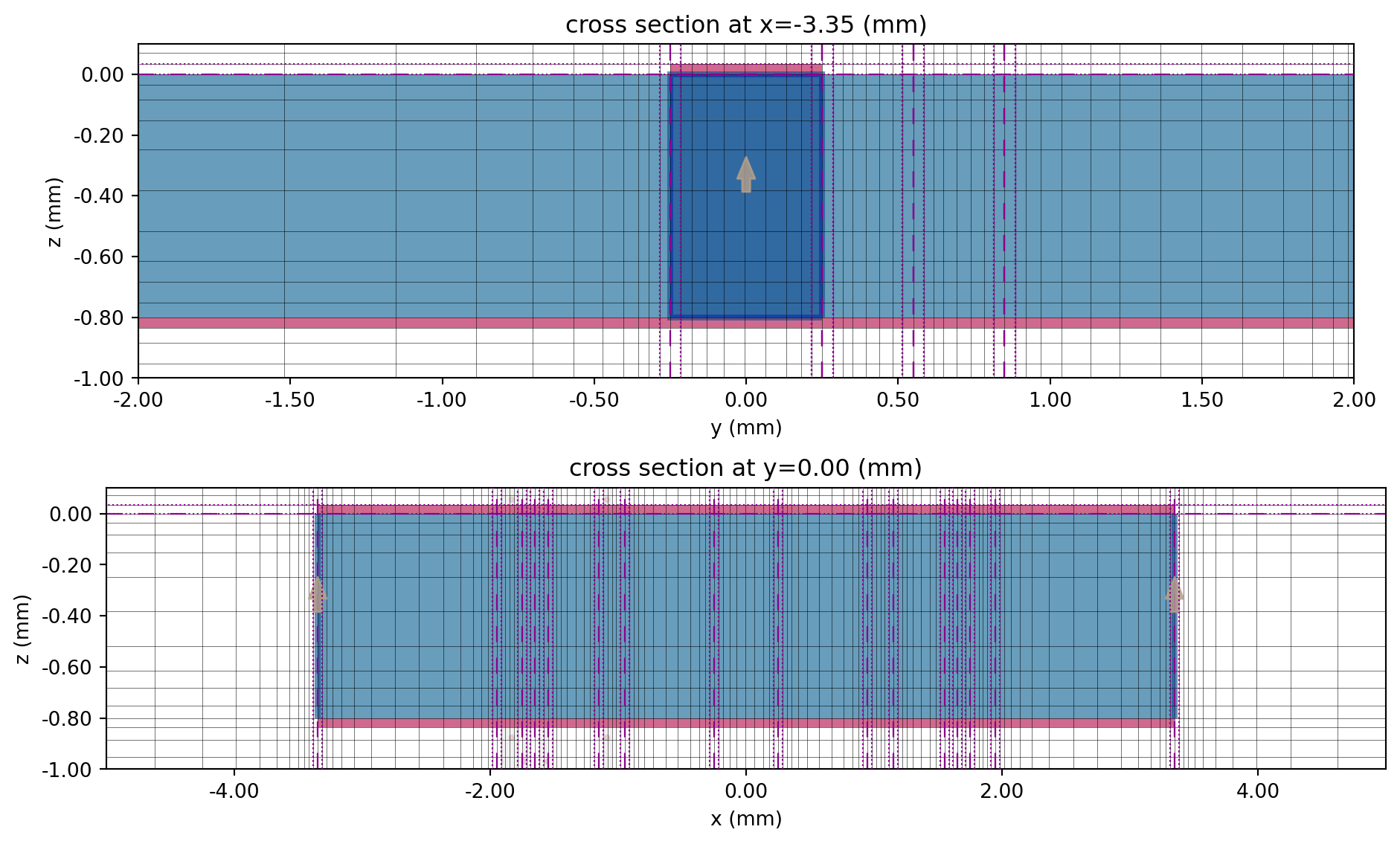
Run Simulation
Section titled “Run Simulation”tcm_data_modified = web.run(tcm2, task_name="WPD modified resonator", path="data/tcm_data_modified.hdf5", verbose=False)Results
Section titled “Results”Field Profile
Section titled “Field Profile”sim_data2 = tcm_data_modified.data["LP1"]As before, we plot the field amplitude profile within the pass- and stopbands.
# Field plotsfig, ax = plt.subplots(1, 2, figsize=(10, 6), tight_layout=True)sim_data2.plot_field("field in-plane", "E", val="abs", f=f_min, ax=ax[0])ax[0].set_title(f"Field magnitude at f={f_min / 1e9:.1f} GHz")sim_data2.plot_field("field in-plane", "E", val="abs", f=f0, ax=ax[1])ax[1].set_title(f"Field magnitude at f={f0 / 1e9:.1f} GHz")for axis in ax: axis.set_xlim(-5 * mm, 5 * mm) axis.set_ylim(-5 * mm, 12 * mm)plt.show()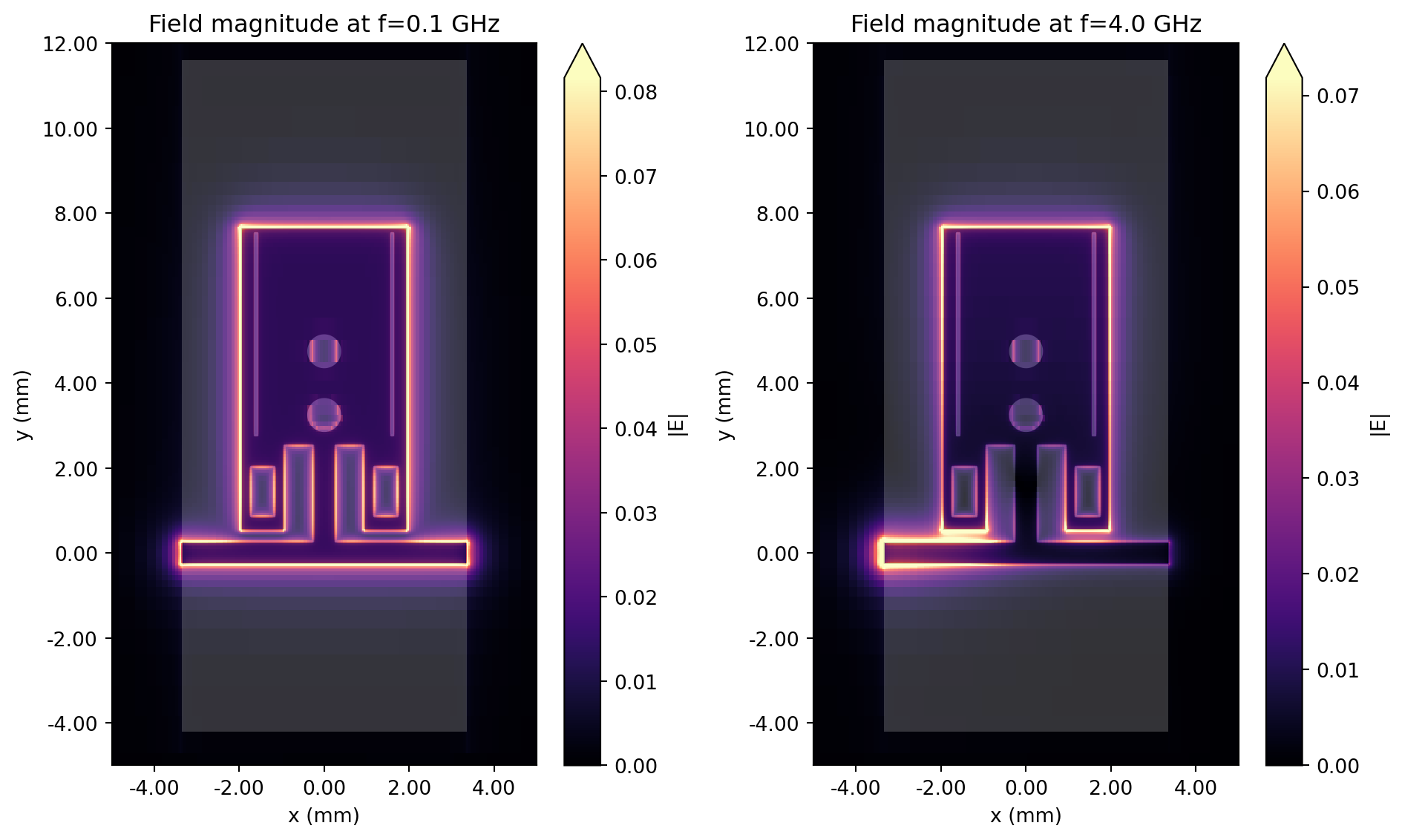
S-parameters
Section titled “S-parameters”S-parameters for the modified resonator are extracted below.
smat2 = tcm_data_modified.smatrix()S11_2 = np.conjugate(smat2.data.isel(port_in=0, port_out=0))S21_2 = np.conjugate(smat2.data.isel(port_in=0, port_out=1))S11dB_2 = 20 * np.log10(np.abs(S11_2))S21dB_2 = 20 * np.log10(np.abs(S21_2))Below, we compare the insertion and return loss of the two resonator designs. Notice that the S21 amplitude falls off much more quickly past 2 GHz in the modified resonator, indicating a sharper filter response.
fig, ax = plt.subplots(figsize=(10, 5), tight_layout=True)ax.plot(freqs / 1e9, S21dB, "b--", label="|S21| (basic)")ax.plot(freqs / 1e9, S21dB_2, "b", label="|S21| (modified)")ax.plot(freqs / 1e9, S11dB, "r--", label="|S11| (basic)")ax.plot(freqs / 1e9, S11dB_2, "r", label="|S11| (modified)")ax.set_title("Return loss")ax.set_xlabel("f (GHz)")ax.set_ylabel("dB")ax.legend()ax.grid()plt.show()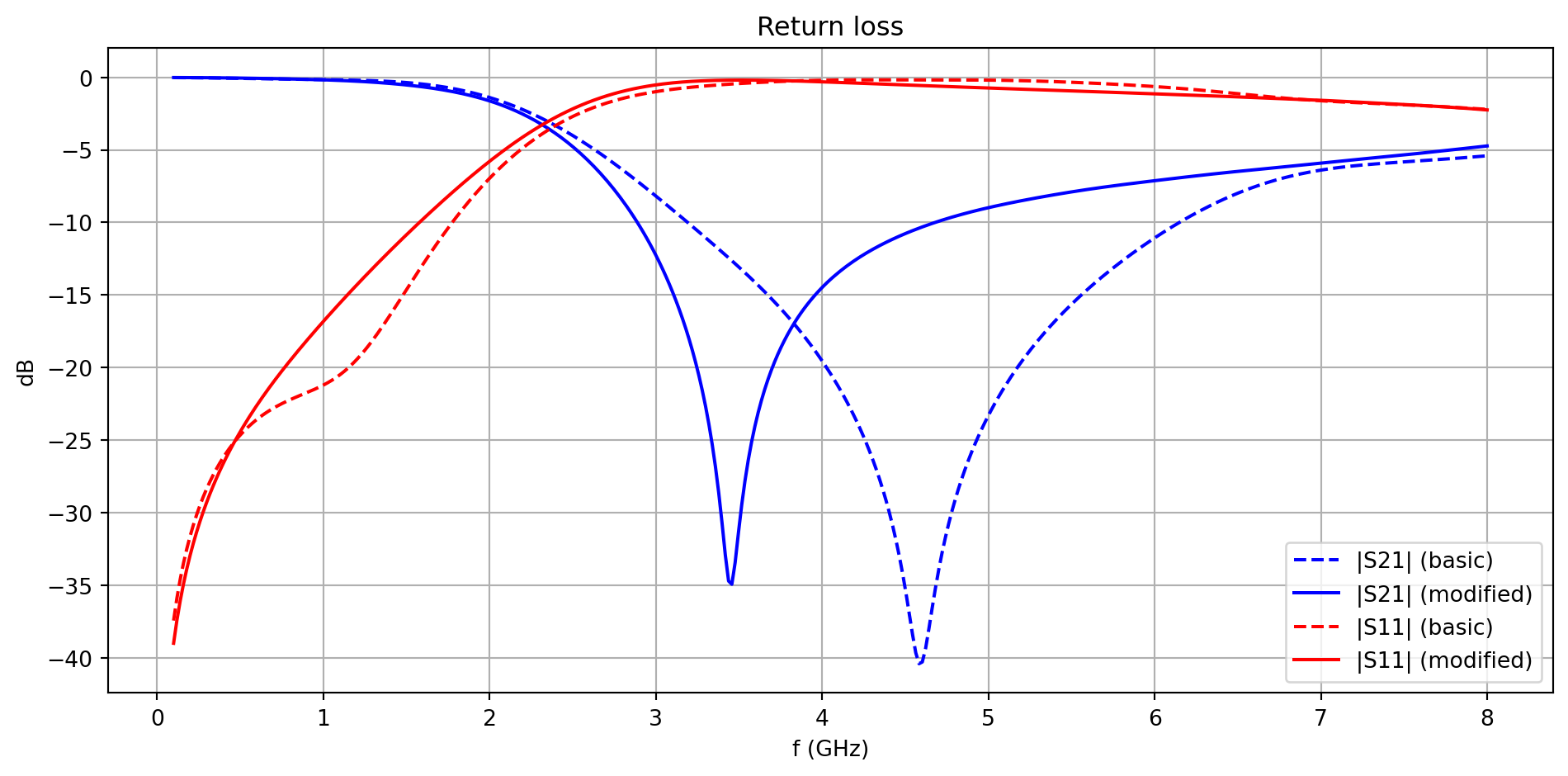
Roll-off rate
Section titled “Roll-off rate”We calculate and compare the ROR below.
print( f"Calculated ROR \n -- Basic LC resonator: {calculate_ROR(S21dB):.2f} dB/GHz \n -- Modified resonator: {calculate_ROR(S21dB_2):.2f} dB/GHz")Calculated ROR -- Basic LC resonator: 13.02 dB/GHz -- Modified resonator: 23.98 dB/GHzThe modified resonator shows an almost 2x improvement in ROR compared to the basic design.
Conclusion
Section titled “Conclusion”In this notebook, we compared two different low pass filter designs with the goal of improving ROR performance above 2 GHz. In the next notebook, we will investigate adding a harmonic suppression circuit to improve stopband performance.
Reference
Section titled “Reference”[1] Moloudian, G., Soltani, S., Bahrami, S. et al. Design and fabrication of a Wilkinson power divider with harmonic suppression for LTE and GSM applications. Sci Rep 13, 4246 (2023). https://doi.org/10.1038/s41598-023-31019-7