Intro to Transmission Line Modeling
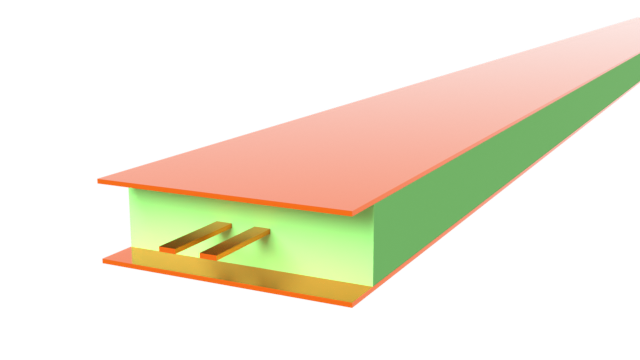
The stripline is a commonly used transmission line in printed circuit board (PCB) designs. Compared to the microstrip, the advantage of the stripline includes better shielding from EM interference, lower radiation loss, and better performance at higher frequencies. These strengths make it suitable for use in high-speed interconnects, where bandwidth, package size, and signal integrity are key concerns.
In this notebook, we will build a 100 Ohm edge-coupled differential stripline and simulate it from 1 to 70 GHz. We will demonstrate the typical transmission line analysis workflow in Flex RF, including how to use the TerminalWavePort feature, how to perform 2D mode calculations, and how to run a full-wave 3D analysis.
import matplotlib.pyplot as pltimport numpy as npimport flex_rf.tidy3d as rfimport flex_rf.web as webrf.config.logging.level = 'ERROR'Building the Simulation
Section titled “Building the Simulation”Key Parameters
Section titled “Key Parameters”We begin by defining some key parameters. The design impedance for the differential mode will be 100 Ohms. The geometry parameters are chosen with that in mind. Material properties are assumed constant over the frequency band.
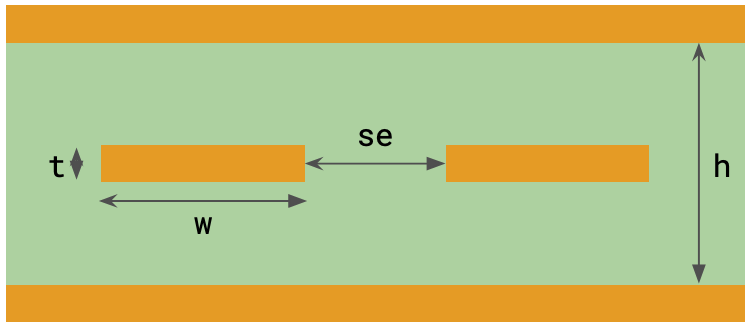
# Frequency range (Hz)f_min, f_max = (1e9, 70e9)f0 = (f_max + f_min) / 2freqs = np.linspace(f_min, f_max, 101)# Geometrymil = 25.4 # conversion factor: mils to microns (default unit)w = 3.2 * mil # Signal strip widtht = 0.7 * mil # Conductor thicknessh = 10.7 * mil # Substrate thicknessse = 7 * mil # Gap between edge-coupled pairL = 1000 * mil # Line lengthW_port = 50 * mil # Wave port widthL_sub, W_sub = (L + 10 * mil, W_port + 30 * mil) # Substrate length and width# Material propertiescond = 60 # Metal conductivity in S/umeps = 4.4 # Relative permittivity, substratelosstan = 0.0012 # Loss tangent, substrateMediums and Structures
Section titled “Mediums and Structures”We define the simulation mediums below. Loss is assumed constant over the frequency band.
- Metal: The
LossyMetalMediumfeature implements the surface impedance boundary condition for lossy metals . - Dielectric: The
constant_loss_tangent_model()method automatically generates aPoleResiduemedium given permittivity, loss tangent, and frequency range parameters.
med_sub = rf.FastDispersionFitter.constant_loss_tangent_model(eps, losstan, (f_min, f_max), tolerance_rms=2e-4)med_metal = rf.LossyMetalMedium(conductivity=cond, frequency_range=(f_min, f_max), name="Metal")Best weighted RMS error: 0.00018 ━━━━━━━━━━━━━━━━━━━━━━━━━━━━━━━━━━ 100% 0:00:00
Use the VisualizationSpec feature to (optionally) control the fill color of the materials during plotting.
med_sub = med_sub.updated_copy( viz_spec=rf.VisualizationSpec(facecolor="#7cc48d")) # green tone for substratemed_metal = med_metal.updated_copy( viz_spec=rf.VisualizationSpec(facecolor="#ce7e00")) # brown tone for metalThe structures are created below.
# Substratestr_sub = rf.Structure(geometry=rf.Box(center=(0, 0, 0), size=(W_sub, h, L_sub)), medium=med_sub)
# Signal stripsstr_strip_left = rf.Structure(    geometry=rf.Box(center=(-(se + w) / 2, 0, 0), size=(w, t, L_sub)), medium=med_metal)str_strip_right = rf.Structure(    geometry=rf.Box(center=((se + w) / 2, 0, 0), size=(w, t, L_sub)), medium=med_metal)
# Top and bottom ground planesstr_gnd_top = rf.Structure(    geometry=rf.Box(center=(0, h / 2 + t, 0), size=(W_sub, 2*t, L_sub)), medium=med_metal)str_gnd_bot = rf.Structure(    geometry=rf.Box(center=(0, -h / 2 - t, 0), size=(W_sub, 2*t, L_sub)), medium=med_metal)
Grid and Boundaries
Section titled “Grid and Boundaries”The LayerRefinementSpec feature controls grid refinement around metallic structures. We apply extra refinement around the signal traces, and basic refinement for the top and bottom ground planes.
# Create a LayerRefinementSpec from signal trace structureslr1 = rf.LayerRefinementSpec.from_structures(    structures=[str_strip_left, str_strip_right],    min_steps_along_axis=5,  # Min grid cells along normal direction    corner_refinement=rf.GridRefinement(        dl=t / 5, num_cells=2    ),  # snap to corners and apply added refinement)
# Layer refinement for top and bottom ground planeslr2 = rf.LayerRefinementSpec(    center=(0, h / 2 + t / 2, 0), size=(rf.inf, t, rf.inf), axis=1, min_steps_along_axis=2)lr3 = lr2.updated_copy(center=(0, -h / 2 - t / 2, 0))
The rest of the grid is automatically generated based on the wavelength.
# Define overall grid specificationgrid_spec = rf.GridSpec.auto( wavelength=rf.C_0 / f_max, min_steps_per_wvl=18, layer_refinement_specs=[lr1, lr2, lr3],)The top (+y) and bottom (-y) boundaries of this model are adjacent to the metal ground planes and can be set to PEC. All other boundaries are open and thus truncated by perfectly matched layers (PMLs).
boundary_spec = rf.BoundarySpec( x=rf.Boundary.pml(), y=rf.Boundary.pec(), z=rf.Boundary.pml(),)Monitors
Section titled “Monitors”For visualization purposes, we add a FieldMonitor between the signal plane and the bottom ground plane.
mon_1 = rf.FieldMonitor( center=(0, -h / 4, 0), size=(rf.inf, 0, rf.inf), freqs=[f_max], name="monitor 1",)Terminal Wave Port
Section titled “Terminal Wave Port”The TerminalWavePort feature is used to excite TEM modes in terminal-based structures. It is most suitable for single- and multi-ended transmission lines in PCBs and related applications.
Within each port plane, the port boundary should enclose all signal traces and touch/contact any adjacent ground planes for best results. All enclosed traces are automatically detected and assigned name labels T0, T1, ... in left-to-right, bottom-to-top order.
For differential/common mode excitations, use the optional differential_pairs parameter to group each double-ended pair of terminals. Below, we assign the grouping ('T0', 'T1') to indicate that the two signal traces are to be treated as a double-ended line.
WP1 = rf.TerminalWavePort( center=(0, 0, -L / 2), size=(W_port, h, 0), direction="+", name="WP1", differential_pairs=[("T0", "T1")],)WP2 = WP1.updated_copy( center=(0, 0, L / 2), direction="-", name="WP2",)Define the Simulation and TerminalComponentModeler
Section titled “Define the Simulation and TerminalComponentModeler”The Simulation object in Tidy3D contains information about the entire simulation environment, including boundary conditions, grid, structures, and monitors.
sim = rf.Simulation( size=(W_sub, h + 2 * t, L_sub), center=(0, 0, 0), grid_spec=grid_spec, boundary_spec=boundary_spec, structures=[str_sub, str_strip_left, str_strip_right, str_gnd_top, str_gnd_bot], monitors=[mon_1], run_time=1e-9, plot_length_units="mil",)The TerminalComponentModeler conducts a port sweep based on our previously defined Simulation in order to construct the full S-parameter matrix.
tcm = rf.TerminalComponentModeler( simulation=sim, ports=[WP1, WP2], # terminal wave ports freqs=freqs, # S-parameter frequency points)Below, we plot the wave port plane of WP1 and the simulation grid (gray lines). The two terminals T0 and T1 are labeled, as well as the double-ended pair Diff0.
# Inspect port and transverse gridfig, ax = plt.subplots(figsize=(10, 6), tight_layout=True)sim.plot_grid(z=1, ax=ax)tcm.plot_port("WP1", ax=ax)plt.show()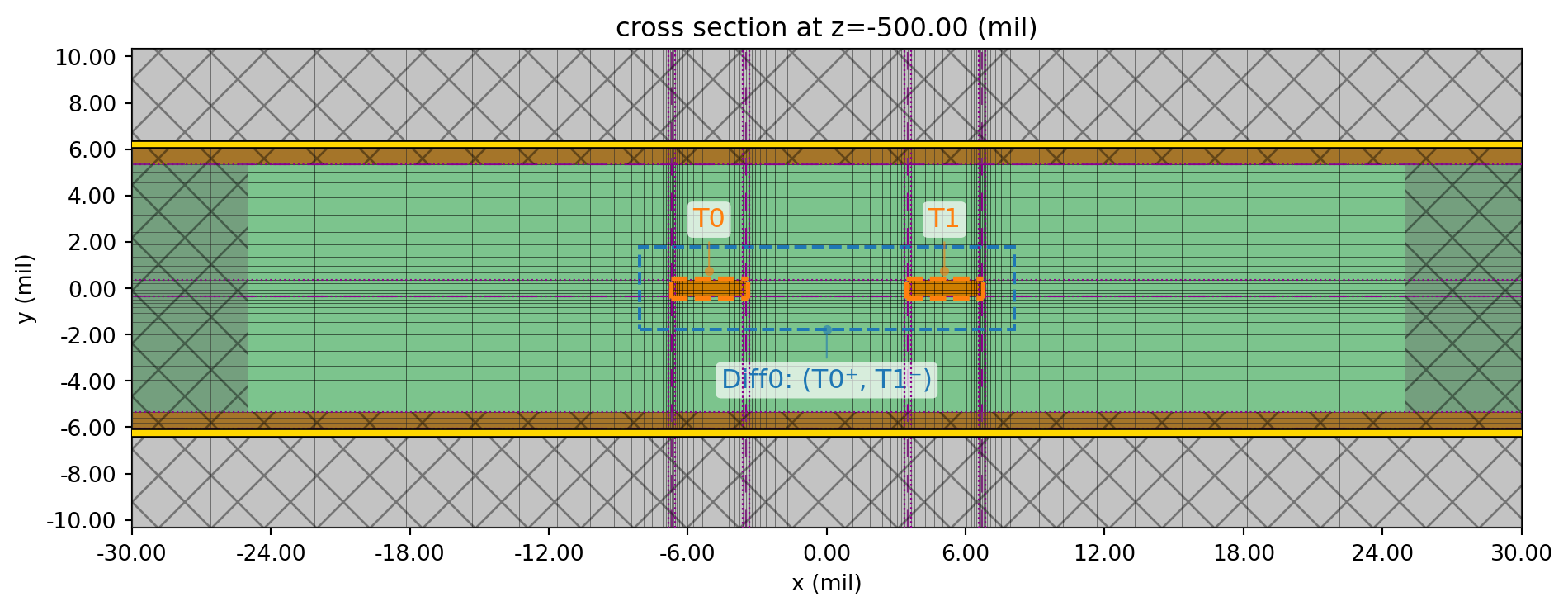
2D Analysis
Section titled “2D Analysis”In this section, we demo a 2D ModeSolver calculation. This calculation provides the key transmission line parameters, such as attenuation , characteristic impedance , and effective index .
The ModeSolver calculation can be easily constructed using one of the previously defined wave ports.
# Convert wave port to mode solvermode_solver = WP1.to_mode_solver(simulation=sim, freqs=np.linspace(f_min, f_max, 51))We submit the mode solver job below.
mode_data = web.run(mode_solver, task_name="mode solver", path='./data/diff_stripline_mode.hdf5', verbose=False)Because there are two terminals in the TerminalWavePort, the mode solver data will include two modes. The Ex and Ey field profiles of both modes are shown below.
# Plot mode fieldfig, ax = plt.subplots(2, 1, figsize=(10, 4), tight_layout=True)mode_solver.plot_field(field_name="Ey", val="real", mode_index=0, f=f0, ax=ax[0])mode_solver.plot_field(field_name="Ey", val="real", mode_index=1, f=f0, ax=ax[1])
ax[0].set_title("Mode 0 (diff) | Re(Ey)")ax[1].set_title("Mode 1 (comm) | Re(Ey)")plt.show()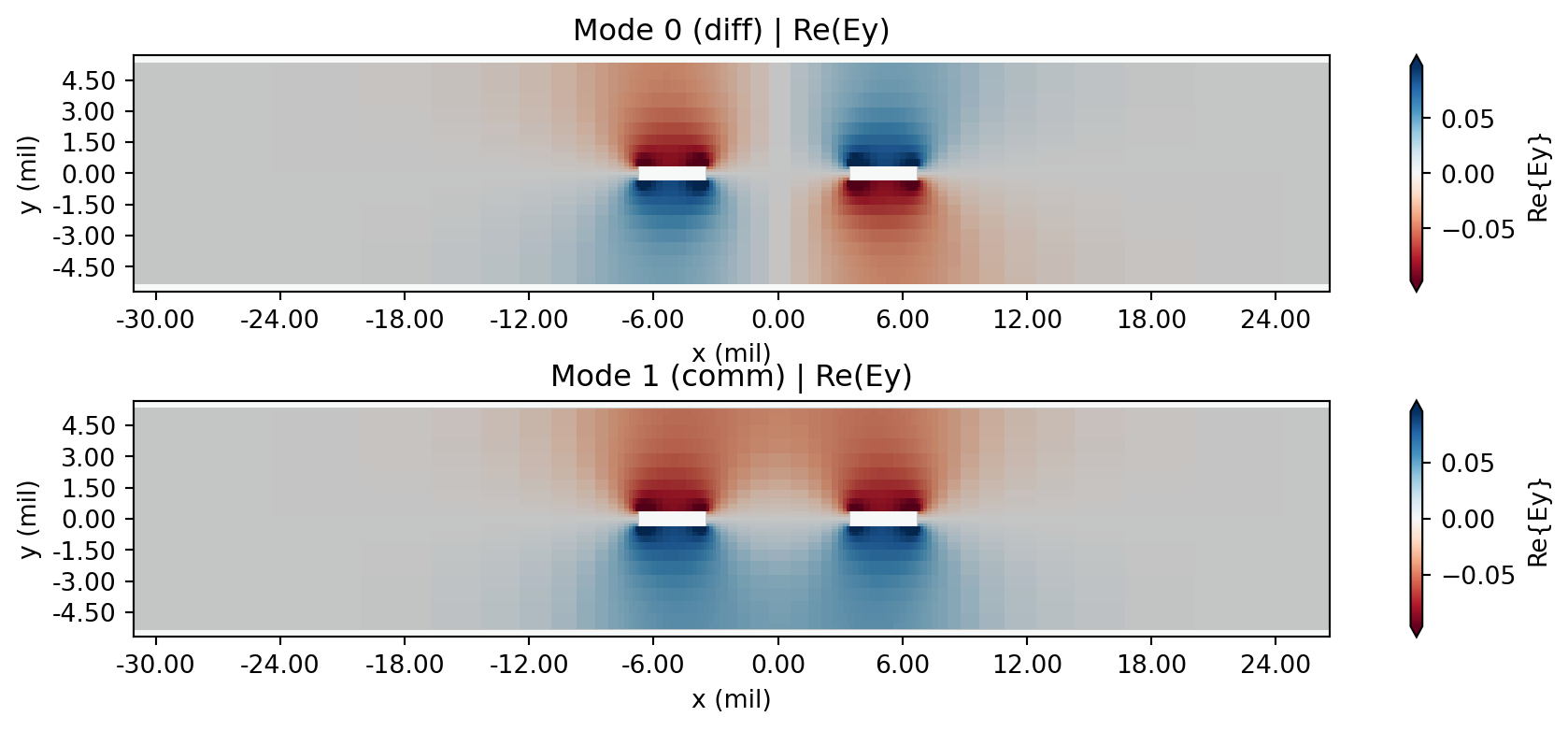
In the analysis below, we will concentrate on the differential mode (mode_index=0).
We extract the effective index and attenuation from the mode_data.
# Gather alpha, neff from mode solver resultsneff_mode = mode_data.modes_info["n eff"].isel(mode_index=0).squeeze()alphadB_mode = mode_data.modes_info["loss (dB/cm)"].isel(mode_index=0).squeeze()We obtain the differential impedance from the full Z-matrix below. The terminal_label_in and terminal_label_out indices specify which row and column of the Z-matrix to extract. The naming scheme is <diff_pair_name>@<diff OR comm>.
Z0_mode = mode_data.transmission_line_terminal_data.Z0.sel( terminal_label_in="Diff0@diff", terminal_label_out="Diff0@diff")Below, we plot the effective index, loss, and characteristic impedance.
fig, ax = plt.subplots(3,1, figsize=(8, 8), tight_layout=True, sharex=True)ax[0].plot(neff_mode.f / 1e9, neff_mode)ax[0].set_title("Effective index")ax[0].set_ylabel("$n_{\\text{eff}}$")
ax[1].plot(alphadB_mode.f / 1e9, alphadB_mode)ax[1].set_title("Attenuation")ax[1].set_ylabel("$\\alpha$ (dB/cm)")
ax[2].plot(Z0_mode.f / 1e9, np.real(Z0_mode))ax[2].set_title("Differential impedance")ax[2].set_ylabel("$Z_0$ ($\\Omega$)")ax[2].set_xlabel("f (GHz)")for axis in ax:    axis.grid()plt.show()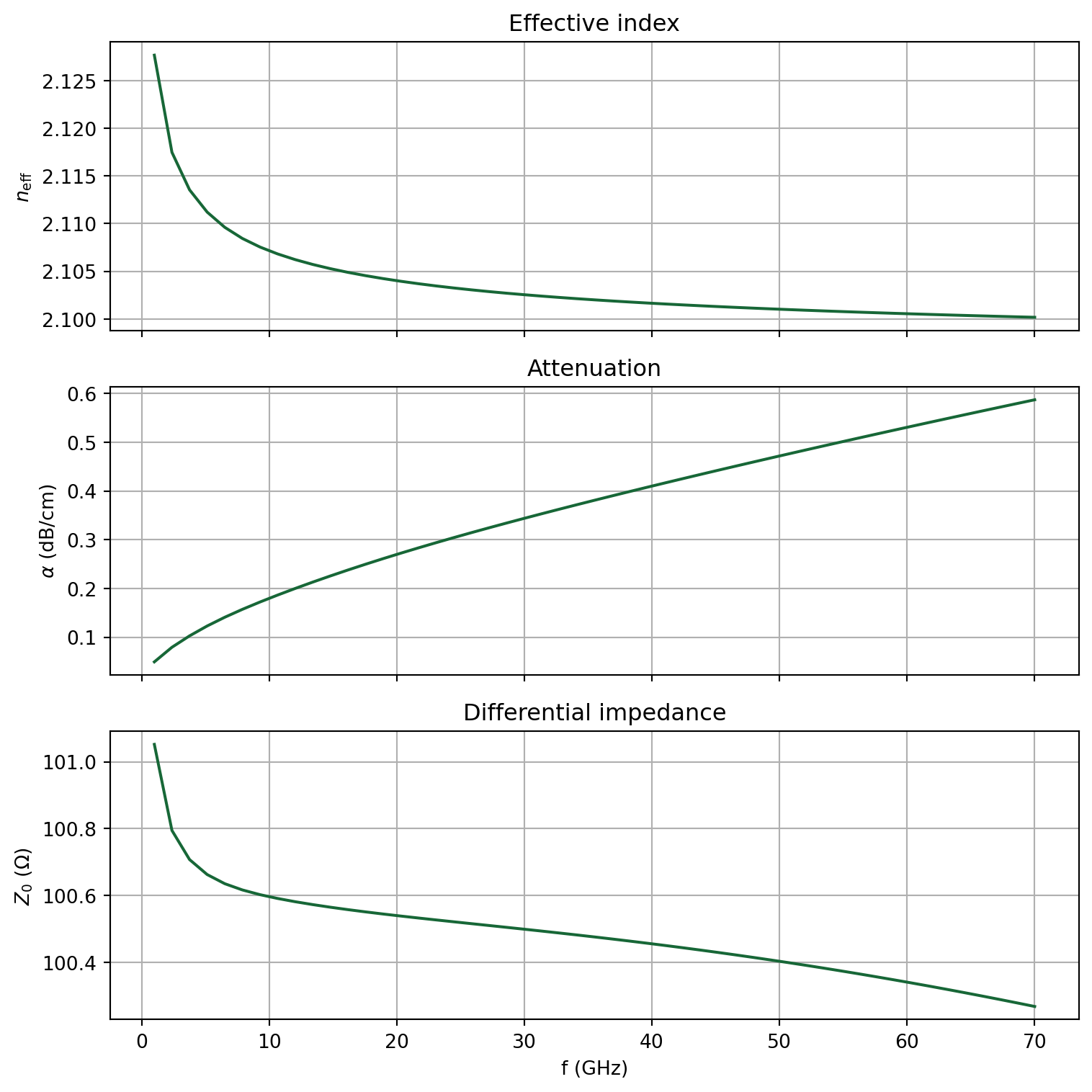
3D Analysis
Section titled “3D Analysis”For a longitudinally-invariant transmission line, the 2D mode solution fully defines its propagation characteristics and the 3D solution is not needed. However, for demonstration purposes, we will perform the 3D FDTD analysis to obtain the differential S21 parameter SDD21. The line length is 4 inches, which is tens of wavelengths at 70 GHz.
S-parameter convergence typically requires a lower level of grid refinement than the 2D mode solution. We reduce the grid refinement below to cut down on computational cost.
# Update layer refinement with reduced fidelitylr4 = lr1.updated_copy(    min_steps_along_axis=2,    corner_refinement=rf.GridRefinement(dl=t, num_cells=2),)
# Update overall grid specificationgrid_spec_3d = grid_spec.updated_copy(layer_refinement_specs=[lr2, lr3, lr4])
Since the transmission line is symmetric and there will be no coupling between the two modes, we only need to run the differential mode of one wave port WP1. This further reduces simulation cost.
# Update sim and TCMsim_3d = sim.updated_copy(grid_spec=grid_spec_3d)tcm_3d = tcm.updated_copy(simulation=sim_3d, run_only=["WP1@Diff0@diff"])The job is submitted below.
tcm_data = web.run(tcm_3d, task_name="diff_stripline_3d", path="./data/diff_stripline.hdf5", verbose=False)We use the port_in and port_out parameters to select the corresponding entry of the S-matrix. The naming scheme is <port_name>@<differential_pair_name>@<diff OR comm> for differential pairs. Below, we extract SDD21.
# Get S-parameterss_matrix = tcm_data.smatrix()SDD21 = np.conjugate(s_matrix.data.sel(port_in="WP1@Diff0@diff", port_out="WP2@Diff0@diff"))SDD21dB = 20*np.log10(np.abs(SDD21))
# Plotfig, ax = plt.subplots(figsize=(8, 4), tight_layout=True)ax.plot(SDD21dB.f / 1e9, SDD21dB)ax.set_title("Insertion loss")ax.set_ylabel("dB")ax.set_xlabel("f (GHz)")ax.grid()plt.show()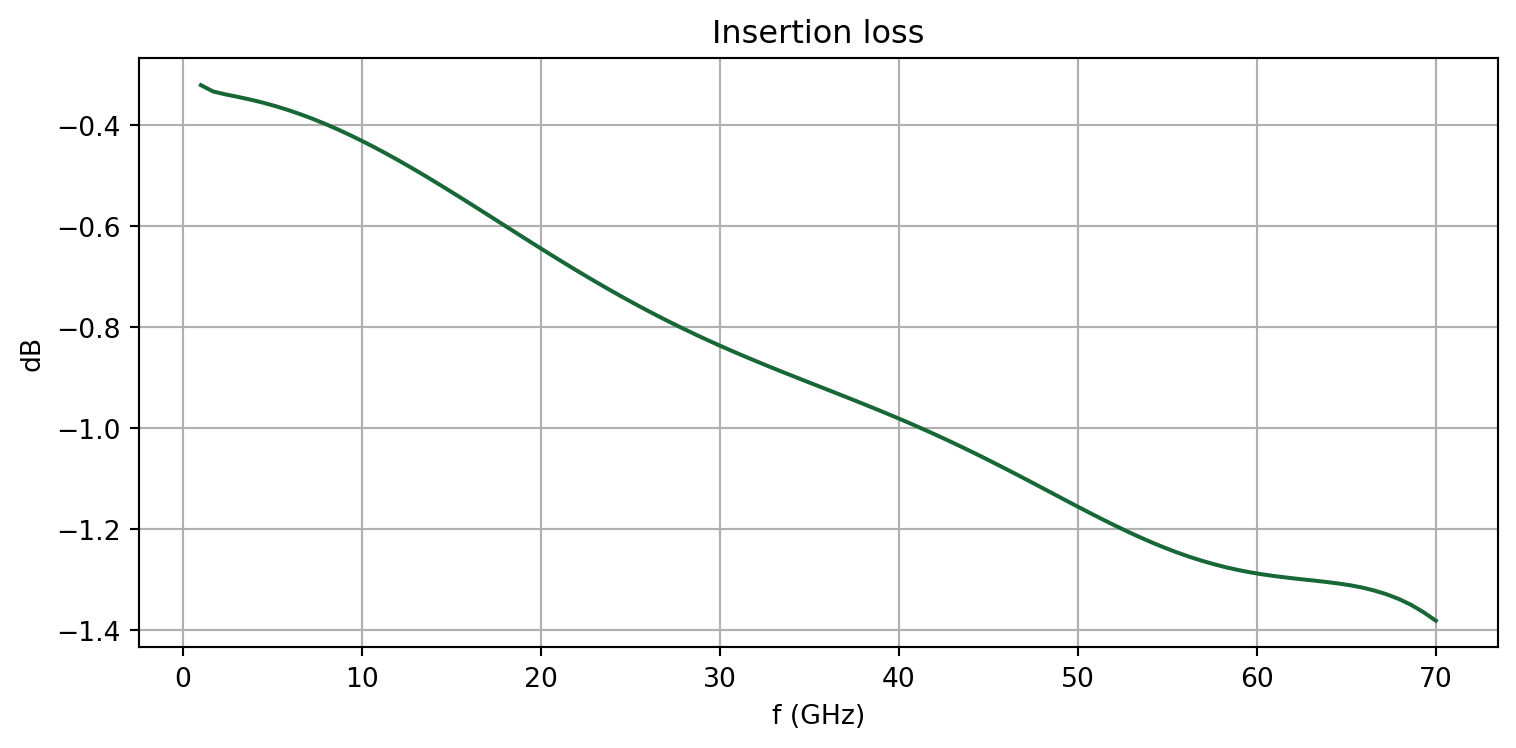
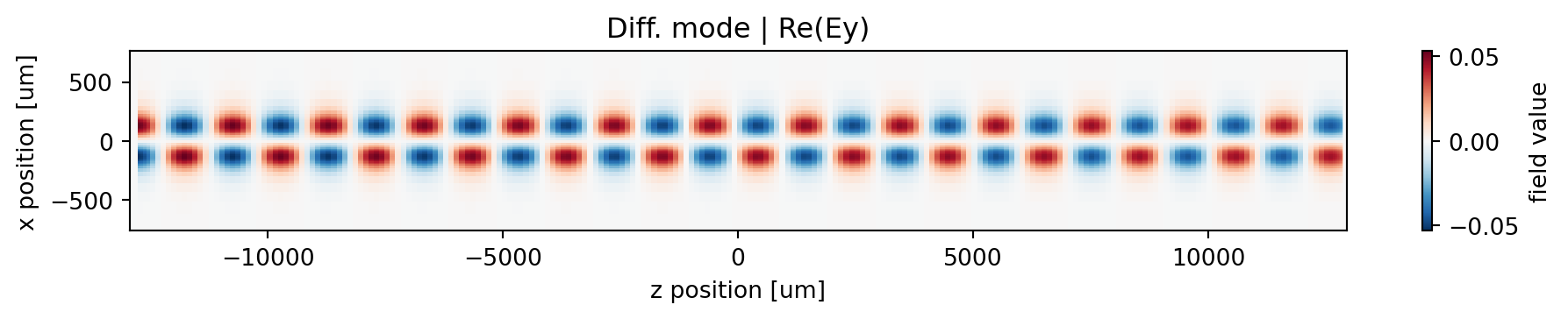
Below, we plot the Ey field profile recorded by the field monitor at max frequency.
fig, ax = plt.subplots(figsize=(10, 2), tight_layout=True)# Plotting diff modesim_data = tcm_data.data["WP1@Diff0@diff"]ey = sim_data["monitor 1"].Ey.sel(f=f_max, method="nearest")np.real(ey).plot(x="z", y="x", ax=ax)ax.set_title("Diff. mode | Re(Ey)")ax.set_ylim(-30 * mil, 30 * mil)plt.show()