

Circularly polarized patch antenna with parasitic strips
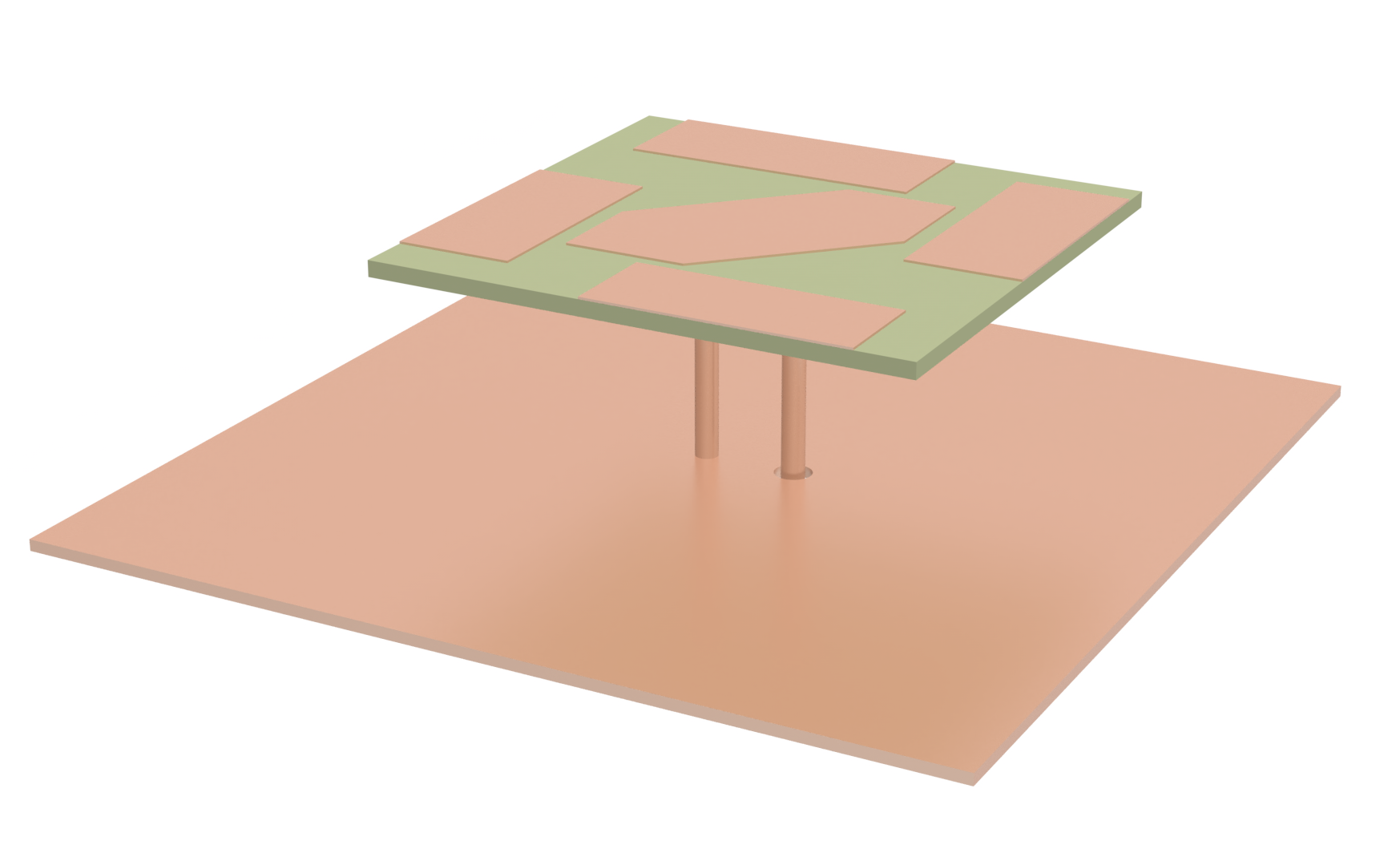
In many applications, such as mobile communications, size, weight, and cost are the primary constraints that drive the design of antennas. In particular, cell phone antennas are required to be economical, low-profile, and easy to manufacture. Patch antennas are attractive devices for these applications, since they can be manufactured directly on printed-circuit boards, which makes their inclusion in cell phones especially convenient. In addition, the shape of a patch antenna can be chosen to imbue it with a variety of different characteristics, e.g., polarization, radiation pattern, and bandwidth.
This notebook reproduces the results from Wu et al.. The authors propose a circularly polarized antenna with parasitic strips that has a lower profile and an improved circularly polarized bandwidth when compared to existing designs.
import matplotlib.pyplot as pltimport numpy as npimport flex_rf.tidy3d as rfimport flex_rf.web as webrf.config.logging.level = "ERROR"Simulation Parameter Setup
Section titled “Simulation Parameter Setup”We begin by defining the frequency range of interest (2.2 GHz to 3 GHz) and key geometric parameters from the reference. The antenna is backed by a ground plane and excited by a feeding pin.
All conductors are assumed to be perfectly conducting and the substrate is modeled with a relative permittivity of 2.55 and frequency-independent loss tangent of 0.002.
# Frequency range of interestfreq_start, freq_stop = (2.2e9, 3e9)freq0 = (freq_start + freq_stop) / 2fwidth = freq_stop - freq_startfreqs = np.linspace(freq_start, freq_stop, 51)
# Parameters from [1]mm = 1000          # mm to micron conversionG = 130 * mm       # Length and width of ground sheetL = 73 * mm        # Length and width of substrateL1 = 39 * mm       # Length and width of center patcha = 21 * mm        # Width of corner cutout of center patchfx = 15 * mm       # X position of feed pingx = 2 * mm        # Horizontal gap distance between center patch and parasitic patchesgy = 8 * mm        # Vertical gap distance between substrate boundary and parasitic patchesLs = 36 * mm       # Length of parasitic patchesWs = 15 * mm       # Width of parasitic patchesr1 = 2 * mm        # Ground pin pad sizer2 = 1.7 * mm      # Feed pin pad sizet = 1 * mm         # Substrate thicknessH = 14 * mm        # Distance between ground and substraterfeed = 0.65 * mmpatch_thickness = 0.02 * mmground_thickness = 0.16 * mmcoax_radius = 1.5 * mmstructure_height = t + H + ground_thickness + patch_thicknessstructure_center = 0.5 * (t + patch_thickness - H - ground_thickness)
# Define key vertical locations within the simulation domain.top_substrate = tbottom_substrate = 0middle_ground = -H - ground_thickness / 2port_location = -H - ground_thickness # Port is located at the bottom of the ground.port_diameter = 2 * coax_radius# Define media in the simulationepsr_sub = 2.55metal = rf.PECMedium()substrate_med = rf.FastDispersionFitter.constant_loss_tangent_model( epsr_sub, 0.002, (freq_start, freq_stop))Best weighted RMS error: 4.31e-06 ━━━━━━━━━━━━━━━━━━━━━━━━━━━━━━━━━ 100% 0:00:00
Create Structures
Section titled “Create Structures”Below, we create the physical structures in the simulation.
def make_structures(differential_feed: bool = False):    """ Creates all of the physical structures that represent the antenna in [1]        with optional differential feed, where a second feeding pin is added to the structure.    """    # Make structures for the simulation for either the proposed or differential feeds in [1].    # Dielectric substrate that extends from the shorting and feeding pins to the patches    substrate = rf.Structure(        geometry=rf.Box(center=[0, 0, t / 2],size=[L, L, t],),        medium=substrate_med,    )
    # A ground plane is connected to the bottom of the pins, where a small air gap is introduced for exciting the    # feeding pin    ground_box = rf.Box(center=[0, 0, -H - ground_thickness / 2], size=[G, G, ground_thickness])
    # A cylindrical hole is created in the ground plane to allow for the coaxial cable connection at the feeding pin.    feed_gap = rf.Cylinder(        center=(fx, 0, -H - ground_thickness / 2),        radius=coax_radius,        length=ground_thickness,        axis=2,    )
    if differential_feed:        left_feed_gap = rf.Cylinder(            center=(-fx, 0, -H - ground_thickness / 2),            radius=coax_radius,            length=ground_thickness,            axis=2,        )        feed_gap = rf.GeometryGroup(geometries=(feed_gap, left_feed_gap))
    # The air gap is removed from the ground box    ground_with_holes = rf.ClipOperation(        operation="difference", geometry_a=ground_box, geometry_b=feed_gap    )
    # The final ground plane structure is created    ground = rf.Structure(        geometry=ground_with_holes,        medium=metal,    )
    # Define the vertices that outline the shape of the central patch.    main_vertices = np.array(        [            (-L1 / 2, -L1 / 2),            (L1 / 2 - a, -L1 / 2),            (L1 / 2, -L1 / 2 + a),            (L1 / 2, L1 / 2),            (-L1 / 2 + a, L1 / 2),            (-L1 / 2, L1 / 2 - a),        ]    )    # Using the vertices, a polyslab structure is created with the previously defined patch_thickness.    main_patch = rf.Structure(        geometry=rf.PolySlab(            vertices=main_vertices.tolist(),            slab_bounds=(t, t + patch_thickness),            axis=2,        ),        medium=metal,    )    # The remaining parasitic strips are sequentially-rotated rectangles around the central patch.    patch_L = rf.Box(        center=(-L / 2 + Ws / 2, -L / 2 + gy + Ls / 2, t + patch_thickness / 2),        size=(Ws, Ls, patch_thickness),    )    patch_R = rf.Box(        center=(L / 2 - Ws / 2, L / 2 - gy - Ls / 2, t + patch_thickness / 2),        size=(Ws, Ls, patch_thickness),    )    patch_B = rf.Box(        center=(L / 2 - Ls / 2 - gy, -L / 2 + Ws / 2, t + patch_thickness / 2),        size=(Ls, Ws, patch_thickness),    )    patch_T = rf.Box(        center=(-L / 2 + Ls / 2 + gy, L / 2 - Ws / 2, t + patch_thickness / 2),        size=(Ls, Ws, patch_thickness),    )    # Conductive pads for the feeding and shorting pins, placed at the bottom of the substrate.    feed_disc = rf.Cylinder(        center=(fx, 0, -patch_thickness / 2), radius=r2, length=patch_thickness, axis=2    )    if differential_feed:        shorted_disc = rf.Cylinder(            center=(-fx, 0, -patch_thickness / 2), radius=r2, length=patch_thickness, axis=2        )    else:        shorted_disc = rf.Cylinder(            center=(0, 0, -patch_thickness / 2), radius=r1, length=patch_thickness, axis=2        )    # All patch structures are collected into a list and assigned the same material    patch_geoms = [patch_L, patch_R, patch_B, patch_T, feed_disc, shorted_disc]    patch_structures = [rf.Structure(geometry=patch, medium=metal) for patch in patch_geoms]
    # Next, the shorting and feeding pins are added to the simulation as cylinders.    if differential_feed:        # Short pin represents the other feed when using the differential feed configuration.        short_pin = rf.Structure(            geometry=rf.Cylinder(                center=(-fx, 0, -H / 2 - ground_thickness / 2),                radius=rfeed,                length=H + ground_thickness,                axis=2,            ),            medium=metal,        )    else:        short_pin = rf.Structure(            geometry=rf.Cylinder(                center=(0, 0, -H / 2 - ground_thickness / 2),                radius=rfeed,                length=H + ground_thickness,                axis=2,            ),            medium=metal,        )    feed_pin = rf.Structure(        geometry=rf.Cylinder(            center=(fx, 0, -H / 2 - ground_thickness / 2),            radius=rfeed,            length=H + ground_thickness,            axis=2,        ),        medium=metal,    )    # Create a list of all structures in the simulation.    return [        substrate,        ground,        feed_pin,        short_pin,        main_patch,    ] + patch_structures
# Use above function to make structure liststructures_list = make_structures(differential_feed=False)
# Setting up the scene for visualization, with all structures included# and units set to millimeters for the plot.scene = rf.Scene(structures=structures_list, plot_length_units="mm")fig, axs = plt.subplots(1, 2, figsize=(10, 5), tight_layout=True)sub_ax = axs[0]scene.plot(z=t, ax=sub_ax)sub_ax.set_xlim(-L / 2, L / 2)sub_ax.set_ylim(-L / 2, L / 2)sub_ax = axs[1]scene.plot(y=0, ax=sub_ax)sub_ax.set_xlim(-L / 3, L / 3)sub_ax.set_ylim(-H - t, 2 * t)plt.show()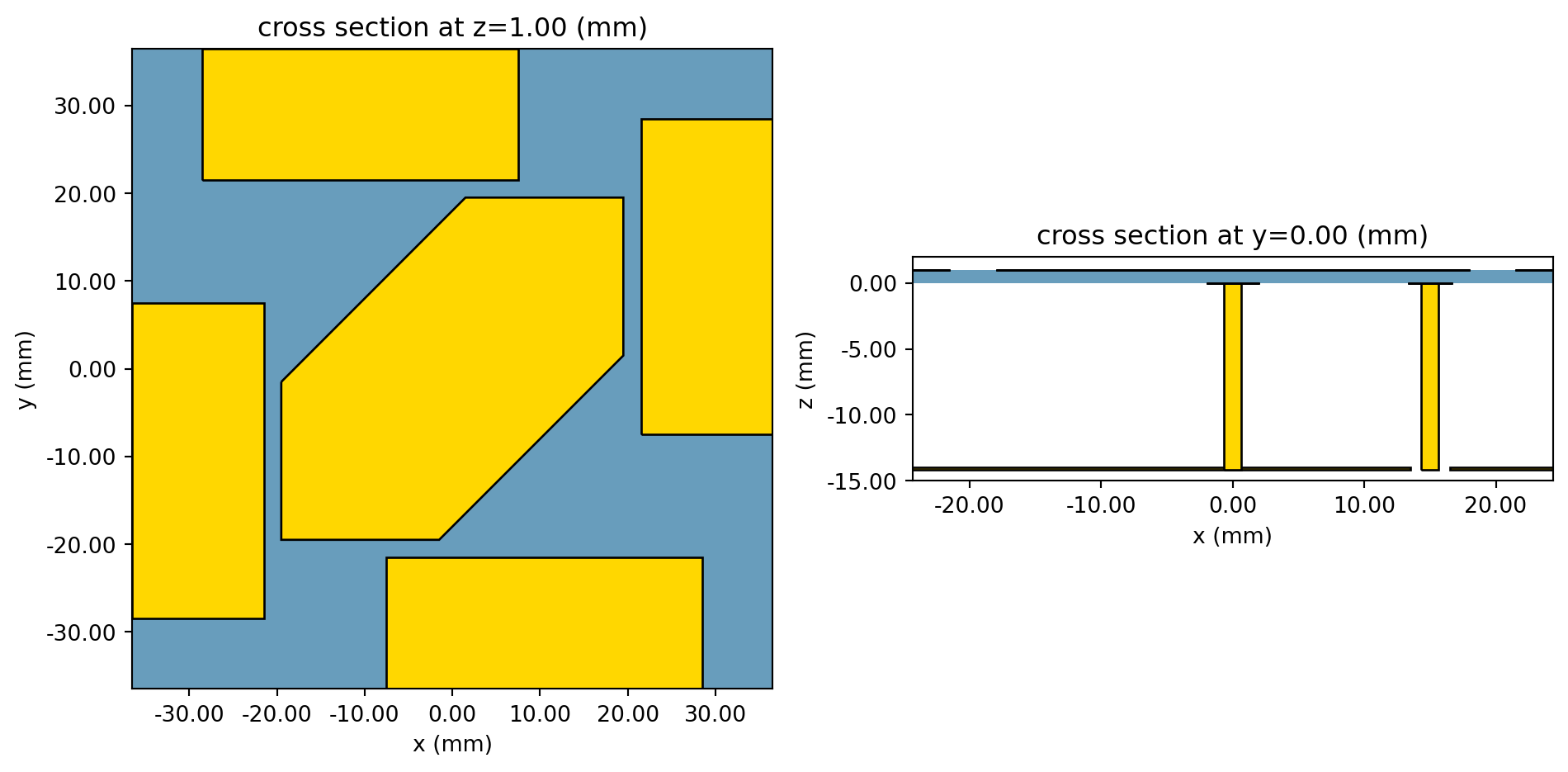
Mesh Overrides and Layer Refinement Specification
Section titled “Mesh Overrides and Layer Refinement Specification”It is important to resolve all subwavelength metallic features which play a critical part to the microwave behavior of the antenna. To this end, we make use of two local mesh refinement features in Flex RF: mesh override structures and layer refinement specification.
The MeshOverrideStructure is used to refine the grid near the locations of the shorting and feeding pins. We use MeshOverrideStructures to ensure that there will be about four grid cells in the gap between the feeding pin and ground plane, where the excitation will be placed. Finally, another similar MeshOverrideStructure is added near the shorting pin to resolve the cylinder’s surface accurately.
We also make use of the LayerRefinementSpec feature, which automatically creates refined mesh in each layer defined by the user. We choose to refine the mesh around metallic objects on the top and bottom of the substrate. In addition, we add a LayerRefinementSpec corresponding to the ground plane.
def make_grid_spec(use_differential_feed: bool = False):    """ Define a grid specification for the simulation """    # Make a GridSpec for the simulation for either the proposed or differential feeds in [1].    # Set the size of grid cells to be used for the portion of the structure containing all patches.    #dl_plane = gx / 2    # Vertical cell size around printed components    #dz_metal = 100
    # Provide a larger cell size (dl value) for regions or dimensions that do not require fine resolution.    dl_background = 10 * mm    # Set the cell size at the port to fit approximately `port_cells` between the feed pin and ground    port_cells = 4    dl_pins = (coax_radius - rfeed) / port_cells    # Add MeshOverrideStructures around both pins, which will capture the curved geometry of the cylinders more accurately.    # These MeshOverrideStructures also improve the accuracy of the fields in the air gap, where the port excitation will be placed.    short_x_center = 0    if use_differential_feed:        short_x_center = -fx    mesh_overrides = [        rf.MeshOverrideStructure(            geometry=rf.Box(                center=[fx, 0, middle_ground],                size=[port_diameter, port_diameter, ground_thickness],            ),            dl=[dl_pins, dl_pins, dl_background],        ),        rf.MeshOverrideStructure(            geometry=rf.Box(                center=[short_x_center, 0, middle_ground],                size=[port_diameter, port_diameter, ground_thickness],            ),            dl=[dl_pins, dl_pins, dl_background],        ),    ]
    top_substrate_spec = rf.LayerRefinementSpec.from_layer_bounds(        bounds=(top_substrate, top_substrate + patch_thickness),        axis=2,        min_steps_along_axis=1,    )    bottom_substrate_spec = rf.LayerRefinementSpec.from_layer_bounds(        bounds=(bottom_substrate - patch_thickness, bottom_substrate),        axis=2,        min_steps_along_axis=1,    )    ground_spec = rf.LayerRefinementSpec.from_layer_bounds(        bounds=(-H - ground_thickness, -H),        axis=2,        min_steps_along_axis=1,    )    return rf.GridSpec.auto(        min_steps_per_wvl=20,        wavelength=rf.C_0 / freq_stop,        layer_refinement_specs=[top_substrate_spec, bottom_substrate_spec, ground_spec],        override_structures=mesh_overrides,    )
grid_spec = make_grid_spec(use_differential_feed=False)
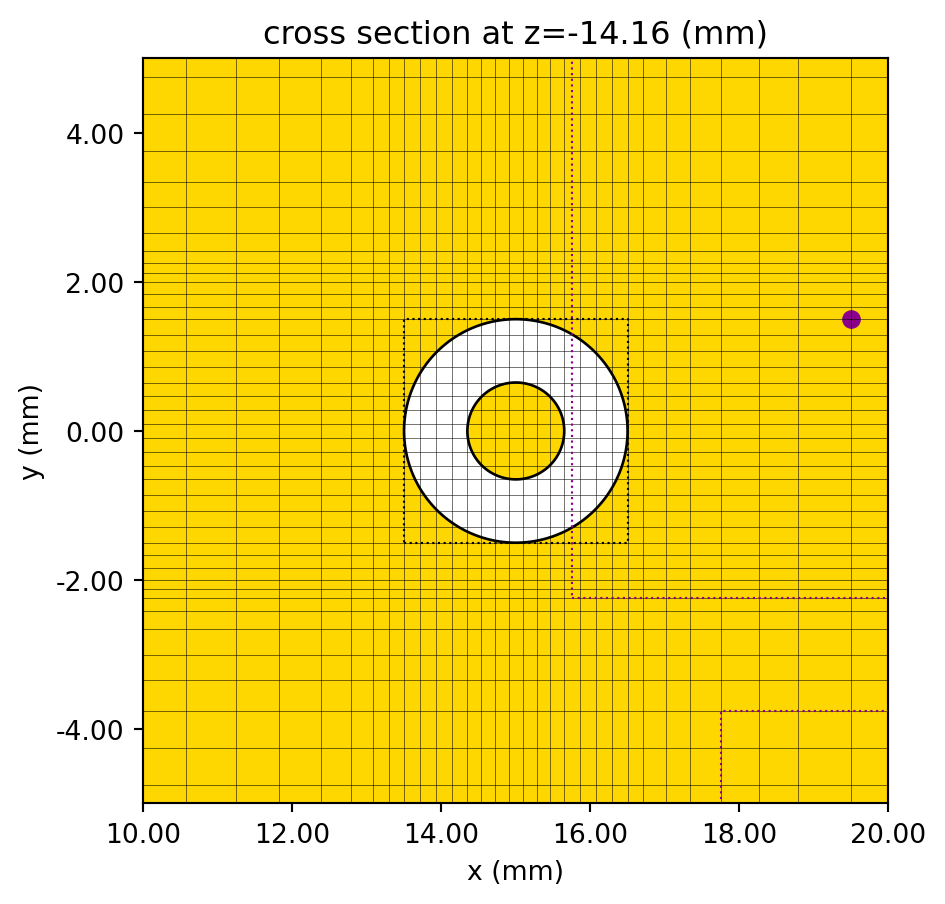
Now, we plot the created geometry along with the FDTD grid to see how the MeshOverrideStructures and LayerRefinementSpecs have affected the grid. In the first figure, you can clearly see the mesh refinement created by the MeshOverrideStructures around the shorting and feeding pins. The figure on the right shows a close-up of the gap region between the central patch and a parasitic strip. The purple markers indicate the locations of corners where the mesh grid has been snapped and refined. The subsequent plot illustrates the refined grid near the port location, clearly showing the desired four grid cells between the inner and outer conductors.
# Create simulation object, so that we can view the created grid superimposed with simulation structures.padding = rf.C_0/freq0/2sim_size = (G + 2 * padding, G + 2 * padding, structure_height + 2 * padding)sim_center = [0, 0, structure_center]sim = rf.Simulation(    center=sim_center,    size=sim_size,    grid_spec=grid_spec,    structures=structures_list,    run_time=rf.RunTimeSpec(quality_factor=5),    plot_length_units="mm",)
# Display information about the simulation grid, including the number of cells along each axis and the smallest cell size,# which are important for simulation accuracy.sim.grid_info
{'Nx': 216, 'Ny': 195, 'Nz': 112, 'grid_points': 4717440, 'min_grid_size': 20.0, 'max_grid_size': 4996.540966666755, 'computational_complexity': 235872.0, 'fine_mesh_info': ['z=-30 (size=20)', 'z=-10 (size=20)', 'z=10 (size=20)', 'z=990 (size=20)', 'z=1010 (size=20)', 'z=1030 (size=20)']}# Create two plots: one showing the overall grid and simulation setup, and another zoomed in near the gap and feed pin location.fig, axs = plt.subplots(1, 2, figsize=(10, 10), tight_layout=True)sub_ax = axs[0]sim.plot(z=t, ax=sub_ax, monitor_alpha=0)sim.plot_grid(z=t, ax=sub_ax)sub_ax.set_xlim(-L / 2, L / 2)sub_ax.set_ylim(-L / 2, L / 2)sub_ax = axs[1]sim.plot(z=t, ax=sub_ax, monitor_alpha=0)sim.plot_grid(z=t, ax=sub_ax)sub_ax.set_xlim(L1 / 2 - 4 * gx, L1 / 2 + 4 * gx)sub_ax.set_ylim(L / 2 - gy - Ls - 2 * gx, L / 2 - gy - Ls + 6 * gx)plt.show()
# Create a detailed plot at the port location to verify the mesh refinement in this critical region.fig, ax = plt.subplots(figsize=(5, 5), tight_layout=True)sim.plot(z=port_location, ax=ax)sim.plot_grid(z=port_location, ax=ax)ax.set_xlim(fx - 5 * mm, fx + 5 * mm)ax.set_ylim(-5 * mm, 5 * mm)plt.show()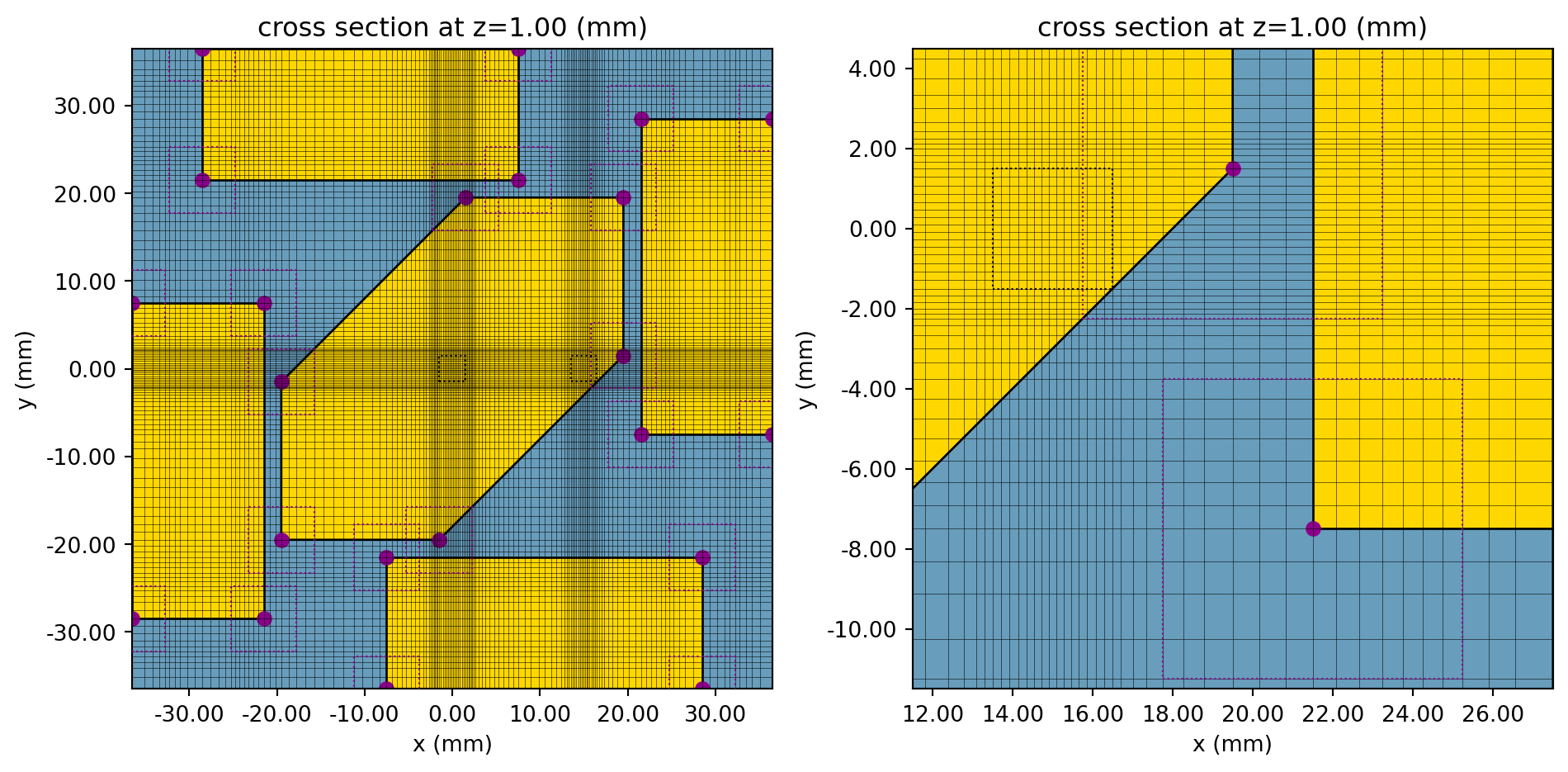
Simulation Monitors
Section titled “Simulation Monitors”In this notebook, we wish to compute a variety of antenna parameters. We will first create plots of the normalized radiation pattern at 2.6 GHz for right-handed and left-handed circular polarizations. We will also reproduce a few plots from [1] that are functions of frequency, i.e., the axial ratio and the antenna gain along the z axis. In order to create these plots efficiently, we use one DirectivityMonitor that records the far-field pattern over a range of directions at a fixed frequency. We use a separate DirectivityMonitor to capture the field over a range of frequencies at a specific observation point, denoted by spherical coordinates .
# Place the far field monitors just inside simulation boundariesfarfield_size = (sim_size[0] * 0.9, sim_size[1] * 0.9, sim_size[2] * 0.9)# Theta and Phi angles at which to observe fieldstheta_proj = np.linspace(0, 2 * np.pi, 200, endpoint=False)phi_proj = np.linspace(0, np.pi / 2, 2)
# First, create a FieldProjectionAngleMonitor that will be used to plot the radiation pattern in the xz and yz planesmon_rad_spatial = rf.DirectivityMonitor(    center=sim_center,    size=farfield_size,    freqs=[freq0],    name="rad_spatial",    phi=list(phi_proj),    theta=list(theta_proj))
# Next, create a FieldProjectionAngleMonitor that will be used to compute radiated fields normal to the antenna vs the frequency.mon_rad_freqency = rf.DirectivityMonitor(    center=sim_center,    size=farfield_size,    freqs=freqs,  # Record radiated fields for different frequencies.    name="rad_frequency",    phi=[0],  # Record radiated fields normal to the antenna    theta=[0],)
Set up the TerminalComponentModeler
Section titled “Set up the TerminalComponentModeler”The last step before launching the simulation is to set up the TerminalComponentModeler, which will simplify the calculation of . As previously mentioned, we use a CoaxialLumpedPort with a reference impedance of as the source. The CoaxialLumpedPort will model a radially directed uniform current source and an annular resistive load between the feed pin and ground plane. Scattering parameters calculated with this definition of the CoaxialLumpedPort should match experimental results where a coaxial cable is used with characteristic impedance of .
# Use a CoaxialLumpedPort to excite the feed pin. The CoaxialLumpedPort models a radially symmetric current# flowing from the feed pin to the ground plane through a resistive element.coax_center = [fx, 0, port_location]coax_port = rf.CoaxialLumpedPort( center=coax_center, outer_diameter=port_diameter, inner_diameter=2 * rfeed, normal_axis=2, direction="+", # Indicates that the current will flow in the positive direction along the feed pin. name="coax_port",)modeler = rf.TerminalComponentModeler( simulation=sim, ports=[coax_port], radiation_monitors=[mon_rad_spatial, mon_rad_freqency], freqs=freqs,)We submit the job to the cloud below.
modeler_data = web.run(modeler, task_name="cpa_modeler", verbose=False)Postprocessing
Section titled “Postprocessing”Polar plots of normalized radiation patterns
Section titled “Polar plots of normalized radiation patterns”We will use the simulation results to reproduce Fig. 10 (b) from [1]. First, we retrieve the radiation intensities using the helper method get_antenna_metrics_data, which returns a AntennaMetricsData object. The radiation intensities are obtained in the circular polarization basis, which is decomposed into right-handed circular polarization (RHCP) and left-handed circular polarization (LHCP) components. Then, we normalize by the peak total radiation intensity.
antenna_parameters_spatial = modeler_data.get_antenna_metrics_data(monitor_name="rad_spatial")partial_U = antenna_parameters_spatial.partial_radiation_intensity(pol_basis="circular").sel(f=freq0)peakU = np.max(antenna_parameters_spatial.radiation_intensity)normalized_partial_U = partial_U / peakU
# Select fields along theta for phi = 0 and phi = pi/2Urad_RH_Phi_0 = normalized_partial_U.Uright.sel(phi=0).squeeze().valuesUrad_LH_Phi_0 = normalized_partial_U.Uleft.sel(phi=0).squeeze().valuesUrad_RH_Phi_90 = normalized_partial_U.Uright.sel(phi=np.pi / 2).squeeze().valuesUrad_LH_Phi_90 = normalized_partial_U.Uleft.sel(phi=np.pi / 2).squeeze().values
# Plot the normalized radiation pattern similar to [1].fig, ax = plt.subplots(1, 2, subplot_kw={"projection": "polar"}, figsize=(8, 4))sub_ax = ax[0]sub_ax.set_theta_direction(-1)sub_ax.set_theta_offset(np.pi / 2.0)sub_ax.plot(theta_proj, 10 * np.log10(Urad_RH_Phi_0), "-k", label="RHCP")sub_ax.plot(theta_proj, 10 * np.log10(Urad_LH_Phi_0), "-r", label="LHCP")sub_ax.set_rlim(-40, 0)sub_ax.set_rticks([-40, -30, -20, -10, 0])sub_ax.set_title(r"Radiation Pattern ($\phi = 0$)")sub_ax.legend(loc="lower center", ncols=2)
sub_ax = ax[1]sub_ax.set_theta_direction(-1)sub_ax.set_theta_offset(np.pi / 2.0)sub_ax.plot(theta_proj, 10 * np.log10(Urad_RH_Phi_90), "-k", label="RHCP")sub_ax.plot(theta_proj, 10 * np.log10(Urad_LH_Phi_90), "-r", label="LHCP")sub_ax.set_rlim(-40, 0)sub_ax.set_rticks([-40, -30, -20, -10, 0])sub_ax.set_title(r"Radiation Pattern ($\phi = \pi/2$)")sub_ax.legend(loc="lower center", ncols=2)fig.tight_layout()plt.show()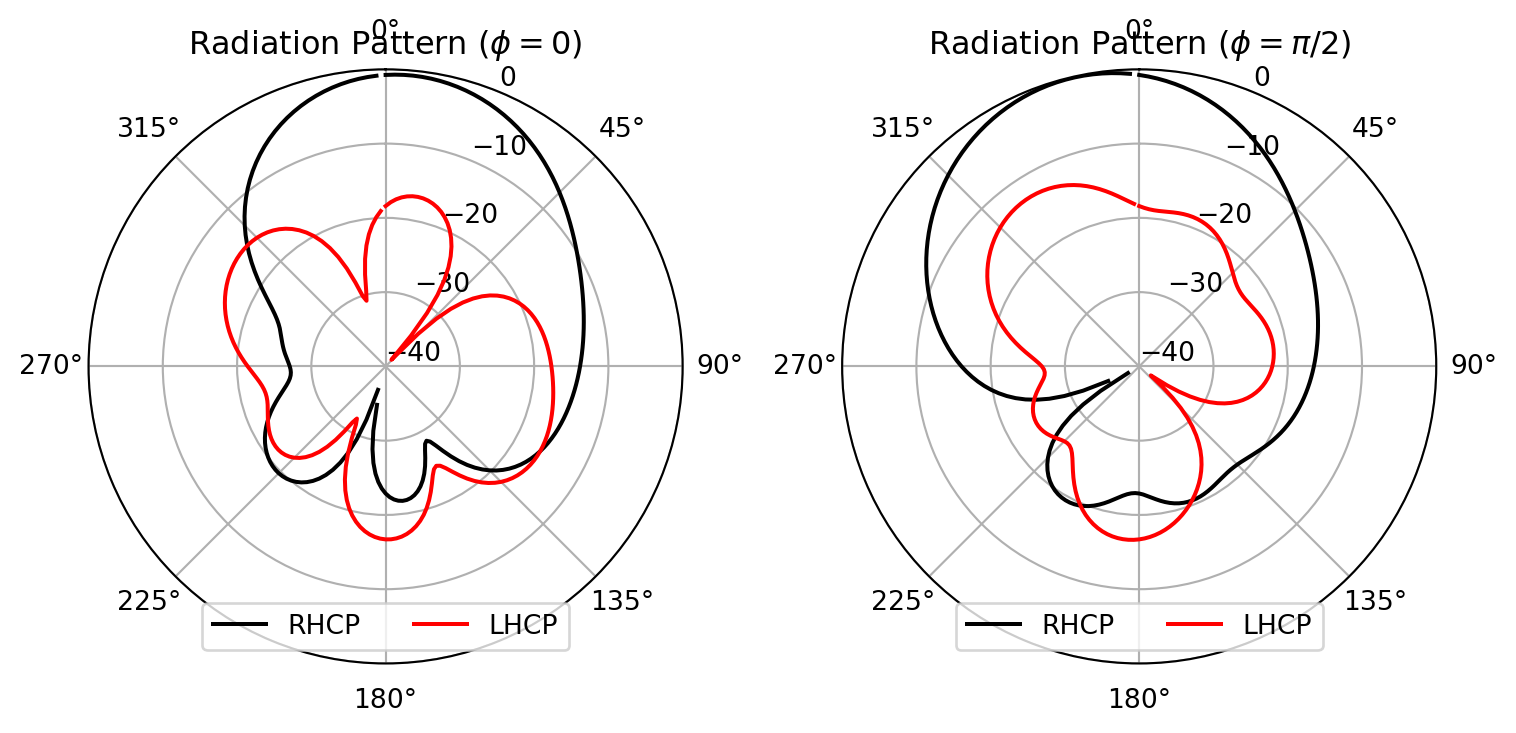
Finding antenna lobes with the LobeMeasurer
Section titled “Finding antenna lobes with the LobeMeasurer”Given a 1D array of values representing the radiation pattern, we can use the LobeMeasurer tool to find the direction of the main antenna lobes.
xz_plane_lobe_measurer = rf.LobeMeasurer(angle=theta_proj, radiation_pattern=Urad_RH_Phi_0)main_lobe_phi_0 = xz_plane_lobe_measurer.main_lobe["direction"] * 180 / np.pi
yz_plane_lobe_measurer = rf.LobeMeasurer(angle=theta_proj, radiation_pattern=Urad_RH_Phi_90)main_lobe_phi_90 = yz_plane_lobe_measurer.main_lobe["direction"] * 180 / np.pi - 360
print(f"The main lobe direction in the xz-plane is {main_lobe_phi_0:.2f} degrees.")print(f"The main lobe direction in the yz-plane is {main_lobe_phi_90:.2f} degrees.")
The main lobe direction in the xz-plane is 3.60 degrees.The main lobe direction in the yz-plane is -12.60 degrees.The beam directions are close to the values reported in [1], which are 5 degrees in the xz plane and -10 degrees in the yz plane.
Next, we reproduce Fig. 9 (a) from [1] using the scattering parameter computed by the TerminalComponentModeler.
# Plot the reflection coefficient using the scattering parameter computed by the TerminalComponentModelers_matrix = modeler_data.smatrix()freq = s_matrix.data.f / 1e9s_11 = 20 * np.log10(np.abs(s_matrix.data.isel(port_out=0, port_in=0).values.flatten()))plt.plot(freq, s_11, "-b")plt.xlabel("Frequency (GHz)")plt.ylabel(r"$|S_{11}|$ (dB)")plt.title(r"Plot of $S_{11}$")# Make the plot identical to [1].plt.xlim(2.1, 3.1)plt.ylim(-40, 0)plt.yticks([-40, -30, -20, -10, 0])plt.grid(True)plt.show()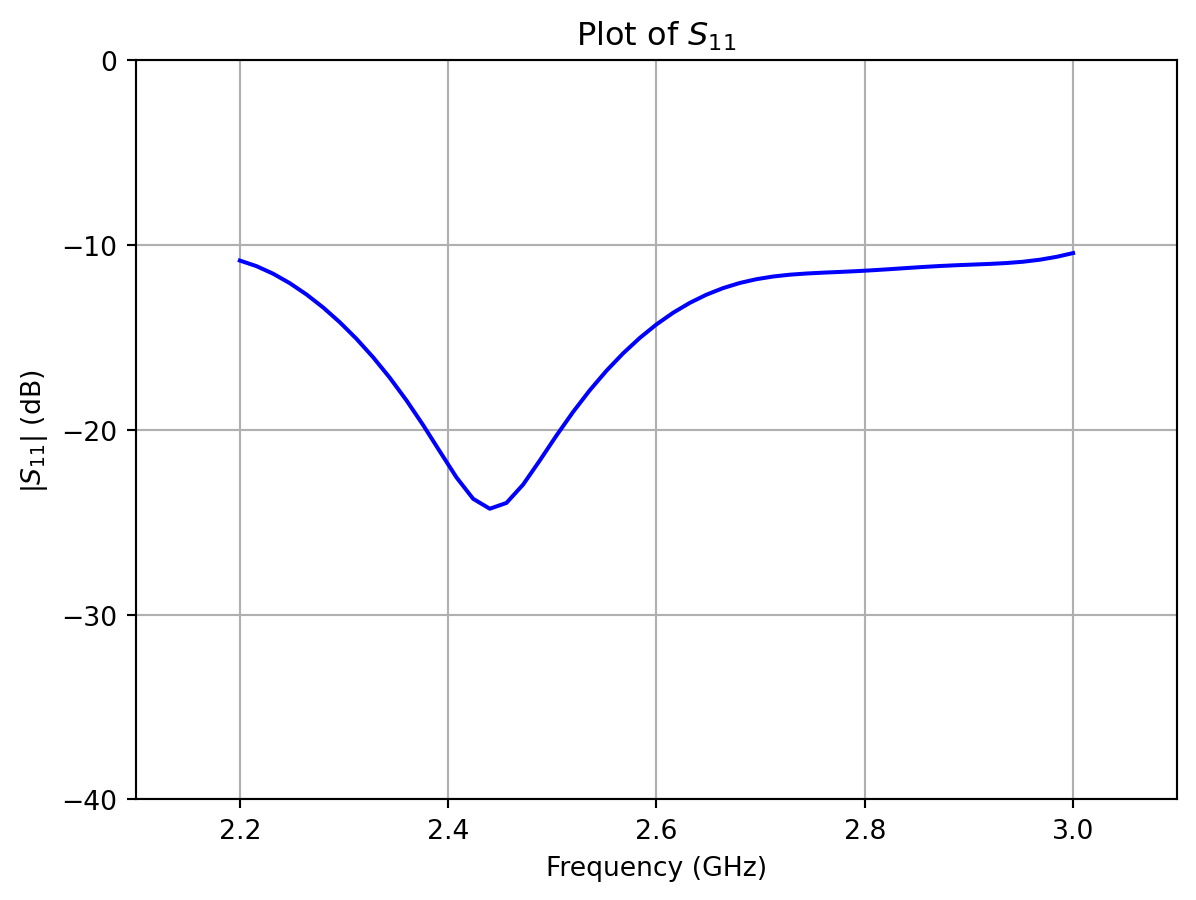
Compute and plot the axial ratio
Section titled “Compute and plot the axial ratio”Next, we use the simulation results to reproduce Fig. 9 (a) from [1].
# Retrieve the field data from the "rad_frequency" monitorantenna_parameters_freq = modeler_data.get_antenna_metrics_data(monitor_name="rad_frequency")axial_ratio = antenna_parameters_freq.axial_ratio
freq = axial_ratio.f.values.squeeze() / 1e9axial_ratio_dB = 20 * np.log10(np.abs(axial_ratio.values.squeeze()))plt.plot(freq, axial_ratio_dB, "-b")plt.xlabel("Frequency (GHz)")plt.ylabel("Axial ratio (dB)")plt.title("Axial ratio")# Make the plot identical to [1].plt.xlim(2.1, 3.1)plt.ylim(0, 12)plt.yticks([0, 3, 6, 9, 12])plt.grid(True)plt.show()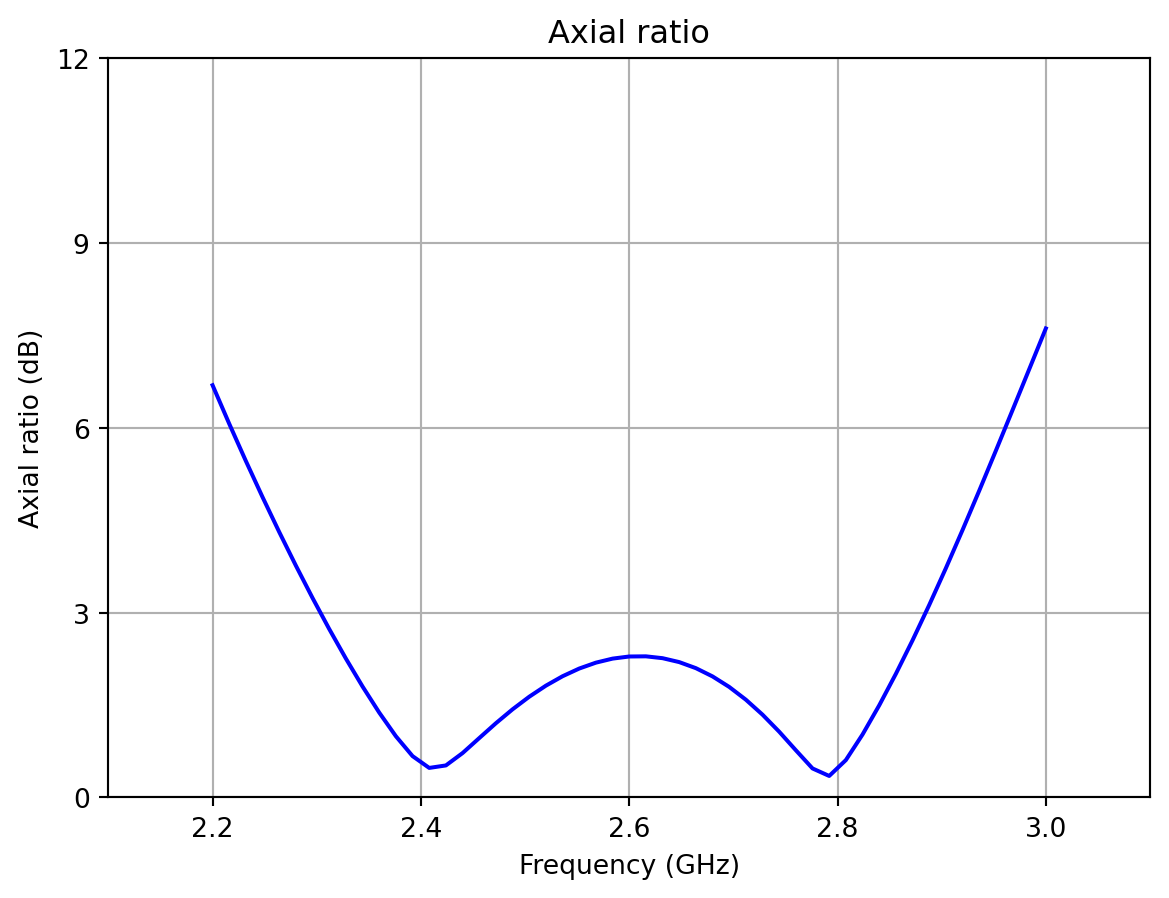
Compute and plot the antenna gain for RHCP
Section titled “Compute and plot the antenna gain for RHCP”We plot the antenna gain for the RHCP component. These results can be retrieved from AntennaMetricsData by specifying a “circular” polarization basis.
The gain is calculated by multiplying the directivity by the radiation efficiency of the antenna. The resulting plot will replicate Fig. 9 (b) from [1].
freq = antenna_parameters_freq.f.squeeze() / 1e9gain = antenna_parameters_freq.partial_gain(pol_basis="circular").Gright.values.squeeze()gain_dB = 10 * np.log10(gain)plt.plot(freq, gain_dB, "-b")plt.xlabel("Frequency (GHz)")plt.ylabel("Gain (dB)")plt.title("Gain")plt.xlim(2.1, 3.1)plt.ylim(5, 10)plt.yticks([6, 7, 8, 9])plt.grid(True)plt.show()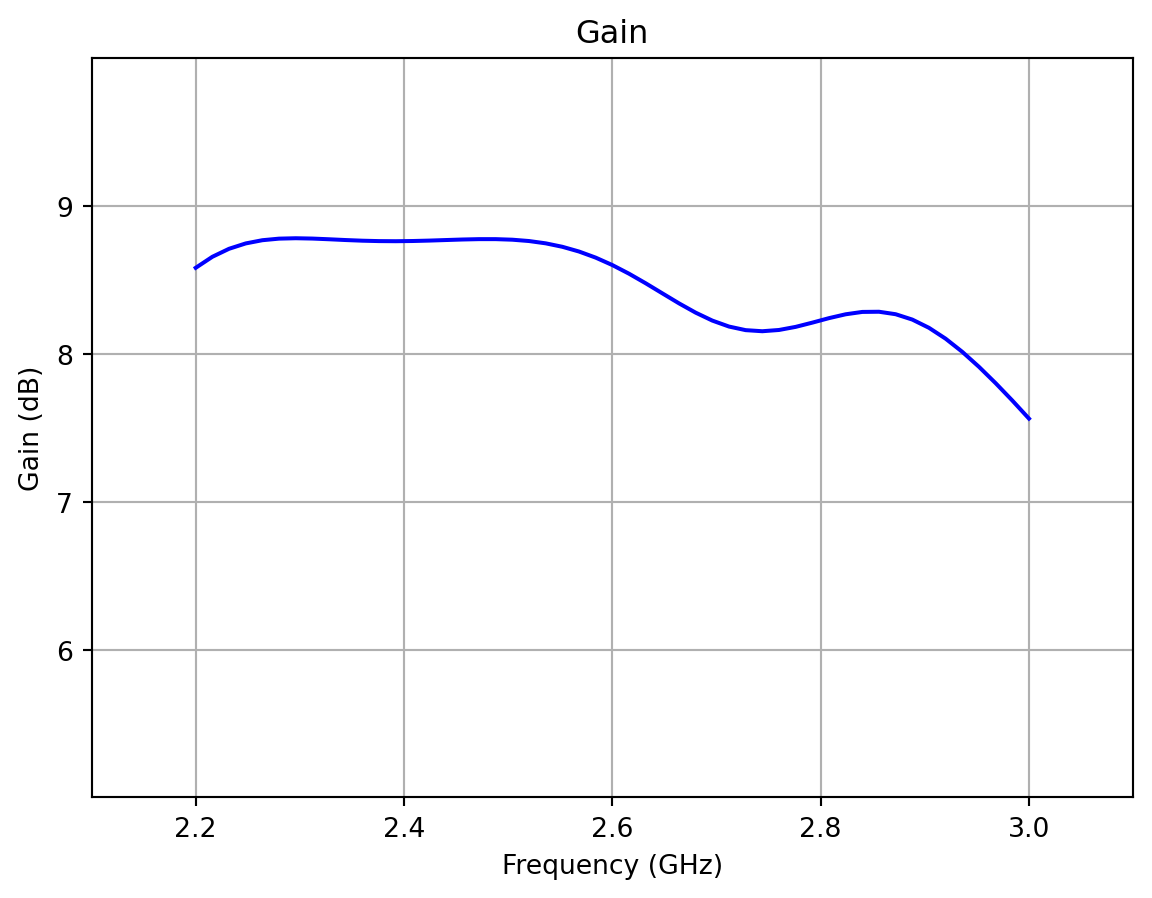
Setting Up and Simulating the Differential Feed Antenna Configuration
Section titled “Setting Up and Simulating the Differential Feed Antenna Configuration”In [1], the proposed single-feed excitation is compared to a differential feed excitation, where the ground pin is removed and a second feed pin is added. We can reproduce the results in [1] by changing the Tidy3D simulation to reflect the new geometry, as well as adding an additional coaxial port to the TerminalComponentModeler.
The radiated fields due to the differential feed configuration can be calculated as a post-processing step in the TerminalComponentModeler, which forms a superposition of the fields with user-defined port amplitudes. However, unlike the single feed case, we need to recompute the radiated power by integrating over a spherical surface. As a result, we need to ensure that the DirectivityMonitor samples the electromagnetic field over an entire sphere. In this section, we will use a single DirectivityMonitor that will sample both the spatial coordinates and all desired frequency values.
# Create simulation in the differential feed configurationstructures_list = make_structures(True)grid_spec = make_grid_spec(True)
# Create a new monitor that samples entire spherical surfacetheta_proj2 = np.linspace(0, np.pi, 101)phi_proj2 = np.linspace(0, 2 * np.pi, 200)
# First, create a DirectivityMonitor that will be used to plot the radiation pattern in the xz and yz planesmon_rad_spatial = rf.DirectivityMonitor(    center=sim_center,    size=farfield_size,    freqs=freqs,    name="rad_spatial",    phi=list(phi_proj2),    theta=list(theta_proj2),)sim = sim.updated_copy(structures=structures_list, grid_spec=grid_spec)
# Setting up the scene for visualization, with all structures included# and units set to millimeters for the plot.scene = rf.Scene(structures=structures_list, plot_length_units="mm")fig, axs = plt.subplots(1, 2, figsize=(10, 5), tight_layout=True)sub_ax = axs[0]scene.plot(z=t, ax=sub_ax)sub_ax.set_xlim(-L / 2, L / 2)sub_ax.set_ylim(-L / 2, L / 2)sub_ax = axs[1]scene.plot(y=0, ax=sub_ax)sub_ax.set_xlim(-L / 3, L / 3)sub_ax.set_ylim(-H - t, 2 * t)plt.show()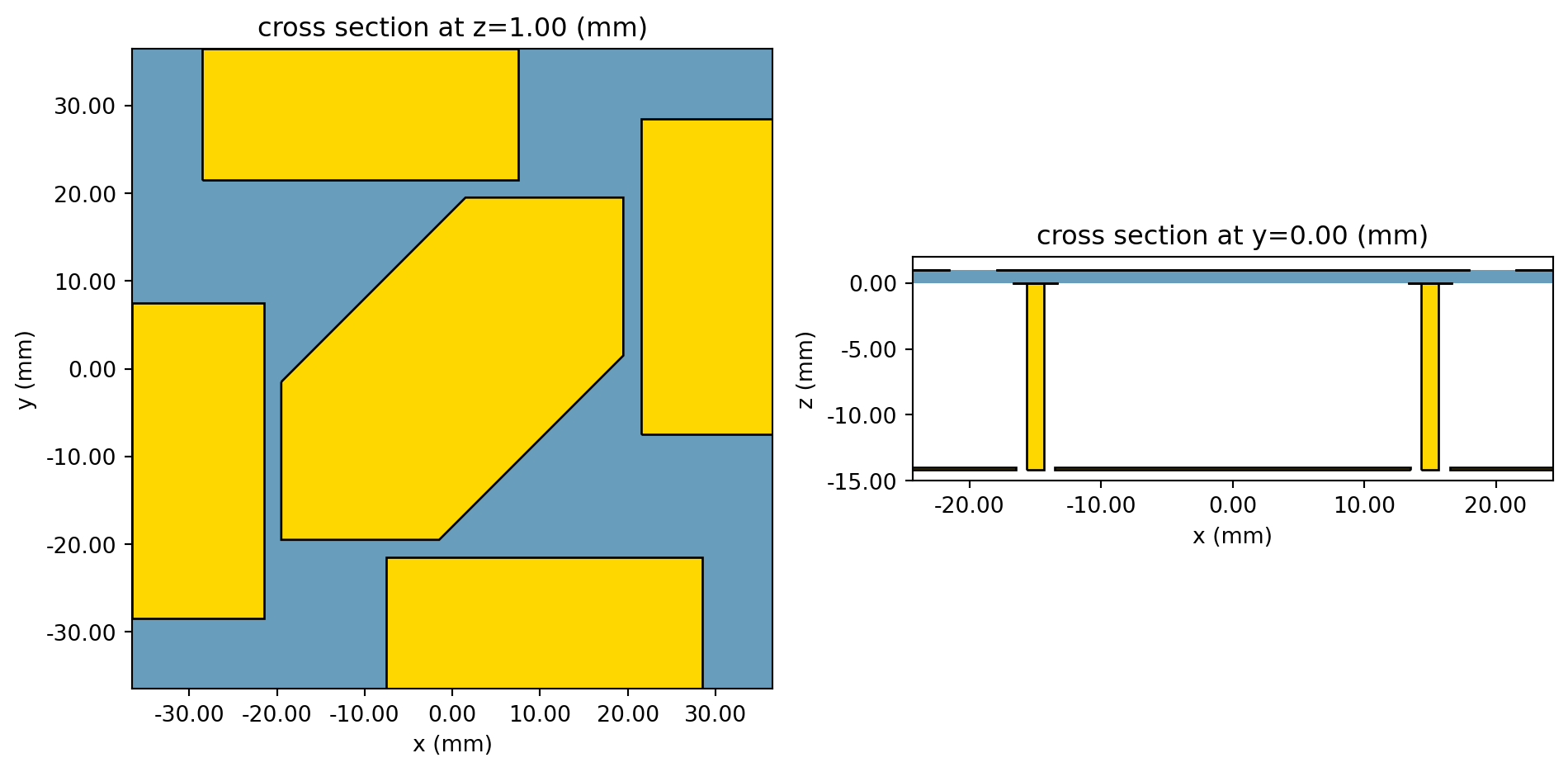
Then, we create a new TerminalComponentModeler with an additional port, the modified Simulation, and the modified radiation monitor.
diff_center = [-fx, 0, port_location]diff_port = coax_port.updated_copy(center=diff_center, name="diff_port")
modeler_diff_feed = modeler.updated_copy( simulation=sim, ports=[coax_port, diff_port], radiation_monitors=[mon_rad_spatial])# Run the TerminalComponentModeler and populate the scattering matrix of this single CoaxialLumpedPort network.modeler_diff_feed_data = web.run(modeler_diff_feed, task_name="cpa_modeler_diff_feed", verbose=False)s_matrix = modeler_diff_feed_data.smatrix()Comparison of the radiation patterns for the different feed configurations
Section titled “Comparison of the radiation patterns for the different feed configurations”We use the simulation results to partially reproduce Fig. 7 (b) from [1]. We retrieve the directivities using the helper method get_antenna_metrics_data, which returns an AntennaMetricsData object. We retrieve the partial directivity, which corresponds with the right-handed circular polarization (RHCP) component.
# Get the directivity from the original modeler using the proposed feedD_right = antenna_parameters_spatial.partial_directivity(pol_basis="circular").Dright.sel(f=freq0)# Select fields along theta for phi=0 and phi = pi/2D_Phi_0 = D_right.sel(phi=0).squeeze().valuesD_Phi_90 = D_right.sel(phi=np.pi / 2).squeeze().values
# Create a differential excitation by setting the amplitudes of the two ports to be equal in magnitude but opposite in phase.port_amplitudes = {"coax_port": 1.0, "diff_port": -1.0}antenna_parameters_shell = modeler_diff_feed_data.get_antenna_metrics_data(    port_amplitudes, monitor_name="rad_spatial")D_right_diff = antenna_parameters_shell.partial_directivity(pol_basis="circular").Dright.sel(    f=freq0)
# These helper functions are used to extract the fields along theta for phi=0 and phi=pi/2, so that theta is in the range [0, 2*pi).D_Phi_0_diff = antenna_parameters_shell.get_phi_slice(D_right_diff, 0.0)D_Phi_90_diff = antenna_parameters_shell.get_phi_slice(D_right_diff, np.pi / 2)theta_plot = D_Phi_90_diff.theta.values# Convert to numpy arrays for plottingD_Phi_0_diff = D_Phi_0_diff.squeeze().valuesD_Phi_90_diff = D_Phi_90_diff.squeeze().values
# Plot the partial directivities similar to [1].fig, ax = plt.subplots(1, 2, subplot_kw={"projection": "polar"}, figsize=(8, 4))sub_ax = ax[0]sub_ax.set_theta_direction(-1)sub_ax.set_theta_offset(np.pi / 2.0)sub_ax.plot(theta_plot, 10 * np.log10(D_Phi_0_diff), "-.b", label="Differential feed")sub_ax.plot(theta_proj, 10 * np.log10(D_Phi_0), "-r", label="Proposed feed [1]")sub_ax.set_rlim(-20, 12)sub_ax.set_rticks([-20, -10, 0, 10])sub_ax.set_title(r"$D_{\rm RHCP}$($\phi = 0$)")sub_ax.legend(loc="lower center", ncols=2)
sub_ax = ax[1]sub_ax.set_theta_direction(-1)sub_ax.set_theta_offset(np.pi / 2.0)sub_ax.plot(theta_plot, 10 * np.log10(D_Phi_90_diff), "-.b", label="Differential feed")sub_ax.plot(theta_proj, 10 * np.log10(D_Phi_90), "-r", label="Proposed feed [1]")sub_ax.set_rlim(-20, 12)sub_ax.set_rticks([-20, -10, 0, 10])sub_ax.set_title(r"$D_{\rm RHCP}$($\phi = \pi/2$)")sub_ax.legend(loc="lower center", ncols=2)fig.tight_layout()plt.show()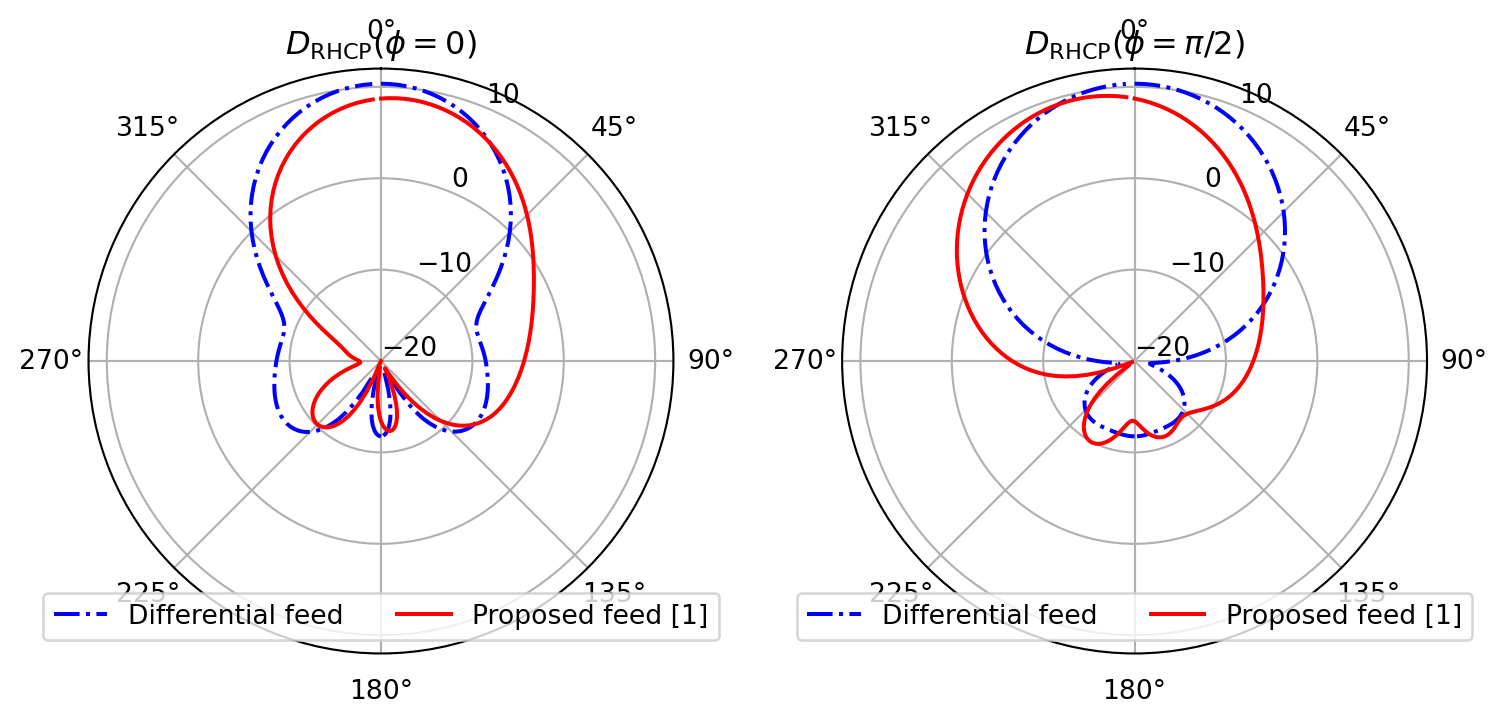
Gain comparison for the different feed configurations
Section titled “Gain comparison for the different feed configurations”Next, we plot the gain of both feed types. Again, these results can be retrieved from the AntennaMetricsData object by specifying a “circular” polarization basis. The resulting plot will replicate Fig. 6 (b) from [1].
freq = antenna_parameters_shell.f.squeeze() / 1e9gain_diff = ( antenna_parameters_shell.partial_gain(pol_basis="circular") .Gright.sel(theta=0, phi=0) .values.squeeze())gain_diff_dB = 10 * np.log10(gain_diff)plt.plot(freq, gain_diff_dB, "-.b", label="Differential feed")plt.plot(freq, gain_dB, "-k", label="Proposed feed [1]")plt.xlabel("Frequency (GHz)")plt.ylabel("Gain (dB)")plt.title("Gain")plt.xlim(2.1, 3.1)plt.ylim(7, 11)plt.yticks([7, 8, 9, 10, 11])plt.legend(loc="lower center", ncols=2)plt.grid(True)plt.show()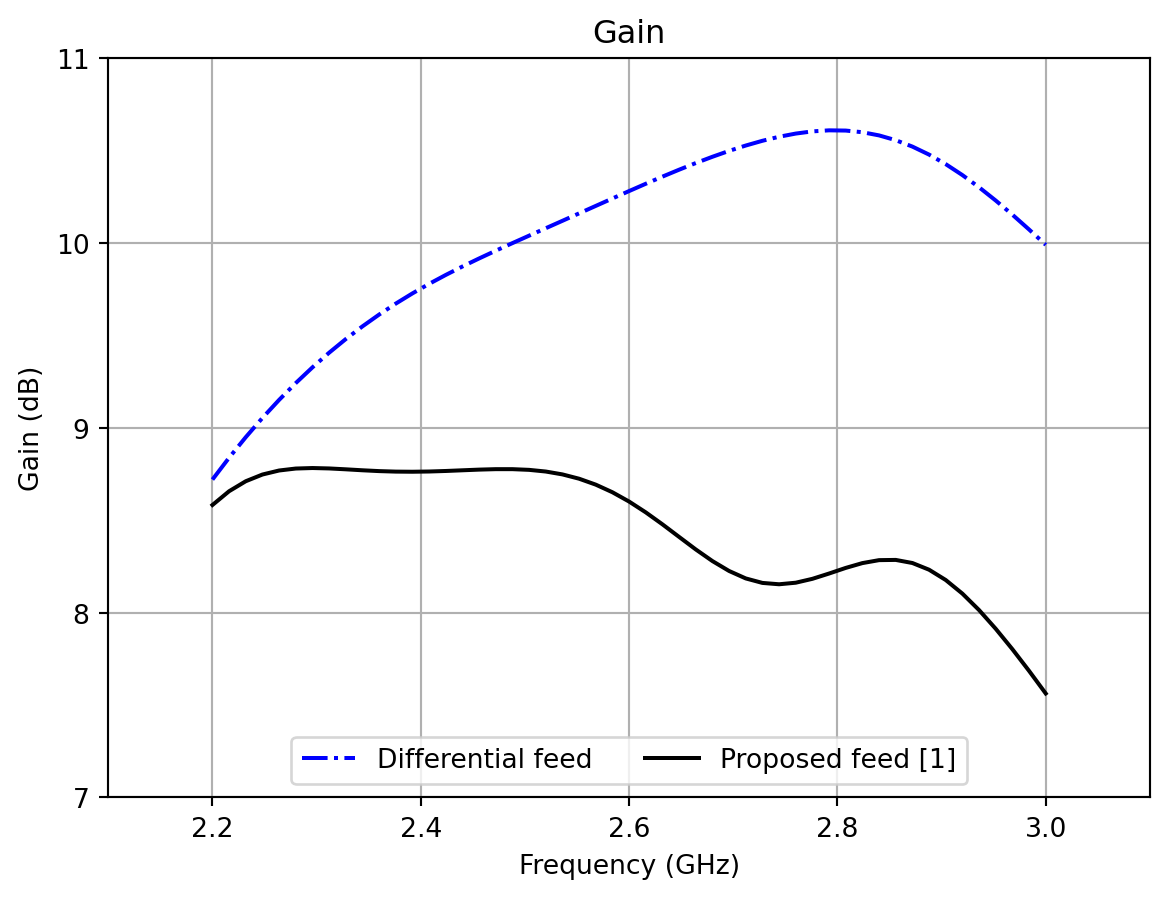
References
Section titled “References”[1] J. Wu, Y. Yin, Z. Wang and R. Lian, “Broadband Circularly Polarized Patch Antenna With Parasitic Strips,” in IEEE Antennas and Wireless Propagation Letters, vol. 14, pp. 559-562, 2015.
[2] C. A. Balanis, Antenna Theory: Analysis and Design. John Wiley & Sons, 2016.